Cross-platform UI design tools save time and resources by enabling developers to create apps for multiple platforms from a single codebase. Here’s a quick look at the top five tools shaping this space in 2026:
- Figma: A browser-based design tool with real-time collaboration, Auto Layout for responsive designs, and Dev Mode for code handoff. Ideal for prototyping and team collaboration.
- Flutter: Google's UI toolkit offering pixel-perfect designs, fast rendering with the Impeller engine, and hot reload for live updates. Best for custom, high-fidelity apps.
- React Native: Meta's framework using native UI components for iOS and Android. Known for its performance, extensive library access, and suitability for consumer apps.
- Ionic: Leverages web technologies (HTML, CSS, JS) for hybrid apps and PWAs. Great for quick development and content-heavy projects.
- .NET MAUI: Microsoft's tool for building native apps with C# and XAML. Perfect for enterprise apps and integration with the Microsoft ecosystem.
These tools are transforming development with faster timelines, cost savings (30–50%), and near-native performance. Below, explore their key features, best use cases, and pricing details.
Quick Comparison:
| Tool | Platforms Supported | Key Features | Pricing | Best Use Cases |
|---|---|---|---|---|
| Figma | Web, Windows, macOS | Auto Layout, real-time collaboration | Free–$90/month | Design and prototyping |
| Flutter | iOS, Android, Web, Desktop | Impeller engine, hot reload | Free | High-fidelity, custom UI apps |
| React Native | iOS, Android, Desktop | Native UI, extensive libraries | Free | Consumer apps, rapid prototyping |
| Ionic | iOS, Android, Web | Web-first approach, PWA support | Free–Paid tiers | Content-driven apps, PWAs |
| .NET MAUI | iOS, Android, Desktop | Native controls, Blazor Hybrid support | Free | Enterprise apps, Microsoft ecosystem |
Each tool has unique strengths, making it easier to find one that matches your team's skills and project needs, including free low code platforms for budget-conscious teams.
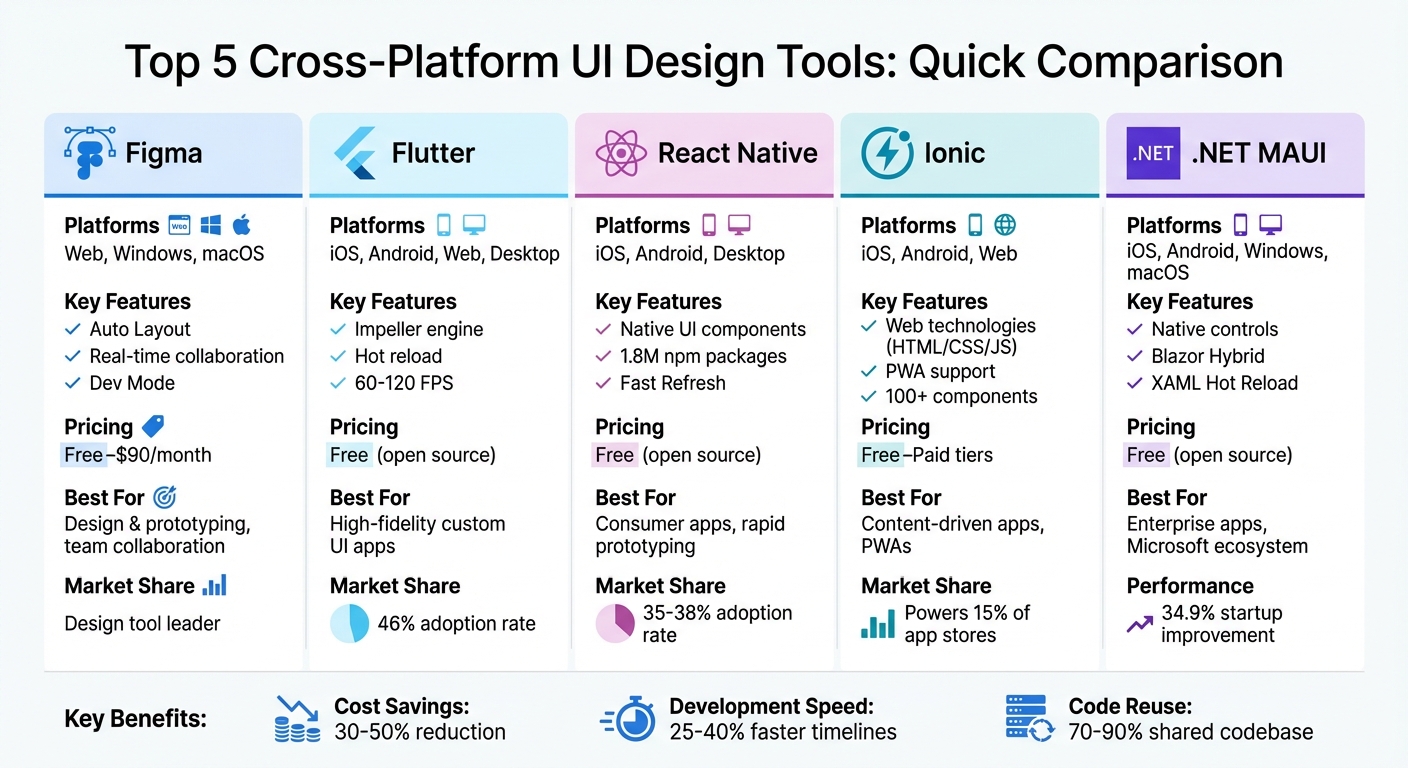
Cross-Platform UI Design Tools Comparison: Features, Pricing & Use Cases
Building Mobile and Desktop Apps with VS and .NET MAUI
sbb-itb-33eb356
1. Figma
Figma is a proprietary design tool that works seamlessly across Windows, Mac, Linux, and ChromeOS. This eliminates the hassle of platform-specific installations, making it a go-to choice for teams working on consistent designs across iOS, Android, and web. It’s no surprise that PCMag awarded it an Editors' Choice with a 4.5/5 rating in 2026.
Cross-Platform Compatibility
Figma offers desktop apps for macOS and Windows, while mobile apps for Android and iOS enable users to preview interactive prototypes directly on their devices. It supports major browsers like Chrome, Safari, Microsoft Edge, and Firefox. This cross-platform flexibility allows designers using different operating systems to collaborate in real time without worrying about file compatibility.
On top of this, Figma provides a suite of features designed to simplify and enhance the design workflow.
Key Features
One standout feature is Auto Layout, which automatically adjusts components based on content and screen size. This ensures that buttons, lists, and other elements adapt effortlessly across mobile, tablet, and desktop resolutions. Another game-changer is Dev Mode, a dedicated space where developers can inspect designs and extract CSS, Swift, or Kotlin code snippets directly.
"When the developers see it, it feels real. They know exactly how to begin developing. Those prototyping tools are just elite." - Andrew Matthews, Design Director, YETI
Figma also offers design system libraries, which act as a single source of truth. Teams can build reusable components and variables, ensuring consistent branding and design across all platforms. For example, the Material 3 Design Kit includes 245 components, while the iOS 18 + iPad OS 18 Kit offers 156 components to accelerate platform-specific projects. Additionally, Figma automatically tracks changes every 30 minutes, allowing users to compare or restore earlier versions without manual saving.
Best Use Cases
Figma shines in scenarios where real-time collaboration is essential. Teams can edit, comment, and track live cursors simultaneously, making it perfect for distributed teams or startups developing MVPs. Its interactive prototyping feature allows users to create clickable mockups with transitions and conditional logic. This is especially useful for user testing before any code is written.
Whether you're managing complex design systems for an enterprise or working on a small team project, Figma’s tools are built to handle a wide range of design needs.
Pricing
| Plan | Price (per user/month) | Key Features |
|---|---|---|
| Starter | Free | 3 files, unlimited drafts, basic templates |
| Professional | $15 (billed annually) or $16 monthly | Unlimited projects, shared libraries, Dev Mode |
| Organization | $55 (billed annually) | Unlimited teams, shared fonts, admin tools |
| Enterprise | $90 (billed annually) | Custom workspaces, advanced security, SCIM |
2. Flutter
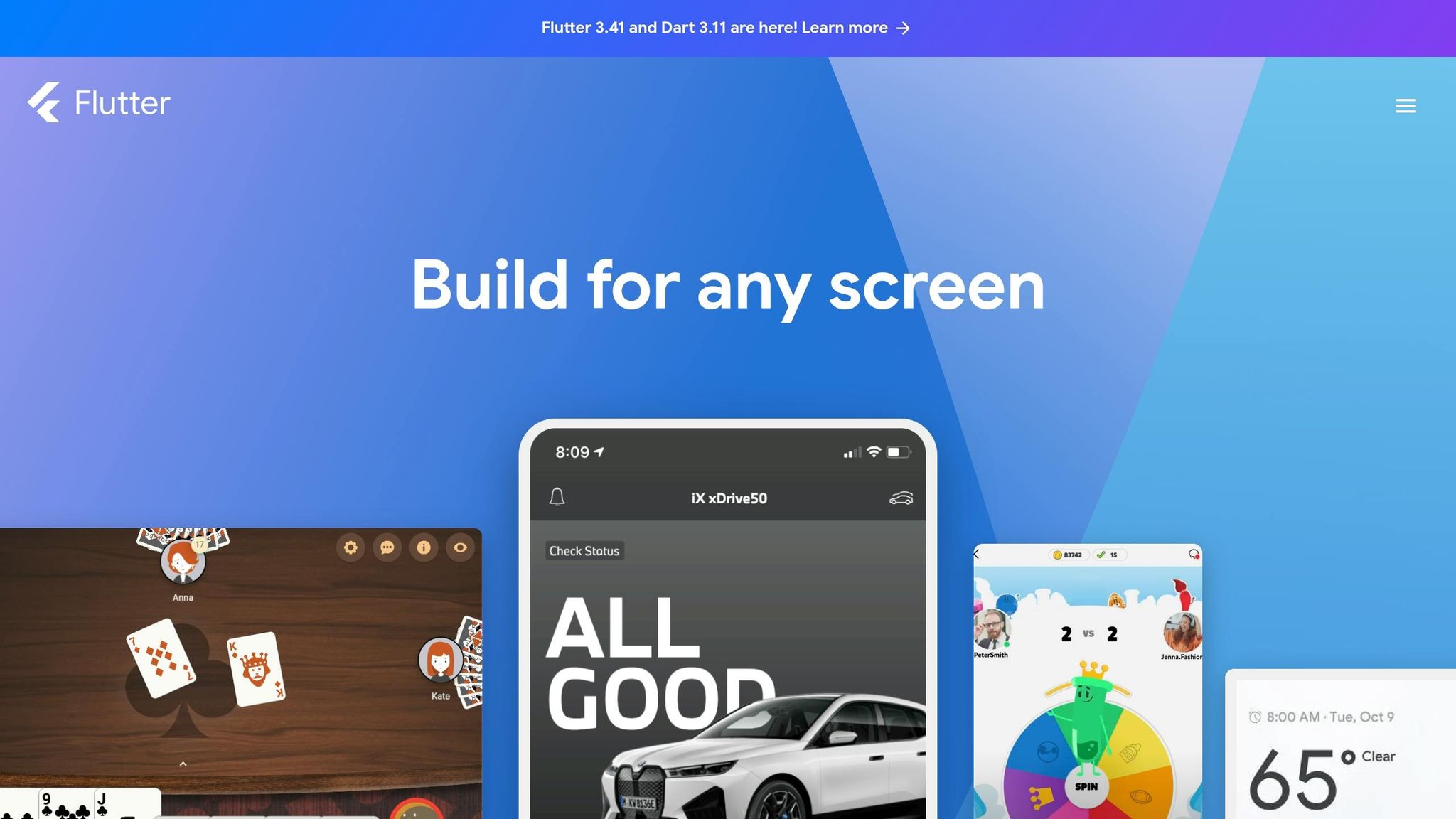
Flutter is Google's open-source UI toolkit, designed to help developers create apps for mobile, web, desktop, and even embedded devices - all from a single codebase. By 2026, it dominates the cross-platform development market with a 46% adoption rate among mobile developers. Unlike frameworks that rely on a JavaScript bridge, Flutter compiles directly to machine code, ensuring performance levels comparable to native apps.
Cross-Platform Compatibility
Flutter supports an impressive range of platforms, including Android, iOS, Windows, macOS, Linux, and web browsers. Its Impeller rendering engine delivers hardware-accelerated, pixel-perfect graphics. This ensures apps look and function identically across devices, such as an iPhone and a Samsung Galaxy, sidestepping the subtle UI inconsistencies that often affect other frameworks.
Major companies have embraced Flutter for its ability to deliver consistent user experiences. For example, BMW uses Flutter to power its "My BMW" app, handling complex vehicle integrations across platforms. Similarly, Google Pay transitioned to Flutter, enabling a unified team to manage its app for both iOS and Android.
Key Features
Flutter's extensive feature set makes it a favorite among developers for speeding up the development process and enhancing flexibility.
Hot Reload is one of Flutter's standout features. It allows developers to see changes in real-time without restarting the app, making UI iterations faster and more efficient. Whether tweaking a button's layout or adjusting an animation, changes are visible almost instantly.
Flutter also boasts a rich collection of widgets, including Material and Cupertino components that replicate native iOS and Android designs. However, unlike other frameworks that rely on native platform components, Flutter takes full control of every pixel on the screen. This approach allows for complete customization, enabling brands to create unique designs and animations. Apps built with Flutter consistently achieve frame rates of 60–120 FPS on supported devices, with iOS startup times averaging just 16.67ms, significantly faster than React Native's 32.96ms.
"When using Flutter, 90% of the code became multi-platform and only needed to be updated once." - Fei Song, Senior Software Engineer, Tencent
Flutter also integrates seamlessly with Google's ecosystem, including Firebase, Google Maps, and Google Pay. This makes it particularly appealing for projects already tied to Google's services.
Best Use Cases
Flutter is ideal for projects where brand consistency and visually polished UIs are critical. Companies like Alibaba, eBay Motors, and Credit Agricole rely on it for mobile-first consumer apps that require a high level of design precision. It also works well for large enterprise applications in industries like finance and healthcare, where stability and long-term support are essential.
The framework is also a great choice for rapid prototyping. Developers can create web-based prototypes using the same codebase as mobile apps, allowing for quick feedback and iteration. However, Flutter might not be the best choice for content-heavy websites that require deep SEO optimization, as search engines may struggle with Flutter-rendered pages.
Pricing
Flutter is completely free as an open-source SDK. For developers or teams looking for low-code development platforms that export Flutter code, pricing starts at $30 per month.
Next, we’ll take a closer look at how React Native continues to shape cross-platform development.
3. React Native
React Native, an open-source framework from Meta, has reshaped cross-platform app development. Built with JavaScript and React, it allows developers to create mobile apps that feel truly native on both iOS and Android. By early 2026, React Native held a 35%–38% share of the cross-platform developer market. Unlike frameworks that rely on wrapping web content in a browser shell, React Native uses native UI components through its Fabric renderer, delivering a genuinely native user experience.
Cross-Platform Compatibility
React Native primarily focuses on iOS and Android, although Microsoft maintains versions for Windows and macOS. The framework allows developers to share 70%–90% of their codebase across platforms, making it highly efficient. By 2026, React Native had fully adopted its New Architecture. This update integrates Fabric, TurboModules, and JSI, replacing the older JSON bridge with synchronous communication [22, 24]. The changes led to significant performance boosts, including a 43% improvement in cold start times on mid-range Android devices (from 3,200 ms to 1,800 ms) and a 20%–30% reduction in memory usage.
Some of the world’s biggest companies rely on React Native for their high-traffic apps. Discord uses it to support over 150 million monthly active users with real-time messaging and voice. Shopify powers millions of mobile storefronts with a consistent experience across platforms. Even Walmart uses React Native to meet the demands of its retail apps, all while maintaining a shared codebase.
Key Features
React Native offers a range of features that enhance performance and developer productivity.
- Fast Refresh: Developers can see updates to their code in under a second without losing app state.
- Extensive Library Access: With over 1.8 million npm packages and UI libraries like NativeWind and Shopify Restyle, the framework is highly adaptable [29, 22, 23].
- High Performance: Version 0.74+ achieves 95% native-like rendering, with frame times for complex animations dropping from 18 ms to 11 ms [1, 22].
- React 19 Compatibility: Features like the React Compiler automate code optimization and reduce the need for manual memoization.
React Native is also advancing mobile AI capabilities. It supports Meta's ExecuTorch and the react-native-ai module, allowing models like Llama 3.2 to run directly on devices.
Best Use Cases
React Native is ideal for building large-scale consumer apps, such as social media platforms, e-commerce stores, and marketplaces. It’s also well-suited for content-driven apps, productivity tools, and data dashboards [24, 4]. Teams with JavaScript or React experience can easily transition their skills to mobile development [22, 24]. As CodeNote.net puts it:
"React Native has the lowest lock-in since JS/TS/React skills transfer directly to web development."
The framework is especially valuable for startups needing rapid prototyping and a quick time-to-market. For most standard apps, its performance rivals native development. However, fully native code might still be necessary for 3D games or intensive AR/VR applications. Engineering teams report a 30%–40% reduction in production time compared to separate native builds, with cost savings ranging from $50,000 to $150,000 for startups [32, 24].
Pricing
React Native is completely free to use, licensed under MIT [7, 26].
4. Ionic
Ionic is a framework that allows developers to create apps using familiar web technologies or a low-code development platform. Backed by a community of over 5 million developers, it powers nearly 15% of the apps available in the Apple and Google app stores.
Cross-Platform Compatibility
Ionic uses HTML, CSS, and JavaScript to create cross-platform applications based on its "Hybrid-Web" philosophy. This approach means that UI components run on all platforms through a webview container, enabling apps to function on iOS, Android, desktops, and as Progressive Web Apps. It also integrates easily with Angular, React, Vue, or even vanilla JavaScript.
To access native device features like the camera, geolocation, and biometrics, Ionic relies on Capacitor, its cross-platform runtime. Capacitor ensures consistent APIs across platforms. Additionally, Ionic components adapt their visual styles and animations to mimic the native look and feel of each platform. As Matt Kremer, Enterprise Product Manager, puts it:
"Ionic is unique in that it takes a web-first approach, leveraging HTML, CSS, and Javascript to build high-quality iOS, Android, desktop, and Progressive Web Apps".
Key Features
Ionic includes over 100 mobile-optimized components that deliver smooth performance at 60fps. Its on-device hot refresh feature allows developers to instantly see changes during development. Developer Steve Sanders shared his experience:
"One developer added a dark mode in less than a day, highlighting Ionic's rapid development capabilities."
The responsive grid system ensures layouts scale effortlessly from small mobile screens to large desktop monitors. Ionic Storage intelligently picks the best storage engine - SQLite, IndexedDB, or LocalStorage - depending on the environment. In addition, the Ionic CLI, which sees around 15 million monthly npm installs, simplifies tasks like scaffolding, building, testing, and deploying apps.
These tools make Ionic a versatile choice for projects with varied requirements.
Best Use Cases
Ionic is well-suited for enterprise-level applications and is trusted by numerous organizations for critical business apps. It’s particularly beneficial for companies with existing web development teams, as it enables them to create native mobile apps without needing specialized native developers. Like Flutter and React Native, Ionic allows for code reuse across platforms, often enabling teams to deliver hybrid apps two to three times faster than native SDKs.
It’s also an excellent choice for Progressive Web Apps, multi-platform projects that need a consistent design, and rapid prototyping when speed is a priority. While native SDKs may still be the go-to for performance-intensive applications, Ionic delivers performance that feels comparable to native for most standard use cases. As Sean Bannigan explains:
"I love building apps with Ionic and Capacitor because you can build UI that looks amazing, all with web technologies and a little plugin magic. As a user, I would never know this wasn't a 'native' app".
Pricing
Ionic offers flexible pricing options to fit different project needs. The Ionic UI Toolkit is free and open-source under the MIT license, making it accessible for personal and commercial projects. For more advanced features, Appflow, Ionic's mobile CI/CD service, provides a free "Hobby" plan and paid upgrades for automation, single sign-on (SSO), and direct app store publishing. Enterprise plans include expert support, advisory services, and pre-built security plugins.
5. .NET MAUI
.NET MAUI (Multi-platform App UI) is Microsoft's reimagined version of Xamarin.Forms, designed to create native mobile and desktop applications using a single C# and XAML codebase. Instead of relying on custom-rendered visuals, .NET MAUI uses platform-native controls - like WinUI 3 for Windows and Mac Catalyst for macOS - ensuring apps benefit from OS-level updates and accessibility features automatically.
Cross-Platform Compatibility
.NET MAUI supports Android (API 24–36), iOS (13–26), Windows (10 and 11), and macOS (10.15+) through a unified project system. This single project structure simplifies asset management across platforms, making it particularly appealing for teams already working within the Microsoft ecosystem, including Azure, .NET, and Visual Studio. Its seamless integration with backend services and cloud infrastructure further enhances productivity.
Additionally, .NET MAUI supports Blazor Hybrid, enabling developers to embed Blazor web components directly into native applications. Unlike traditional WebView-based solutions, these components run on the .NET runtime, improving performance and allowing for greater code reuse across web and native platforms. This feature is especially useful for teams aiming to deliver cohesive experiences across multiple environments.
Key Features
.NET MAUI builds on its cross-platform foundation with features designed to enhance performance and streamline development. For instance, the framework has achieved a 34.9% improvement in startup performance overall, with a 39.4% increase specifically for .NET on Android. The .NET Podcast sample app highlighted these gains in 2022, with its startup time dropping from 1,299 ms to 814.2 ms - a 37.3% improvement. Developers have also reported faster compilation speeds (up to three times quicker) and app sizes that are 40% smaller compared to Xamarin.Forms.
The framework includes both XAML Hot Reload and .NET Hot Reload, allowing developers to make real-time updates to the UI and code without recompiling or losing application state. It also provides over 40 built-in controls, layouts, and pages, along with semantic services to simplify the creation of accessible apps. These services manage features like screen reader descriptions and focus levels, making it easier to build apps that are inclusive.
David Ortinau, Principal Product Manager at Microsoft, emphasizes the framework's potential:
"With .NET MAUI you can achieve no-compromise user experiences while sharing more code than ever before."
Best Use Cases
.NET MAUI is ideal for enterprise applications where robust data handling, seamless backend connections, and desktop support are as important as mobile functionality. A great example is Kahua, a construction project management software company. In May 2022, Kahua transitioned to a single .NET MAUI codebase, which CTO Colin Whitlatch described as transformative:
"Consolidating on a single .NET codebase has materially improved our delivery efficiency across every platform we support."
The framework shines in data-driven business applications like CRMs, field workforce tools, and insurance claim processors. It's equally effective for admin dashboards, business intelligence platforms, and cross-platform media apps requiring efficient image and video handling. Teams with existing Blazor web applications can use the BlazorWebView control to wrap web components in a native interface, making it easier to reach desktop and mobile users quickly.
Pricing
.NET MAUI is open source and available for free under MIT/Apache 2.0 style licenses. While the framework itself is free, development often requires Visual Studio. Fortunately, Visual Studio offers a free Community edition for individuals and small teams, while larger organizations can opt for paid subscriptions.
For those exploring low-code solutions alongside traditional frameworks, the Low Code Platforms Directory provides a helpful tool for finding platforms suited to app building, automation, and enterprise needs.
Tool Comparison Table
Here's a quick breakdown of five popular tools to help you decide which one fits your project best. This table outlines each tool’s strengths, giving you a clear picture of how they align with your team’s expertise, platform preferences, and performance goals.
| Tool | Supported Platforms | Key Features | Pricing | Best Use Cases |
|---|---|---|---|---|
| Figma | Web-based (any browser), Windows, macOS | Real-time editing, component libraries, and Dev Mode (code generation) | Free starter plan; Professional $15/month, Organization $45/month, Enterprise $75–$90/month | UI/UX design and prototyping, design system creation, team collaboration, and client handoff |
| Flutter | iOS, Android, Web (Wasm), Windows, macOS, Linux | Custom Impeller rendering (stable 60/120fps), GenUI SDK for AI-generated UI, pixel-perfect UI and hot reload | Free and open source | High-fidelity brand apps, design-heavy applications requiring custom UI, consistent look across platforms |
| React Native | iOS, Android, Windows (Microsoft-supported), macOS (Microsoft-supported), limited Web | Native OS UI components via Fabric renderer, New Architecture with faster cold start (3,200ms to 1,800ms), access to 1.8 million npm packages | Free and open source | Mobile-first apps using native platform components, teams with JavaScript/React expertise, platform-authentic UI |
| Ionic | iOS, Android, Web | Web technologies (HTML5/CSS/JS), pre-designed component library, PWA support, Capacitor/Cordova bridge for native features | Free and open source; enterprise Appflow (CI/CD) has paid tiers | Content-driven apps, internal business tools, PWAs, fast time-to-market projects over high-performance graphics |
| .NET MAUI | iOS, Android, Windows, macOS, limited experimental Web | Platform-native controls for cross-platform environments, Blazor Hybrid support, XAML and .NET Hot Reload | Free and open source (MIT/Apache 2.0); Visual Studio Community free for individuals/small teams | Enterprise applications, data-driven business tools (CRMs, field workforce apps), projects within Microsoft ecosystem |
Market trends give additional insight: Flutter leads with about 46% of mobile developers using it, while React Native holds a 35–38% share.
For those exploring low-code alternatives, the Low Code Platforms Directory offers tools to narrow down options for app building, automation, CRM, and more.
With these comparisons in mind, you’re one step closer to finding the best cross-platform UI design tool for your project.
Conclusion
Selecting the right cross-platform UI design tool means aligning your project's unique requirements with the strengths of each platform. Figma is a fantastic choice for visual design and prototyping. As you move from design to development, the best tool will depend on the scale of your project and the performance you need.
Flutter is ideal for creating custom, high-fidelity UIs with smooth animations. React Native has a proven track record for large-scale consumer apps that need a native appearance and feel. Ionic is perfect for quickly building content-heavy apps and Progressive Web Apps using web technologies. Meanwhile, .NET MAUI shines in enterprise environments, offering seamless Visual Studio integration and compatibility with C#.
Cross-platform development can lead to major cost and time savings. Research indicates developers can save 30–50% on costs and reduce development timelines by 25–40%. Notably, 46% of developers now rely on these frameworks.
When choosing a framework, consider your team's expertise, the level of UI quality you need, and whether speed or performance is your priority. As Professor Daniel Rosenberg aptly states:
"The specific tool doesn't matter quite as much, because the tools change all the time. So, you want somebody who can quickly learn new tools".
Begin with a framework that suits your team's current skills, and adapt as your project evolves.
For those exploring alternatives to traditional frameworks, the Low Code Platforms Directory is a helpful resource. It offers tools to filter platforms tailored to app creation, automation, and CRM solutions.
FAQs
Which tool should I choose for my project?
The right tool for your project depends on factors like your target platforms, the level of design flexibility you need, and the resources available. If you're focused on UI design, tools like Figma, Sketch, and Adobe XD are great options for crafting visually appealing and interactive designs. For cross-platform development, you might want to explore Flutter, React Native, or .NET MAUI - your choice should align with the scope of your project and your team's expertise. Consider whether your priority is streamlined design workflows or robust multi-platform compatibility.
How close to native performance can these tools get?
Modern cross-platform tools have reached a point where their performance is almost on par with native apps. Although native apps still offer the most control and fine-tuning, improvements in cross-platform frameworks have significantly narrowed the gap, making the difference barely noticeable in most cases.
What skills does my team need to use each tool?
The skills your team needs will vary based on the specific features of each cross-platform UI design tool. Here's a breakdown:
- Design Skills: Expertise in UI/UX design and prototyping is crucial, especially for tools like Figma, which emphasize visual and interactive design elements.
- Development Skills: A solid grasp of programming languages, such as Dart for Flutter or JavaScript for React Native, is necessary to work effectively with these frameworks.
- Collaboration Skills: Teams benefit from familiarity with feedback workflows and version control systems to streamline collaboration and maintain project consistency.
- Platform Knowledge: A deep understanding of iOS, Android, and web design guidelines ensures your designs align with platform-specific requirements.
Each skill plays a role in ensuring the success of your cross-platform projects.