Embedded analytics platforms are transforming how businesses integrate data insights directly into their applications using low code platforms. In 2026, these tools go beyond basic charts, offering AI-driven insights, robust governance, and flexible embedding options. Here's a quick look at the top platforms:
- Omni: Prioritizes governed AI and consistent metrics with advanced multi-tenancy features. Starts at $800/month.
- Sisense: Developer-friendly with Compose SDK for interactive dashboards. Pricing from $1,299/month.
- Qrvey: Flat-rate pricing with multi-tenant isolation, ideal for SaaS applications.
- GoodData: Focused on governance and tenant isolation with usage-based pricing.
- Looker: Best for Google Cloud users with LookML governance. Starts at $3,000+/month.
- Tableau: Known for visual dashboards but less scalable for large external user bases.
- Power BI: Seamless for Microsoft ecosystems with capacity-based pricing.
- Knowi: Handles SQL/NoSQL data with flexible embedding options.
- Domo: Strong multi-tenancy and credit-based pricing.
- ThoughtSpot: AI-powered search analytics with usage or user-based pricing.
Quick Comparison
| Platform | Embedding Methods | AI Features | Pricing Model | Best For |
|---|---|---|---|---|
| Omni | iframe, SDK, API | Governed AI, NLP queries | Query-based ($800/month) | Governed metrics consistency |
| Sisense | Compose SDK, iframe | Predictive analytics, NLP | $1,299/month | Developer-centric tools |
| Qrvey | JavaScript widgets, API | AI workflows, ML insights | Flat-rate | Multi-tenant SaaS apps |
| GoodData | iframe, SDK | NLP, anomaly detection | Usage-based | Enterprise governance needs |
| Looker | SDK, iframe, API | Gemini AI, BigQuery ML | $3,000+/month | Google Cloud integration |
| Tableau | JavaScript API, iframe | NLP, AI-driven visuals | $70/user/month | Visual storytelling |
| Power BI | SDK, iframe, API | Q&A, Azure ML | Capacity-based | Microsoft ecosystem |
| Knowi | iframe, API | NLP, ML integration | Custom | Multi-database setups |
| Domo | iframe, SDK, API | AI-powered alerts | Credit-based | Large-scale multi-tenancy |
| ThoughtSpot | SDK, iframe, API | AI search, anomaly detection | Usage/User-based | AI-driven search experiences |
These platforms cater to diverse needs, from SaaS providers to enterprises, ensuring seamless integration, powerful AI, and scalable pricing options.
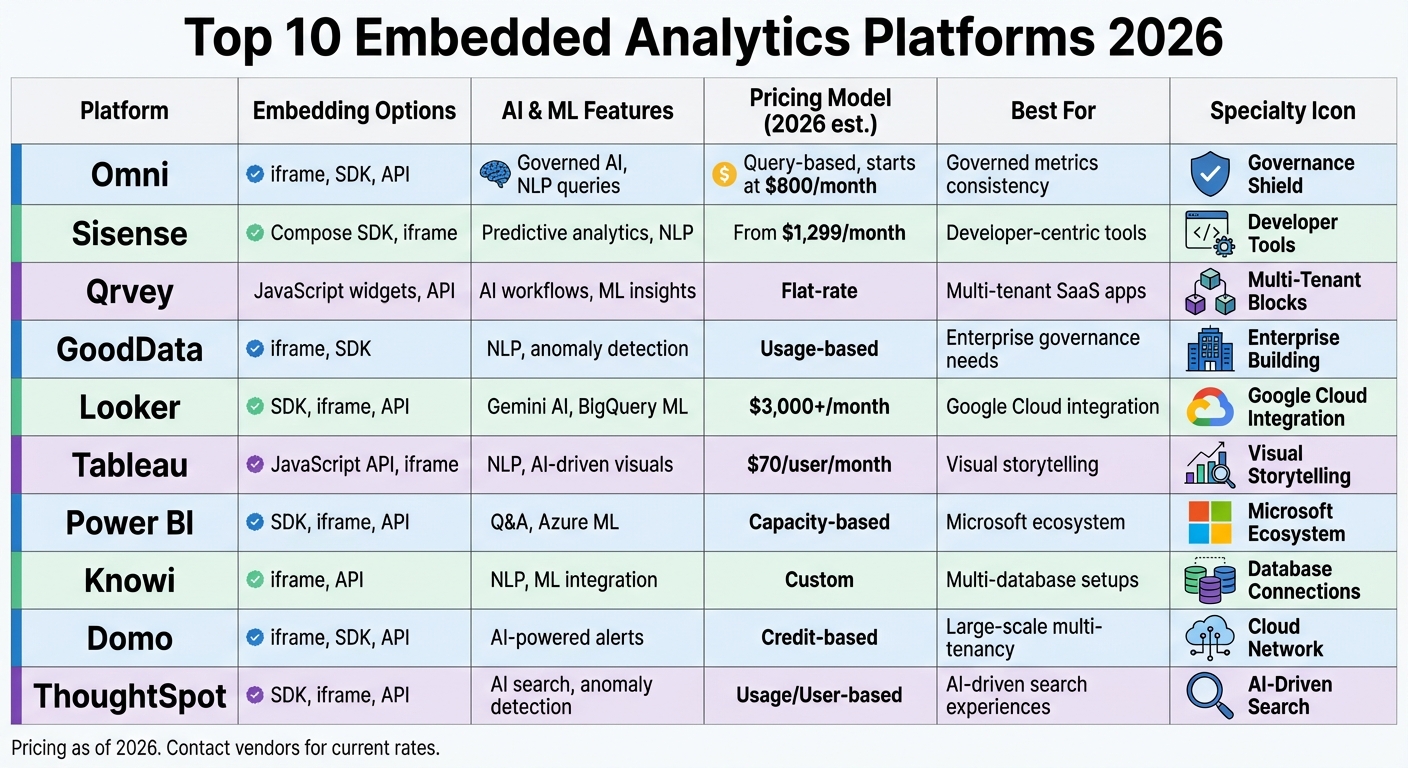
Top 10 Embedded Analytics Platforms 2026: Features, Pricing & Best Use Cases Comparison
Power BI vs Domo | Which BI Tool Is Best? 2026
sbb-itb-33eb356
1. Omni
Omni ranks as the top embedded analytics platform in 2026 because it addresses a critical gap many others overlook: ensuring AI remains grounded in clear, governed business logic. Instead of relying on AI to interpret raw database tables, Omni employs a semantic layer that enforces consistent business definitions across metrics, dashboards, and AI-generated insights. This consistency prevents the confusion and loss of trust that can arise when users encounter conflicting numbers for the same query.
Embedding Capabilities (SDKs, iFrame, APIs)
Omni primarily uses iFrame embedding to integrate dashboards and reports into external applications. Its sandbox UI simplifies this process by auto-generating iFrame embed codes. For teams that need analytics for public-facing applications, Omni offers Public Embedding, which allows shareable links to be embedded into websites without requiring authentication. Developers looking for more customization can use Omni's SDKs and API-based integrations, though these options prioritize quick deployment over flexibility.
AI and Automation Features
Omni enhances its embedding capabilities with AI-driven tools for seamless data exploration. The platform's "Ask AI" feature enables users to query data in natural language directly within an Embed Portal. To ensure security, Omni's tenant-safe AI applies row-level permissions to every AI-generated query. Users can also review the AI-generated queries to confirm their accuracy, reducing the risks associated with opaque, automated analytics. Additionally, Omni integrates with dbt's semantic layer, allowing teams to tap into existing warehouse models and synchronize metrics across internal and embedded environments automatically.
Multi-Tenancy and Governance
Omni's commitment to secure multi-tenant operations complements its AI capabilities. It employs row-level security through secure server-side tokens (JWT) and can dynamically switch data sources based on the tenant. The semantic layer ensures consistent business logic across all customer instances, avoiding discrepancies in metric definitions that could arise between different tenants. Following its acquisition of Explo in 2025, Omni has integrated advanced customer-facing dashboard features into its governed framework.
Pricing Structure and Scalability
Omni's pricing model is designed to be both competitive and scalable. Unlike traditional BI tools that charge per user, Omni adopts a query-based pricing structure starting at $800 per month (over $9,600 annually). This model includes unlimited dashboard viewers, making it an economical choice for SaaS applications with large user bases. By comparison, platforms like Looker often require a significant upfront investment, with embedded implementations starting around $180,000 per year. However, Omni requires a modern data infrastructure, such as Snowflake, BigQuery, or Redshift, to operate effectively. Teams lacking this foundation will need to make additional investments in their data setup.
2. Sisense
Sisense earns its spot as a top-tier analytics platform with its flexible and customizable proprietary tools. Established in 2004, the platform has carved out a niche in embedded analytics and OEM applications. A key feature is its Compose SDK, which enables developers to craft interactive dashboards with minimal coding effort. Unlike traditional BI tools that cater primarily to analysts, Sisense markets itself as an "Analytics-Platform-as-a-Service" (AnPaaS), focusing on app creators and product teams.
Embedding Capabilities (SDKs, iFrame, APIs)
Sisense offers multiple ways to embed analytics, including JavaScript SDKs, REST APIs, and iFrames. A standout feature is its widget-level embedding, which allows individual charts or components to be integrated directly into an application's user interface, avoiding the need to embed entire dashboards. The Compose SDK also includes Angular modules like ChatbotComponent and GetNlgInsightsComponent, making it easier to build advanced analytics features. Beyond embedding, Sisense incorporates AI tools to deliver more impactful analytics.
AI and Automation Features
Sisense leverages Natural Language Queries to simplify data exploration. Its AI Narratives feature provides text-based summaries and explanations of visual data, helping users quickly grasp the meaning behind the numbers. The platform’s ElastiCube technology uses an in-chip columnar database to deliver lightning-fast queries, even on datasets with billions of rows. Additionally, Sisense supports predictive analytics and AI-assisted decision-making through its robust API suite.
Multi-Tenancy and Governance
For multi-tenant deployments, Sisense includes built-in support for row-level security and a Tenant Management API. It also stands out for its white-labeling capabilities, allowing businesses to completely remove vendor branding - something not all competitors offer. Advanced features like column-level security, HIPAA compliance, and single sign-on (SSO) are available in higher-tier plans. Its cloud-native design supports multiple environments, such as staging and production, across various regions.
Pricing Structure and Scalability
Sisense’s pricing starts at $399 per month with the Launch tier, which includes 20GB of storage, 20,000 monthly credits, and 50 viewer seats. The Grow tier, priced at $1,299 per month, adds features like white-labeling, SSO, and multi-environment support, along with 80GB of storage and 100 viewer seats. For larger organizations, the Scale tier offers custom pricing with features like auto-scaling, multi-tenancy, and a 99.99% availability SLA. Typical costs range from $80,000 to $200,000 annually for mid-size SaaS setups, while enterprise OEM deployments can exceed $500,000 per year. Sisense’s scalability makes it well-suited for both startups and large enterprises, eliminating infrastructure concerns.
3. Qrvey
Qrvey is a self-hosted embedded analytics platform designed for deployment on AWS or Azure, giving users full control over data residency and compliance. Tailored for multi-tenant SaaS applications, Qrvey features a native architecture with a dedicated data lake and semantic layer, ensuring secure data isolation for customers. This foundation supports its advanced embedding tools.
Embedding Capabilities (SDKs, iFrame, APIs)
Qrvey takes an SDK-first approach, offering JavaScript-based widgets and web components instead of iframes. This ensures analytics integrate seamlessly into your application's look and feel. Its comprehensive API suite allows for custom interface design, workflow automation, and deep integration with SaaS application logic.
Ryan Quackenbush, Senior PM at JobNimbus, shared: "We can't speak highly enough of the stellar team at Qrvey. Within months of deploying Qrvey, JobNimbus achieved 70% adoption among large enterprise users".
AI and Automation Features
Qrvey includes a no-code workflow builder and the Smart Analyzer, which leverages generative AI for natural language data interactions, enabling actionable insights. The AI Chart Builder simplifies the creation of complex visualizations using AI-driven prompts. These tools align with agentic analytics principles, helping users move from static reporting to actionable workflows for quicker decision-making. Notably, customers using Qrvey's data lake alongside Snowflake have reported cutting their monthly data warehouse costs by 50%.
Multi-Tenancy and Governance
Qrvey's native multi-tenant architecture offers detailed security controls at the tenant, user, and data levels, including row-level and column-level security. These features reflect industry best practices, ensuring secure and scalable deployments. The platform automatically inherits permissions from the parent SaaS application, maintaining consistent security policies across workflows. Its cloud-native, Kubernetes-based architecture supports billions of records and thousands of concurrent users. Additionally, Qrvey provides full white-label customization, allowing the analytics interface to match your application's branding seamlessly.
Pricing Structure and Scalability
Qrvey uses a flat-rate pricing model, avoiding charges based on users, queries, or tenants. Both the Pro and Ultra editions allow unlimited users, dashboards, data, and connections. This predictable pricing ensures stable costs as your business grows.
Herman Haynes, CIO at Global K9 Protection Group, highlighted the platform's impact: "Adding Qrvey to our business was like turning on a light switch".
The company also reported a 60% reduction in costs after switching to Qrvey.
4. GoodData
GoodData stands out as a developer-focused embedded analytics platform, specifically designed for modern SaaS applications.
This platform supports three embedding methods: React SDK for seamless integration with React applications, Web Components for compatibility with any framework, and iFrames for quick deployment. Its "analytics-as-code" approach allows developers to manage dashboards and metrics using version control, streamlining updates and ensuring consistency.
Embedding Capabilities (SDKs, iFrame, APIs)
GoodData's embedding architecture is built around a centralized semantic layer, which eliminates metric drift. This ensures that critical metrics, like revenue or churn, remain consistent across all embedded instances, regardless of whether they're accessed via SDKs, APIs, or iFrames. The platform also features Agentic AI, enabling developers to embed autonomous analytics agents that interpret data and provide insights directly within applications. Sandra Suszterová, Solution Engineer at GoodData, highlights:
"GoodData's Agentic AI Embedded Platform is best for providing multitenant, agentic analytics, and data monetization that scale seamlessly across customers."
Multi-Tenancy and Governance
GoodData employs a hierarchical workspace model, with a master workspace controlling multiple child workspaces. This structure allows teams to build analytics once and roll out updates across thousands of customer tenants while maintaining data isolation and consistent business logic. Serving approximately 4.6 million customers, GoodData guarantees a 99.5% uptime SLA for its managed cloud service.
Security is a key focus, with features like role-based access control (RBAC), single sign-on (SSO), and compliance with standards such as SOC 2, GDPR, HIPAA, and ISO 27001. Unlike some alternatives that require complex workarounds for multi-tenancy, GoodData offers native support with automated provisioning for child workspaces.
Pricing Structure and Scalability
GoodData uses a per-workspace pricing model, starting at $1,500 per month. This approach avoids per-user or per-query fees, making it easier for organizations to scale without additional costs. Both the Professional and Enterprise tiers include unlimited users and data. The Professional plan includes a platform fee plus workspace charges, while the Enterprise tier offers custom pricing and advanced features like the Agent Builder, AI Lake, and access to three environments instead of one.
The platform has received positive feedback, with a 4.3/5 rating on Gartner (based on 187 reviews) and 4.2/5 on G2 (based on 579 reviews). Users often praise its scalability and developer-friendly APIs, though some mention that advanced styling may require extra developer effort and that the native visualization library is less extensive compared to design-centric tools.
5. Looker
Looker, now part of Google Cloud, takes a code-first approach with LookML, providing centralized governance. It’s an excellent fit for organizations heavily invested in Google Cloud and BigQuery.
Embedding Capabilities (SDKs, iFrame, APIs)
Looker’s embedding framework relies on iFrame integration to embed dashboards, Looks, and Explores into web applications. These iFrames are fully interactive, enabling filtering, drilling, and scheduling. For enhanced functionality, Looker offers an Embed SDK - a JavaScript library that simplifies communication between the host application and the embedded iFrame.
Additionally, Looker provides a RESTful API for programmatic tasks like user management and dynamic content control. Security is bolstered through Signed (SSO) Embedding, which uses signed URLs to authenticate users without requiring them to log in separately. A key feature is the LookML semantic layer, which centralizes business logic and allows for Git-managed modeling. This setup also supports advanced AI features and workflow automation.
AI and Automation Features
Looker integrates Gemini AI for conversational analytics, enabling users to query data using natural language directly within embedded applications. It also works seamlessly with large language models through Vertex AI, ensuring AI-generated insights align with the centralized LookML model.
Through BigQuery ML, users can create and execute machine learning models directly within their data warehouse, with real-time visualization of results. The Action Hub connects data to external tools like Slack and Google Ads, automating workflows for greater efficiency. Starting October 1, 2026, conversational AI usage will follow a usage-based pricing model, charging $3.00 per 1 million input tokens and $20.00 per 1 million output tokens.
Multi-Tenancy and Governance
Looker supports multi-tenancy using user attributes and row-level security (RLS), both defined within LookML. This ensures strict data isolation for different customers. Its direct-query architecture delivers real-time insights by querying the underlying database instead of relying on cached extracts.
One verified G2 user highlights the benefits of this approach:
"The best part about Looker is its powerful semantic modeling layer (LookML), which enables a centralized and version-controlled system."
However, this level of sophistication requires dedicated developer resources. As Omni notes:
"Looker remains relevant for teams already staffed and structured around BigQuery, LookML, and Google Cloud administration. It is less compelling as a fast-moving, embedded-first choice."
Pricing Structure and Scalability
Looker offers three pricing tiers: Standard, Enterprise, and Embed.
- Standard: For teams with fewer than 50 users.
- Enterprise: Provides unlimited internal users and 100,000 monthly query API calls.
- Embed: Designed for external analytics with 500,000 monthly query API calls.
Each plan includes 10 Standard Users and 2 Developer Users by default. On average, annual costs are around $83,665, with embedded-specific pricing starting at $180,000 per year. Looker has a 4.6/5 rating on Gartner Peer Insights, appreciated for its governance capabilities but critiqued for the steep learning curve with LookML and higher costs compared to platforms designed specifically for embedded analytics. These pricing options allow for scalable solutions, whether for internal teams or external clients.
6. Tableau
Tableau, part of Salesforce, stands out for its ability to create dynamic and visually engaging dashboards. However, when it comes to embedded analytics, its approach differs from platforms specifically designed for this purpose. Tableau offers three pricing tiers: Creator ($75/user/month), Explorer ($42/user/month), and Viewer ($15/user/month). That said, licensing for external users - especially in customer-facing scenarios - can add up quickly since each typically requires a Viewer or Explorer license. This pricing structure highlights a tradeoff between Tableau's robust visualization capabilities and its scalability for embedded analytics.
Embedding Capabilities
Tableau provides several tools to support embedding. It allows iFrame embedding and offers a JavaScript API, along with an Embedding Playground for quick prototyping. Its Embedding API v3 introduces web components, enabling seamless integration of visualizations into web apps. For backend automation, the REST API takes care of tasks like user management, content provisioning, and setting permissions.
Alberto Pascal, Director of Data Science and Analytics at IDBS, shared: "Tableau Embedded Analytics allows us to do just that, facilitating data access, reporting, visualisation, exploration, searches and advanced data interrogation, all in real-time via the same intuitive interface".
AI and Automation Features
Tableau enhances its embedding options with advanced AI tools to streamline user interactions. For instance, Einstein Copilot - a generative AI assistant - helps users create visualizations using natural language prompts. The Ask Data feature supports conversational data queries, while Tableau Pulse provides AI-driven, personalized KPI tracking and sends role-specific data summaries. Additionally, the REST API simplifies administrative processes like user provisioning, data refreshes, and workbook migrations. However, about 25% of users report that Tableau has a steep learning curve, which can be a hurdle to adoption.
Multi-Tenancy and Governance
Tableau uses a system of "Sites" to implement multi-tenancy, ensuring data segregation by isolating each tenant within its own site. Within these sites, content can be organized using Projects, while row-level security restricts data access based on user identity. Centralized tools like Virtual Connections and data policies help manage these security settings efficiently. Tableau Cloud supports HIPAA and PCI-DSS 4.0 compliance, offers encryption at rest, and provides Customer-Managed Encryption Keys for added security. Authentication options include SAML, OpenID, and OAuth 2.0, and Tableau-native accounts require multi-factor authentication.
Pricing Structure and Scalability
While Tableau excels at creating intricate visualizations, its per-user licensing model can become expensive for external-facing analytics with a large user base. For organizations already using Salesforce or those prioritizing visualization capabilities over embedding flexibility, Tableau remains a compelling option.
7. Power BI
Power BI, Microsoft's analytics platform (one of many free low code platforms available for initial testing), is built to integrate effortlessly with the broader Microsoft ecosystem. It offers three primary embedding methods: iFrame/Secure Embed for quick, no-code setups, the JavaScript SDK (powerbi-client) for programmatic control like filtering and navigation, and REST APIs for backend automation tasks such as generating embed tokens and managing workspaces.
Embedding Capabilities
Power BI supports two main embedding models. The "Embed for your customers" (App owns data) model is ideal for SaaS providers. In this setup, end users don’t need Power BI licenses, and authentication is handled using either a Service Principal or a Master User. On the other hand, the "Embed for your organization" (User owns data) model works best for internal use cases where every user has a Power BI Pro or Premium license.
For SaaS production environments, Microsoft suggests using Service Principal authentication to avoid single points of failure. One standout feature is "Bootstrap embedding", which preloads the iFrame before the embed token is ready, cutting perceived load times by 200–500ms. Developers can also delay loading the JavaScript SDK (about 300KB) until users navigate to analytics sections, improving initial page load speeds. These features make Power BI a natural fit for enterprises already invested in Microsoft technologies, simplifying analytics integration and deployment.
AI and Automation Features
Power BI incorporates advanced AI tools to enhance user experience. Copilot AI allows users to create visuals using natural language prompts, and the Q&A feature enables data exploration through plain English questions. Advanced visuals like "Key Influencers" and "Decomposition Trees" automatically identify patterns and key drivers in data. Additionally, Power BI integrates directly with Azure Machine Learning, bringing predictive models into reports for deeper insights.
Joseph Colangelo, CEO of Bear Analytics, highlighted the platform's personalization capabilities: "Our modules in Power BI deploy automatically, but the content is personalized for each customer... our clients feel like they have a dedicated data analyst".
Multi-Tenancy and Governance
Power BI supports multi-tenancy with Row-Level Security (RLS), which isolates tenant data using DAX filters. Static RLS applies fixed filters, while Dynamic RLS uses functions like USERNAME() or USERPRINCIPALNAME() to filter data based on the identity in the embed token. Microsoft's significant investments in cybersecurity bolster this framework. Additionally, Power BI offers data residency options in over 60 regions, ensuring compliance with various data governance requirements. This secure setup is paired with flexible pricing to accommodate different needs.
Pricing Structure and Scalability
Power BI uses Fabric F SKUs for capacity-based pricing. The F2 SKU, priced at about $1 per hour, is perfect for development environments, while the F8 SKU supports small production deployments with up to 100 concurrent users. For "User owns data" scenarios, Power BI Pro licenses cost $10 per user per month, and Premium licenses are $20 per user per month. Additionally, pay-as-you-go plans allow businesses to pause capacity during off-hours, potentially reducing costs by up to 60%.
8. Knowi
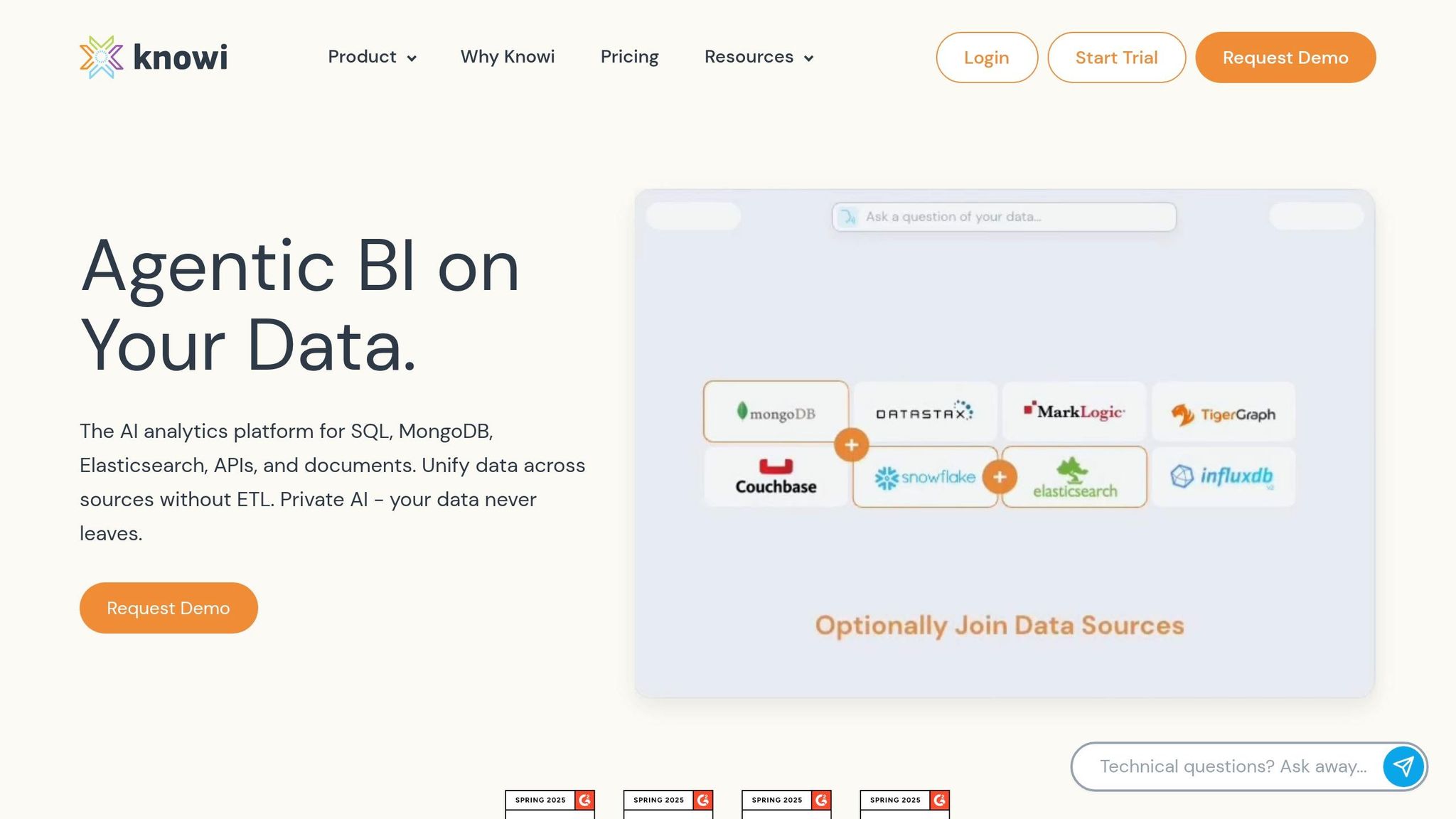
Knowi is a versatile BI tool designed to handle both SQL and NoSQL databases, making it easier for businesses to work across diverse data sources without needing complex ETL processes. This adaptability makes it a solid option for organizations managing intricate, multi-database setups. Let’s break down its standout features in embedding, AI, governance, and pricing.
Embedding Capabilities
Knowi offers three main ways to integrate analytics: iFrames for embedding entire dashboards, a JavaScript SDK for embedding individual charts, and REST APIs for headless analytics. The platform also supports advanced white-labeling options, such as custom CSS, branded subdomains (e.g., analytics.yourcompany.com), and seamless SSO integration. While iFrames are the primary method, they may limit styling flexibility compared to fully headless solutions.
"White label embedded analytics is often mistaken for a simple design exercise like adding the brand logos, colors and custom domains. In reality, successful white labeling depends on two deeper foundations: a scalable embedded analytics architecture... and a secure embedding model." - Knowi
AI and Automation Features
Knowi includes Natural Language Querying (NLQ), which it refers to as "private AI." This feature allows users to ask questions in plain English and receive charts or executive summaries in response. It’s particularly useful for users who need quick insights without diving deep into technical workflows. Additionally, the platform supports predictive modeling, although its primary focus remains on internal dashboards and analytical processes.
Multi-Tenancy and Governance
Designed for multi-tenant SaaS environments, Knowi ensures robust security with row-level and column-level access controls and data isolation capabilities. It complies with key standards like SOC 2, HIPAA, and GDPR, making it suitable for industries with strict data regulations, such as healthcare and finance. The platform can be deployed in the cloud or on-premises, providing flexibility for organizations with specific data sovereignty needs.
Pricing Structure and Scalability
Knowi uses a usage-based pricing model, which eliminates per-user fees and offers more predictable costs for SaaS companies with large customer bases. This pricing approach can lead to significant savings compared to competitors that charge per seat. Additionally, research indicates that SaaS companies integrating embedded BI often see a 15-20% increase in Annual Recurring Revenue (ARR) within the first year. Products with embedded analytics can also justify charging up to 20% more.
9. Domo
Domo is a cloud-based business intelligence (BI) platform designed to deliver multi-tenant embedded analytics through its Domo Everywhere offering. It's particularly suited for SaaS companies managing hundreds or even thousands of customers. With over 1,000 pre-built connectors, Domo prioritizes seamless integration across diverse data environments.
Embedding Capabilities
Domo Everywhere supports three main embedding methods:
- iFrames: A quick deployment option where you can copy auto-generated HTML code to embed dashboards or cards into external portals.
- JavaScript API: Allows for two-way communication, enabling your host application to apply filters, respond to user interactions, and dynamically manage content. This includes features like programmatic filtering (pfilters) and dataset switching for personalized data views.
- SDKs: Available in Java and Python, these are ideal for building custom applications.
To ensure the embedded analytics align with your application's design, Domo's Brand Kit lets you adjust colors, fonts, and logos. Virtuagym, a fitness software company, shared their experience:
"Shipping new metrics and insights to our customers is very simple".
These embedding tools lay the groundwork for Domo's advanced AI and automation capabilities.
AI and Automation Features
Domo includes tools like AI Chat and Natural Language Querying (NLQ), which let users ask questions in plain English and receive visualizations or insights in return. The platform also supports custom AI agents and provides built-in model management. Automated alerts notify users when specific data thresholds are reached, helping users quickly access insights without needing to create complex queries.
Multi-Tenancy and Governance
Domo ensures data security and tenant-specific governance through features like Personalized Data Permissions (PDP) and Domo Workflows, which enforce row-level security and simplify updates. These tools ensure that each tenant only accesses its own data. Domo also complies with standards like SOC 2, GDPR, and HIPAA, and offers specialized setups such as AWS Private Link and HIPAA-compliant environments for paid plans.
Pricing Structure and Scalability
Domo uses a consumption-based pricing model, meaning you pay based on usage. The platform offers a 30-day free trial with unlimited users and platform access. Paid plans include options like volume discounts, dedicated account teams, and custom add-ons. While this pricing model is appealing to growing enterprises, some analysts have noted that costs can become a concern for smaller businesses or at higher usage scales.
With its combination of fast deployment, flexible pricing, and strong governance, Domo is well-equipped to handle the needs of large-scale, multi-tenant environments. Its architecture is specifically designed for programmatic management of extensive customer bases.
10. ThoughtSpot
Closing out our list, ThoughtSpot stands out with its search-focused approach to embedded analytics.
ThoughtSpot is built around an AI-powered platform that emphasizes natural language search rather than traditional dashboards. Users can simply type queries like, "Which products had the highest margin last month?", and immediately receive interactive visualizations to explore the data further. This method has shown impressive results - NeuroFlow, a healthcare organization, reported an 85% increase in its analytics NPS after switching from traditional dashboards to ThoughtSpot Embedded.
Embedding Capabilities
Through the ThoughtSpot Everywhere developer portal, the platform provides multiple ways to integrate its analytics. Key options include:
- Visual Embed SDK: A low-code solution for seamless embedding.
- iFrame embedding: A straightforward option for simpler needs.
- REST API framework: Ideal for developers who need programmatic control over object creation, data management, and deployment automation.
A standout feature is SpotterCode, an AI-assisted tool that generates production-ready embed code from natural language prompts. This tool works directly within your IDE, streamlining the development process.
AI and Automation Features
ThoughtSpot's automated visualization engine takes the guesswork out of data presentation by selecting the most suitable charts for each query without requiring manual input. The platform connects directly to cloud data warehouses like Snowflake, Databricks, and BigQuery, enabling real-time insights rather than relying on outdated, static data extracts.
For example, Loan Market Group, Australia's largest mortgage broker network, saw user engagement soar by 14× after embedding ThoughtSpot analytics. Brokers gained instant access to vital loan performance data, showcasing the platform's ability to deliver fast, actionable insights in real-time. This focus on immediacy and engagement makes ThoughtSpot a strong contender in the embedded analytics space.
Pricing Structure and Scalability
ThoughtSpot offers a tiered pricing model to meet varying needs:
- Analytics Essentials: Starts at $1,250 per month, supporting up to 20 users and 25 million rows of data.
- Analytics Pro: Costs $50 per user per month or $0.10 per query on a consumption-based plan, with support for up to 500 million rows.
- Enterprise Tier: Features unlimited data and users with custom pricing.
Additionally, interactive dashboard loads are priced around $5–$6 each. This flexible pricing structure ensures ThoughtSpot can scale with businesses of different sizes and requirements.
Platform Comparison Table
Here’s a breakdown of popular platforms for embedded analytics, comparing their embedding methods, AI features, governance, and pricing. This table can help you quickly find the best fit for your needs.
| Platform | Embedding Methods | AI Capabilities | Governance & Security | Pricing Model | Best For |
|---|---|---|---|---|---|
| Omni | iframe, SDK, Web Components | Semantic-aware AI, natural language querying | Strong semantic layer, governed metrics | Query runs/slots model, starts at $800/month | Governed AI & metrics consistency |
| Sisense | Compose SDK, iframe | Predictive analytics, NLP, anomaly detection | Multi-tenancy, RLS | Custom pricing, ~$1,299/month for 100 viewers | Developer-led data products |
| Qrvey | JavaScript Widgets, REST API | Predictive insights, ML workflows, AI-assisted decisions | Full-stack multi-tenant isolation | Flat-fee annual subscription (custom quote) | Multi-tenant SaaS applications |
| GoodData | iframe, SDK | Anomaly detection, natural language interface | Enterprise-grade governance, tenant isolation | Usage-based (custom pricing) | Enterprise governance needs |
| Looker | Embed SDK, iframe, REST API | Gemini AI, BigQuery ML integration | LookML-governed definitions, RLS | Custom licensing, starts at $3,000+/month | Google Cloud/LookML teams |
| Tableau | JavaScript API, iframe | Ask Data (NLQ), Einstein Copilot, visual suggestions | Row-level security, enterprise governance | ~$70/user/month for creators | Visual storytelling & dashboards |
| Power BI | JavaScript SDK, iframe, REST API | Q&A, Copilot, Azure ML, anomaly detection | RLS, Microsoft security stack | Capacity-based, starts at ~$735.91/month (A1 node) | Microsoft ecosystem integration |
| Knowi | iframe, API | AI-driven insights, ML integration | Multi-tenant support, RLS | Custom pricing (not disclosed) | General-purpose BI |
| Domo | iframe, REST API | Predictive analytics, natural language querying | Cloud-native security, RLS | Credit-based usage, ~$134,000/year average | Cloud-native full-stack analytics |
| ThoughtSpot | Visual Embed SDK, iframe, REST API | AI-powered search, SpotIQ anomaly detection | Automated RLS, tenant-safe AI | Usage ($0.10/query) or user-based ($50/viewer) | AI-driven search experiences |
Key Takeaways
Embedding methods vary in flexibility and ease of use. SDKs and Web Components provide more customization but demand extra development effort. In contrast, iframes are faster to deploy but offer less control.
AI capabilities are a major factor in choosing the right platform. As we move toward 2026, platforms with robust AI features are setting themselves apart. An insightful point from the Omni Guide emphasizes this shift:
"The question is not just which embedded analytics tool can we embed? It is which embedded analytics platform can give customers self-serve analytics and AI without forcing our team to become a BI vendor, security team, and prompt QA function all at once?" - Omni Guide
Governance also plays a critical role. Platforms with semantic layers ensure consistent metrics across tenants, reducing the risk of AI misinterpretations.
Pricing models differ significantly, aligning with various business needs. Fixed-fee plans are ideal for rapidly growing user bases, while usage-based or capacity-based pricing works well for businesses with sporadic dashboard interactions. Choosing a model that matches your usage can lead to cost efficiency as your operations scale.
Conclusion
Choosing the right embedded analytics platform isn't just about ticking off a list of features - it’s about aligning the platform with your business needs. For example, if your data resides in Google Cloud and you handle massive datasets, Looker integrates seamlessly with BigQuery, cutting down on data movement and latency issues. On the other hand, if your ecosystem revolves around Microsoft, Power BI Embedded offers tight Azure integration, with pricing starting at around $735.91 per month for an A1 node. Considerations like cost structures, governance, and technical compatibility should guide your decision.
For SaaS providers, multi-tenancy is a game-changer. Platforms like GoodData and Qrvey are specifically designed to handle analytics delivery across hundreds - or even thousands - of customer environments. They provide secure data isolation from the start, saving you the headache of engineering tenant boundaries yourself. When scaling to thousands of tenants, these platforms significantly reduce operational complexity.
AI capabilities are now a must-have, but not all AI tools are equal. As the Omni Guide notes:
"The question is not just which embedded analytics tool can we embed? It is which embedded analytics platform can give customers self-serve analytics and AI without forcing our team to become a BI vendor, security team, and prompt QA function all at once?"
Platforms with strong semantic layers, such as Omni, Looker, and GoodData, ensure that AI operates within governed business logic. This approach minimizes metric inconsistencies while maintaining robust governance.
Pricing models also play a critical role in long-term scalability. Fixed-fee platforms like Qrvey shield you from escalating per-user costs, while usage-based models like Power BI Embedded are ideal for scenarios where many users access dashboards sporadically. It’s essential to analyze realistic usage patterns - like a setup involving 10 builders and 5,000 viewers with row-level security and AI workflows - to uncover potential hidden costs.
Before committing, test your chosen platform under production-like conditions. While internal BI tools like Tableau may falter when serving thousands of external users simultaneously, embedded analytics platforms are purpose-built to handle such demands. Companies that embed analytics report decision-making speeds up to five times faster.
FAQs
How do I pick the right pricing model for embedded analytics?
When deciding on a pricing model for embedded analytics, it's essential to align it with both your usage patterns and budget. Here are three common options to consider:
- Seat-based pricing: This model charges based on the number of users. It's a great fit for businesses with a smaller, consistent user base.
- Capacity-based pricing: Costs are tied to factors like data usage or API calls. This works well for companies expecting to scale as their needs grow.
- Feature-based pricing: Offers tiered plans that include different sets of features, allowing you to pay for only what you need.
To make the most of your investment, choose a model that aligns with your user base, data requirements, and future growth plans.
What’s the best way to handle multi-tenancy and tenant data isolation?
Managing multi-tenancy and ensuring tenant data isolation works best when robust row-level security is combined with semantic modeling. This approach keeps each tenant's data secure and separate, all while supporting a scalable multi-tenant setup.
Do I need a semantic layer for AI-powered embedded analytics?
A semantic layer is strongly recommended for AI-powered embedded analytics. Why? It creates a standardized framework, ensuring consistent definitions, logic, and governance. This structure is key to producing reliable and trustworthy AI-driven insights. By unifying data and maintaining accuracy, the semantic layer also enables smooth integration with AI systems, making it an essential component for effective analytics.