Low-code platforms make building applications faster, but they often introduce security risks. To protect your data and systems, here’s what you need to focus on:
- Run Security Audits: Regularly check for vulnerabilities, patch dependencies, and test for risks using tools like STRIDE and OWASP guidelines.
- Control Access: Use Role-Based Access Control (RBAC) to limit permissions based on roles and enforce the Principle of Least Privilege.
- Strengthen Authentication: Implement Multi-Factor Authentication (MFA) and Single Sign-On (SSO) with trusted identity providers like Microsoft Entra ID.
- Encrypt Data: Apply AES-256 encryption for storage and TLS 1.3 for communication to secure sensitive information.
- Secure Credentials: Store API keys and passwords in centralized vaults and avoid hardcoding them in your applications.
- Monitor and Govern: Establish a Center of Excellence (CoE) for governance, track audit logs, and categorize data flows for better oversight.
- Automate Security: Use tools for vulnerability scanning, dependency checks, and automated patching to address issues quickly.
- Choose Secure Platforms: Opt for proprietary low code platforms with built-in security features like RBAC, MFA, and compliance certifications.
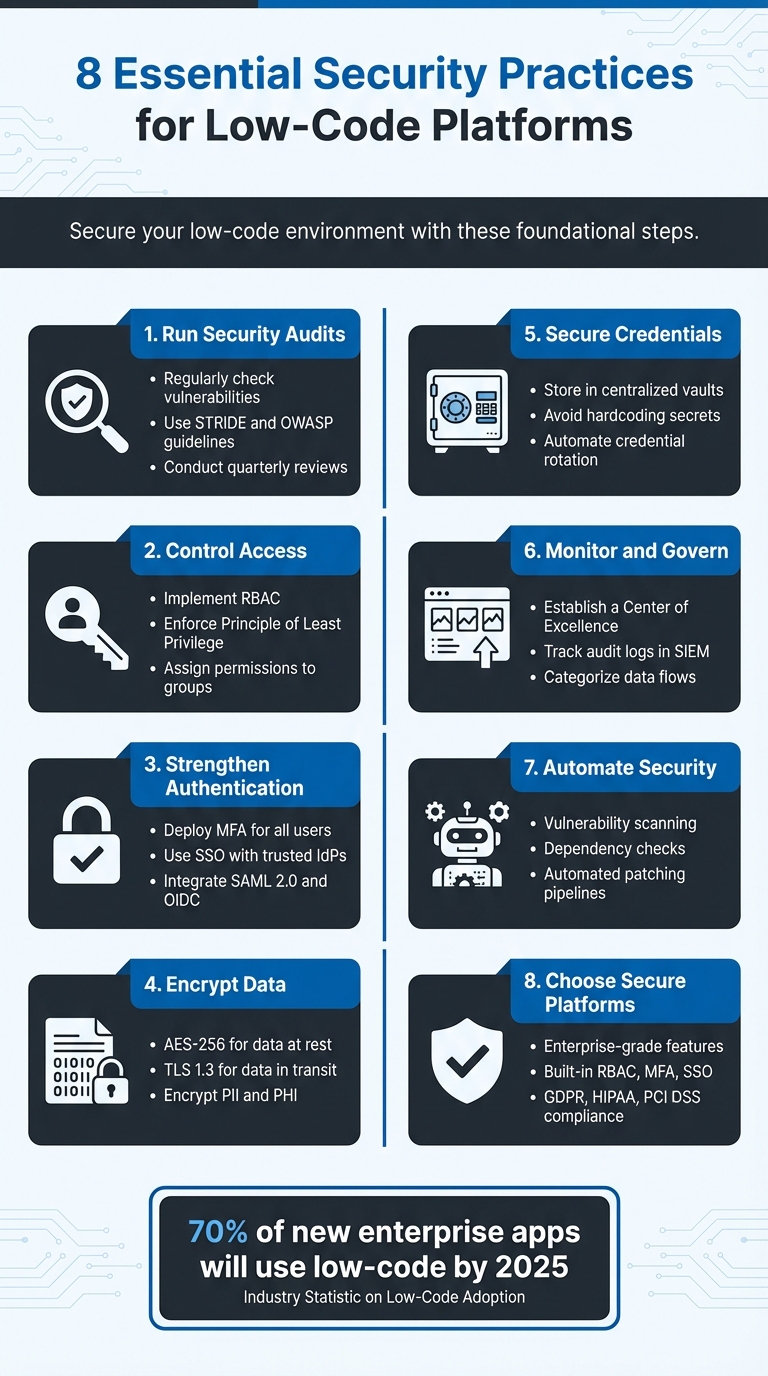
8 Essential Security Practices for Low-Code Platforms
Webcast: OWASP Top 10 Security Risks for Low-code/No-code
sbb-itb-33eb356
Core Security Practices for Low Code Platforms
Creating a secure environment in low-code platforms requires a focused approach to address vulnerabilities, block unauthorized access, and ensure security is integral to the development process. Here are three essential practices to get started.
Run Regular Security Audits and Penetration Tests
A strong security strategy begins with thorough audits. Start by maintaining a central application registry that tracks each app's purpose, ownership, data usage, and connected systems. As cybersecurity analyst David Balaban points out:
"You can't protect what you can't see, and you won't patch what isn't on a list."
Incorporate STRIDE-based threat modeling during the design phase to anticipate potential risks. Use tools like "Solution Checker" for static analysis and add fuzz testing to uncover vulnerabilities and test error handling. Once low-code apps interact with real data or critical systems, include them in penetration testing. Balaban emphasizes this necessity:
"Low-code apps belong in your pen-testing scope as soon as they touch real data or critical systems. Skipping them is like locking the front door and leaving the side gate open with a welcome mat."
Schedule quarterly reviews to ensure app ownership is clear, remove unused integrations, patch dependencies, and address risks such as weak authentication or insecure connectors. Frameworks like the OWASP Low-Code/No-Code Top 10 and other low-code security tips can guide these efforts.
Set Up Role-Based Access Control (RBAC)
Audits often reveal potential access vulnerabilities, and role-based access control (RBAC) helps mitigate these risks by clearly defining permissions. RBAC supports the Principle of Least Privilege (PoLP), limiting users to only the resources they need for their roles, which reduces the impact of security breaches. This approach is formalized in the National Institute of Standards and Technology's RBAC Standard 359-20.
In low-code platforms, apply RBAC across multiple levels, including:
- Workspaces
- Applications
- Data sources
- Pages or components
- Specific data rows or fields
Assign permissions to groups rather than individuals to maintain a clear audit trail. Implement separation of duties, such as ensuring the person submitting a purchase request cannot approve it. Additionally, enforce environment isolation, where developers can build in staging environments but only administrators can deploy to production.
Start with a minimal set of roles like Owner, Admin, Builder, Operator, Approver, Viewer, and External. Configure new applications and data sources as private by default, granting access only when explicitly necessary. Regularly review permissions to prevent privilege creep.
Use Multi-Factor Authentication (MFA) and Single Sign-On (SSO)
Strong authentication mechanisms are critical for safeguarding low-code environments. Multi-factor authentication (MFA) adds an extra layer of protection by requiring additional verification, even if primary credentials are compromised. Meanwhile, single sign-on (SSO) simplifies logins by centralizing authentication through an identity provider (IdP), ensuring consistent application of security policies like password resets and MFA rules.
Integrate your low-code platforms with trusted identity providers like Microsoft Entra ID (formerly Azure AD) using protocols such as SAML 2.0 and OpenID Connect (OIDC). Sakshi Dhakad from Mendix explains the benefits:
"Identity providers such as Entra Id (previously Azure AD) are centralized identity and access management solutions. They are more secure, more user friendly, and more efficient than the traditional username and password paradigm."
To strengthen security, enforce MFA for all users, including developers and administrators. Use tools like SCIM or LDAP to automate user provisioning and ensure timely access removal when employees leave the organization.
Protecting Data in Low Code Environments
Once access controls are in place, the next priority in securing low-code platforms is safeguarding the data itself. These platforms often handle sensitive information like customer records and financial transactions, making encryption and secure credential management critical. As Convertigo highlights:
"Encryption serves as a robust barrier against cyber threats, ensuring that even if malicious entities intercept data, they cannot decipher it without the appropriate decryption key."
Failing to protect data not only increases the risk of breaches but also exposes organizations to regulatory fines. This makes it essential to embed data protection into every layer of your low-code environment.
Encrypt Data at Rest and in Transit
To secure data, use AES-256 encryption for storage and enforce TLS 1.3 for all outgoing communications . Set up CI/CD pipelines to block builds that lack encryption or use unsecured connectors . Cybersecurity analyst David Balaban warns:
"Low-code platforms are great at speed and lousy at reminding people about secure defaults."
This means you can’t assume encryption is enabled; you need to verify it. Apply these encryption practices not just within your low-code platform but also to external systems, third-party apps, and APIs that interact with it. Sensitive data, including Personally Identifiable Information (PII) and Protected Health Information (PHI), should always be encrypted.
Before starting development, map out your data flow. Identify where data originates, where it’s stored, and who interacts with it at each stage. For healthcare apps, ensure compliance with HIPAA and PHIPA guidelines; for financial apps, adhere to PCI-DSS and GLBA standards. With organizations like NIST and NCSC advocating for post-quantum cryptography by 2035, now is the time to future-proof your encryption strategy.
Encryption is just one piece of the puzzle. Managing code and credentials securely is equally important for strengthening your low-code environment.
Manage Code and Credentials Securely
Hardcoded credentials remain one of the biggest security risks in software development. In 2022, 10% of GitHub authors accidentally exposed secrets in their repositories, contributing to breaches that exposed over 1.7 billion records in 2024. The financial impact of credential-stuffing breaches averages $4.8 million per incident.
To mitigate these risks, store all credentials - such as API keys, passwords, and tokens - in a centralized vault like AWS Secrets Manager, Azure Key Vault, or HashiCorp Vault. Avoid embedding secrets directly in source code or configuration files. Instead, use environment variables or dynamically inject them at runtime. Employ pre-commit hooks to scan for secrets before code reaches version control, and configure platforms to mask sensitive values in logs and console outputs.
Automate credential rotation, adjusting the frequency based on sensitivity, from daily to quarterly. Use service accounts, not individual user accounts, to ensure continuity. Standardize naming conventions, such as "Tines Security Team API Key", for easier auditing, and establish workflows to review credentials weekly for compliance. As the Copado Team notes:
"Data encryption is a critical security control for protecting data at rest and in transit. Organizations should encrypt all sensitive data, including personally identifiable information, and protected health information."
With 96% of organizations reporting secrets scattered across codebases, configuration files, and environments, centralizing these credentials is essential for maintaining control and visibility over your security measures.
Improving Visibility and Governance
Strong access and data protection measures are only part of the equation - clear governance ensures you maintain visibility and apply security controls consistently across all applications. Knowing what’s happening with your applications and who’s behind them is crucial for effective security. Without centralized oversight, low-code platforms can lead to shadow IT, introducing unmanaged risks.
Organizations lacking formal low-code governance face security violations and compliance breaches at rates 3-4x higher than those with established Centers of Excellence (CoEs). By centralizing visibility and governance, businesses can scale securely and maintain control over data flows.
Create a Low Code Center of Excellence (CoE)
A Center of Excellence (CoE) connects IT governance with business innovation. Instead of restricting citizen developers, a CoE offers guardrails like standardized templates, naming conventions, and Application Lifecycle Management (ALM) processes to ensure consistency across the organization. This team manages platform administration, defines Data Loss Prevention (DLP) policies, and categorizes connectors into "Business", "Non-Business", and "Blocked" groups to control data flow.
The results speak for themselves: 72% of enterprises with mature CoEs report stronger security and better compliance, while 67% achieve faster solution delivery. With proper training from a CoE, security risks can drop by 40-50%. Cybersecurity analyst David Balaban explains:
"The sweet spot is structured, light-touch governance that's visible but not suffocating."
To get started, create a simple registry where app builders log each application’s purpose, owner, and data sensitivity before launch. Use tiered environments - development (flexible governance), UAT (business validation), and production (strict controls) - to separate experimentation from critical operations. Choose a governance model that suits your organization: centralized for industries like finance and healthcare, federated for large distributed businesses, or hub-and-spoke for matrix structures with independent departments.
Monitor Continuously and Track Audit Logs
While a CoE provides the framework, continuous monitoring ensures compliance. Audit logs should capture key events like login attempts, data access and changes, role assignments, connector usage, and workflow modifications. This visibility is especially important as 70% of new enterprise apps will use low-code technologies by 2025, yet only 12% of code commits currently undergo automated security scans.
Send logs to a Security Information and Event Management (SIEM) tool to detect anomalies in real time, such as large data transfers or unauthorized external connections. Pay close attention to connector usage since third-party integrations can bypass traditional security measures and lead to data leaks.
Automate drift detection to ensure platform settings remain secure, and conduct quarterly reviews of access permissions to uphold the principle of least privilege. Categorize data flows - public, internal, sensitive, or regulated - to prioritize monitoring and security reviews. Finally, establish a non-punitive reporting process so business units can disclose shadow IT apps. This allows IT to formally govern these apps rather than leaving them unmanaged. Together, these practices strengthen your overall security strategy.
Automating Security Processes
By building on solid monitoring and governance practices, automating security processes helps speed up vulnerability detection and patching. Manual reviews simply can't keep up with the pace of low-code development. In fact, 92% of global IT leaders admit that the push for innovation has led to compromises in application security during development. Automation bridges this gap by embedding security checks directly into workflows, identifying vulnerabilities before they ever reach production.
Automate Vulnerability Scanning and Threat Modeling
Automated tools, like Solution Checker, perform static analysis on low-code resources to identify security flaws, problematic patterns, and hard-coded credentials in configuration files. These scans should trigger automatically during builds. For example, if an application lacks encryption, has overly broad permissions, or uses unsecured connectors, the build fails immediately. This ensures that insecure code never makes it to production.
AI-powered security tools also play a crucial role. By using machine learning, they can detect anomalies in real time, spotting suspicious activities that might escape manual reviews. Ronak Desai, Senior Vice-President and General Manager at Cisco Full-Stack Observability and AppDynamics, highlights the importance of context in this process:
"An organisation's ability to quickly assess risks based on potential business impact, align teams and triage threats is entirely dependent on understanding where vulnerabilities exist, the severity of those risks, the likelihood they will be exploited, and the risk to the business of each issue."
Additionally, automating dependency scanning ensures that third-party libraries and connectors are checked for known CVEs (Common Vulnerabilities and Exposures). Tools like Defender for DevOps can help maintain a strong security score. By integrating these scans into the development workflow, security checks become a seamless part of the process, allowing for rapid detection and resolution of issues.
Create Timely Patching Strategies
Once vulnerabilities are identified, automated patching enables quick fixes. Deployment pipelines designed for automation can handle both routine and emergency updates, ensuring that critical vulnerabilities are addressed without delay. For urgent issues, emergency pipelines can bypass non-essential tests while still running core unit tests, allowing for fast yet safe patching.
A phased rollout strategy adds another layer of efficiency by deploying updates incrementally across different infrastructure segments. This allows for close monitoring and quick adjustments if problems arise. Automated alerting systems notify teams immediately when new vulnerabilities or patches are identified, ensuring a rapid response. Compared to manual patching - which can delay updates for weeks - automated systems can implement fixes within hours, significantly reducing the window of exposure.
Choosing Secure Low Code Platforms
Building a secure low-code environment starts with selecting the right platform. Enterprise-grade platforms often include robust protections that standard low-code tools may lack. As Anya Syulina, Product Marketing Manager at OutSystems, explains:
"Security is one of the main differentiators between regular low-code and enterprise-grade low-code".
Security should be a core feature of the platform, not an afterthought.
When evaluating platforms, check for integrated Identity and Access Management (IAM) features like Role-Based Access Control (RBAC), Multi-Factor Authentication (MFA), and Single Sign-On (SSO) through protocols such as SAML, OpenID, or Azure AD. Additionally, prioritize platforms that use AES-256 encryption for securing data at rest and in transit, provide Data Loss Prevention (DLP) tools, and include automated backup systems. Without these safeguards, your data remains vulnerable.
These technical features are also critical for meeting regulatory requirements. Platforms with built-in compliance support for frameworks like GDPR, HIPAA, SOX, and PCI DSS can save time and reduce legal risks. Enterprise-grade solutions often include centralized governance tools, such as Control Centers, to manage applications and prevent shadow IT. Shadow IT - when users create unmanaged apps that bypass security protocols - poses a significant risk. Frank Baalbergen from Mendix highlights this:
"The most incredible application developed in the fastest time possible is useless if its security fails and data is lost".
Vendor transparency is another critical factor. Choose platforms that participate in vulnerability disclosure programs and collaborate with ethical hackers to identify potential threats. Look for vendors that offer 24/7 threat detection, undergo regular third-party penetration testing, and maintain top-tier security certifications. Reviewing a vendor’s documentation for past security incidents can also provide insights into their accountability. Vendors who openly address breaches demonstrate a commitment to maintaining trust.
To simplify your search, the Low Code Platforms Directory offers a curated list of platforms with filters for security features and enterprise-grade support. Resources like this allow you to compare security capabilities, verify compliance with industry standards, and find platforms that fit your operational needs. Selecting a secure platform is essential to strengthening your overall low-code ecosystem and protecting your organization’s data.
Conclusion
By 2025, low-code platforms are expected to power 70% of new enterprise applications. While this shift promises faster development and operational efficiency, it also introduces new vulnerabilities. Cybersecurity analyst David Balaban puts it bluntly:
"Speed only helps when you don't have to circle back with an apology and a post‑mortem".
To mitigate these risks, adopting best practices is non-negotiable. Regular audits, role-based access control (RBAC), automated security scans, and establishing a Center of Excellence are critical steps to safeguard data, maintain compliance, and uphold trust. Without these measures, organizations risk creating shadow IT environments - unmonitored applications operating outside IT’s oversight - which are nearly impossible to secure.
Recent breaches at companies like Confidant Health and Carousell highlight the dangers of neglecting security protocols. These incidents underscore the importance of governance and proactive security measures. Choosing a secure platform is your first line of defense.
The Low Code Platforms Directory is a valuable tool to help you compare platforms. It provides insights into security features, compliance certifications, and built-in protections like AES-256 encryption and automated scanning. Leverage this resource to make informed decisions that strengthen your security from the start.
FAQs
How often should low-code apps be pen-tested?
Low-code apps benefit greatly from regular penetration testing, which many experts recommend conducting on a quarterly basis. Alongside this, continuous monitoring plays a crucial role in spotting vulnerabilities early. Together, these practices help maintain strong security measures and safeguard the integrity of your applications.
What RBAC roles should we start with?
When setting up Role-Based Access Control (RBAC), it's essential to align roles with specific job functions. This approach ensures that users only have the permissions they need for their work. Here are some common role examples:
- Workflow Developer: Focused on creating and managing workflows within the system.
- Data Analyst: Responsible for analyzing and interpreting data while accessing relevant datasets.
- System Administrator: Manages system settings, user accounts, and overall infrastructure.
- End User: Uses the platform for day-to-day tasks without administrative privileges.
By assigning roles based on individual responsibilities, you can enhance security while keeping operations smooth and efficient.
How can we prevent secrets from being hardcoded?
When working with low-code platforms, it's crucial to avoid embedding sensitive information directly into your code. Instead, adopt secure secret management practices. Use tools like secret stores or vaults to safely store sensitive data such as API keys, passwords, and tokens.
Take advantage of environment variables or the secure parameter storage options offered by your platform. Additionally, make it a habit to regularly rotate secrets and implement strict access controls. These steps help reduce the chances of exposure and protect against potential security breaches.