CI/CD test automation is essential for modern software development, but it comes with challenges that can slow down releases, waste resources, and reduce trust in automation. Here's a quick rundown of the top problems and solutions:
-
Flaky Tests: Tests that fail unpredictably due to timing issues, shared dependencies, or brittle selectors.
- Fix: Use dynamic waits, isolate tests, mock APIs, and quarantine unreliable tests.
-
Test Script Maintenance: Fragile scripts break with UI changes or hardcoded values.
- Fix: Use modular architectures (e.g., Page Object Model), stable selectors, and automate test data resets.
-
Environment Inconsistencies: Tests pass locally but fail in CI due to mismatched setups or shared resources.
- Fix: Use Docker for consistent environments, automate resets, and leverage ephemeral test setups.
-
Tool Integration Issues: Mixing frameworks and plugins creates compatibility problems.
- Fix: Decouple test orchestration, consolidate results, and use tools with native CI integration.
-
Slow Execution Times: Long pipelines waste developer hours and increase timeout risks.
- Fix: Parallelize tests, cache dependencies, and split pipelines into faster, smaller tasks.
-
Security Risks: Vulnerabilities in pipelines can lead to breaches (e.g., SolarWinds attack).
- Fix: Integrate security scans, enforce access controls, and secure secrets with management tools.
-
Coverage Gaps: Rapid code changes outpace tests, leaving gaps in validation.
- Fix: Prioritize high-risk tests, monitor pass rates, and adopt self-healing test tools.
These issues impact speed, quality, and reliability, but with the right strategies, teams can regain trust in their pipelines and improve delivery outcomes.
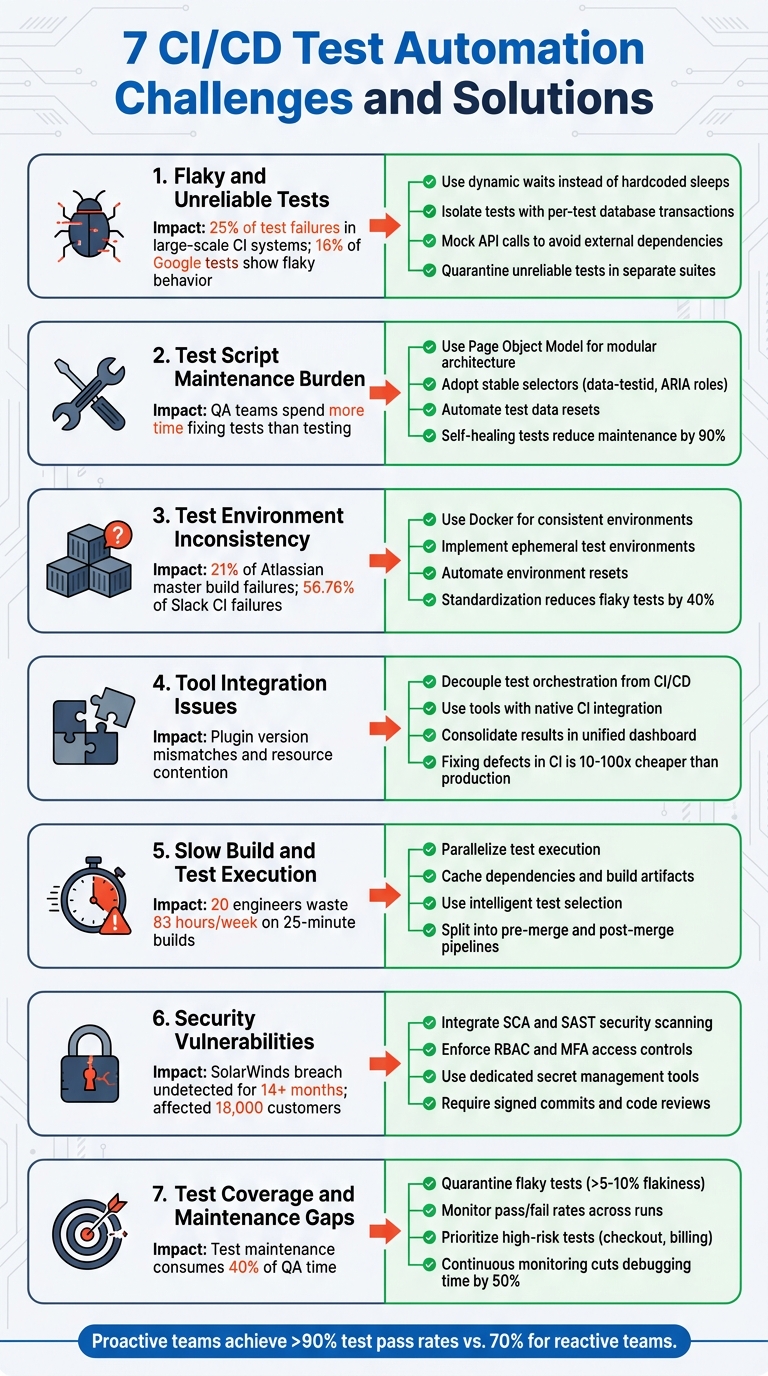
7 CI/CD Test Automation Challenges and Solutions
Testing in Modern CI/CD Pipelines: The Good, The Bad, and The Ugly | Cortney Nickerson & Ole Lensmar
sbb-itb-33eb356
1. Flaky and Unreliable Tests
Flaky tests are one of the biggest hurdles in CI/CD test automation, and they can wreak havoc on pipeline reliability.
Impact on Pipeline Reliability
Flaky tests create a false sense of security in CI/CD pipelines by encouraging developers to re-run tests instead of investigating failures. This habit can hide real bugs, allowing them to slip into production unnoticed.
Studies reveal that flakiness accounts for about 25% of test failures in large-scale CI systems, even when there are no actual code defects. At Google, around 16% of tests have shown flaky behavior. Atlassian reported in 2026 that flaky tests caused 21% of master build failures in the Jira frontend, consuming an estimated 150,000 developer hours annually. Slack's engineering team faced an even larger issue, with flaky tests responsible for 56.76% of CI failures. After addressing the problem, they reduced this percentage to just 3.85%.
"When developers start clicking 're-run' as a reflex instead of investigating failures, you've already lost the signal that automated testing is supposed to provide."
– Tom Piaggio, Co-Founder, Autonoma
These issues often stem from specific technical problems, which are explored below.
Root Causes and Contributing Factors
Flaky tests usually arise from timing problems and shared dependencies, among other factors.
- Timing and Race Conditions: These account for nearly 45% of flaky tests. They occur when tests assume synchronous execution in asynchronous systems or rely on hardcoded waits that fail under varying resource loads. For example, a test might succeed on a local machine but fail on a CI runner under heavy load.
- Shared State and Dependencies: Tests that share databases, global variables, or browser contexts often produce inconsistent results. Differences between local and CI environments - such as operating systems, browser versions, or resource limits - can also lead to unpredictable failures. Additionally, relying on live third-party APIs without mocking can cause tests to break due to network latency or outages.
- Brittle Selectors: Using deep XPaths or dynamically generated CSS classes can make tests fragile. Minor UI changes can cause these selectors to fail, even when the underlying functionality remains unchanged.
These root causes need targeted solutions to improve test reliability.
Practical Solutions and Best Practices
Here are some actionable steps to tackle flaky tests:
-
Use Dynamic Waits: Replace hardcoded sleeps with condition-based waits like
expect().toBeVisible()to handle asynchronous behavior more effectively. - Ensure Test Isolation: Use per-test database transactions with automatic rollbacks and unique data seeding to prevent cross-test contamination.
- Standardize Environments: Leverage Docker containers to ensure consistent versions of tools, browsers, and operating systems across local and CI environments.
- Mock Network Calls: Use tools like Playwright's route interception to simulate stable API responses, avoiding failures caused by external dependencies.
-
Adopt Stable Selectors: Prioritize
data-testidattributes and ARIA roles over fragile CSS or XPath selectors for more resilient tests. - Quarantine Flaky Tests: Move unreliable tests to a separate suite that doesn't block the CI pipeline, allowing issues to be fixed without disrupting the workflow.
2. Test Script Creation and Maintenance Burden
In CI/CD pipelines, managing test scripts can become a significant obstacle. When the time spent creating and maintaining scripts outweighs the time spent actually testing, automation shifts from being an asset to a liability. This imbalance not only slows down testing but also compromises the quality of software delivery.
Impact on Pipeline Reliability
If QA teams are stuck fixing broken tests instead of building new ones, the entire CI/CD pipeline feels the strain. False failures - where tests flag issues that don’t exist - lead engineers down rabbit holes, wasting precious development hours. Over time, teams may start ignoring failed pipelines altogether, especially when flakiness becomes routine. This undermines the core purpose of automated testing and erodes trust in the delivery process. Developers lose confidence in the system when they can't tell if failures stem from actual defects or script issues.
"Your QA team is spending more time fixing tests than actually testing."
– Testsigma Engineering Team
The root of these problems often lies in avoidable technical flaws.
Root Causes and Contributing Factors
One major issue is brittle locators. Tests that depend on fragile element identifiers, such as auto-generated CSS classes or deep XPaths, often break when developers update the UI. Modern applications, with their dynamic elements like AJAX-loaded content and pop-ups, demand more robust wait mechanisms to avoid test failures.
Another culprit is hard-coded values. Embedding URLs, text strings, or test data directly into scripts creates a maintenance nightmare. Any change to application logic or content requires manual updates across multiple test files. Over time, this leads to technical debt, especially when teams skip code reviews for test scripts. The result? Duplicated logic, bloated test suites, and an overall lack of readability.
The rapid adoption of AI-assisted development tools has also contributed to these challenges. AI copilots accelerate code changes, but this increased velocity often exacerbates test maintenance burdens.
Practical Solutions and Best Practices
Here’s how teams can tackle these challenges effectively:
- Use modular architectures like the Page Object Model (POM) to separate UI structure from test logic. This ensures that a single UI update only requires changes in one place rather than across multiple test files.
- Opt for stable selectors such as
data-testidattributes or unique IDs, which are far less prone to breaking than XPath expressions tied to the DOM structure. - Replace static "sleep" timers with smart waits that respond to conditions like element clickability or visibility.
Treat test scripts like production code. Conduct peer reviews regularly, and follow the "Don't Repeat Yourself" (DRY) principle to eliminate redundant logic. Automate database resets via scripts or API calls to ensure every test run starts with clean, consistent data. Additionally, self-healing test capabilities can detect and adapt to broken selectors automatically, cutting down manual maintenance by as much as 90%.
Lastly, focus on automating high-priority workflows, such as checkout processes or authentication, instead of trying to cover every scenario. If test flakiness exceeds 5–10%, it’s a clear sign that your test architecture needs a rethink.
3. Test Environment Inconsistency
Impact on Pipeline Reliability
Ever had tests that pass on your local machine but fail during Continuous Integration (CI)? That’s environment inconsistency - a headache for any team relying on automated testing. This inconsistency creates "noise" in the pipeline, making it difficult to pinpoint whether failures are due to actual bugs or infrastructure quirks. The result? Developers start re-running tests automatically, often sweeping deeper problems under the rug.
At Atlassian, environment mismatches were behind 21% of master build failures, adding to pipeline chaos. Slack faced an even steeper challenge - environment-related flaky tests caused 56.76% of their CI failures before they tackled the issue directly. When test results lose credibility, teams often resort to ignoring alerts, performing manual checks, or bypassing automated gates altogether.
Root Causes and Contributing Factors
The infamous "works on my machine" problem often boils down to technical mismatches. One key issue is configuration drift - differences in operating systems, browser versions, environment variables, or URLs between local setups and CI runners. For example, file system case sensitivity varies between Linux CI runners and Windows/macOS environments, leading to unpredictable behavior.
Resource limitations also play a major role. A standard GitHub Actions runner offers 7GB of RAM, while your local machine might have double that. CI runners often share resources and operate under strict time limits, which can cause slower response times and timeout failures. On top of that, stale or shared test data can wreak havoc when multiple tests modify the same database or when cleanup scripts fail to reset the environment properly.
In cloud-native environments, the challenge grows. CI/CD pipelines often depend on Kubernetes clusters, where factors like network policies, resource constraints, and version mismatches can create transient issues unrelated to the code itself. Tackling these inconsistencies is essential to restore trust in your pipeline.
Practical Solutions and Best Practices
One effective way to combat environment inconsistency is by using containerization. Tools like Docker help ensure that testing environments remain consistent across local machines, staging, and CI/CD runners. Locking runtime versions with tools like .nvmrc for Node.js or .python-version for Python can also prevent unexpected failures. For cross-platform compatibility, rely on language-specific modules like path.join in Node.js instead of hardcoding file paths.
Automating environment resets is another crucial step. Scripts that clean and refresh databases to a known state before every test run can eliminate many issues. Taking it a step further, ephemeral environments - temporary, isolated environments created for each test run - can prevent cross-contamination entirely. These environments are destroyed after use, ensuring a clean slate for the next test.
For example, in early 2026, ResDiary used GoReplay to simulate production traffic during their migration from RackSpace to Azure. This allowed them to identify and address infrastructure flaws before the switch, ensuring a smooth transition across regions like the UK and Australia.
Another approach is to separate test orchestration from the CI/CD pipeline. This allows tests to scale independently without competing for build resources. Replacing unstable external services with mocks can also reduce variability caused by factors outside your application code. Teams that standardize their execution environments have reported up to a 40% drop in flaky tests.
4. Integration and Tool Compatibility Issues
Impact on Pipeline Reliability
Tool integration problems can seriously disrupt the reliability of CI/CD pipelines. When testing tools don’t play well together, automation can break down. Many teams rely on a mix of frameworks - like Cypress for UI tests, JMeter for performance checks, and Postman for API validations. But stitching these tools into a cohesive workflow often turns into a maintenance headache. This tangled setup leads to tightly coupled tests, where test runs compete for limited resources, causing bottlenecks and resource exhaustion.
These issues can result in pipelines that fail consistently for reasons unrelated to actual bugs. Over time, teams may lose trust in their automated tests and start ignoring failed pipeline results altogether.
"When test orchestration lives inside your CI system, every test run competes for pipeline resources. Every rerun requires re-triggering the full pipeline." – Bruno Lopes, Product Leader at Testkube
Understanding the root causes of these issues is key to solving them.
Root Causes and Contributing Factors
One major cause is the chaotic state of plugin maintenance. Take Jenkins, for example - it offers over 1,800 plugins, and version mismatches can quickly become a maintenance nightmare. Many testing tools also lack native CI/CD integration, forcing teams to write custom YAML or Groovy scripts to make them work. These scripts are often fragile, breaking whenever the tools are updated.
Using multiple frameworks adds another layer of complexity. Test results end up scattered across various dashboards and formats, making it difficult to get a clear picture of overall quality. Infrastructure limitations, like insufficient CPU or memory on CI nodes or unstable Selenium Grids causing browser crashes, further compound the problem.
Practical Solutions and Best Practices
To tackle these challenges, teams need to focus on decoupling test orchestration from their CI/CD pipelines and improving tool integration. One effective approach is to shift test execution to independent, cloud-native platforms. This prevents build-blocking and resource contention, while allowing testing infrastructure to scale independently of the main pipeline.
Using tools with built-in integrations for platforms like GitHub Actions or GitLab CI can also reduce reliance on custom scripts, cutting down on configuration errors. For teams juggling multiple frameworks, consolidating all test results into a unified dashboard can make it easier to track trends and assess quality.
Investing in these improvements can pay off quickly. Research shows that fixing defects caught in CI/CD pipelines is 10–100 times cheaper than addressing them in production. Standardizing environments with Docker is another key step, ensuring consistent test execution across both local and CI setups.
A development team with eight developers and two QA engineers adopted Shift-Left API testing in their multi-layered pipeline. This change reduced their pull request-to-merge time from 4 hours to just 45 minutes and led to a 68% drop in production API incidents within the first quarter.
5. Slow Build and Test Execution Times
Impact on Pipeline Reliability
Slow pipelines can wreak havoc on both productivity and code quality. Imagine this: for a team of 20 engineers running 10 builds daily, each taking 25 minutes, nearly 83 hours a week are wasted just waiting. And it doesn’t stop there - developers lose an average of 23 minutes trying to refocus after these interruptions. This constant stop-and-go workflow often leads to a "merge and hope" approach, where developers re-run tests instead of addressing the root cause.
Long execution times also increase the chances of timeout failures or resource bottlenecks. The longer a test suite runs, the more likely it is to hit infrastructure limits or encounter temporary network issues, leading to false failures. When developers stop trusting test results, automated testing loses its value entirely.
These delays usually stem from poor pipeline design choices.
Root Causes and Contributing Factors
One major issue is sequential execution. For instance, running 300 tests that each take 1 minute can stretch a test suite to 5 hours if not parallelized. Many teams make this worse with monolithic pipeline designs - combining unrelated tasks like linting, unit tests, and end-to-end tests into one linear flow. This setup forces the entire suite to run, even for minor changes like fixing a typo in documentation.
Another culprit is poor caching strategies. Teams that fail to cache dependencies, build artifacts, or Docker layers end up wasting time on repetitive downloads and recompilations. Over-reliance on slow UI tests instead of faster unit and integration tests - known as an inverted test pyramid - further drags down execution times. At Slack, flaky tests were responsible for 56.76% of CI failures before they tackled the issue head-on.
Infrastructure also plays a role. Shared CI runners often create unpredictable queueing delays, sometimes adding 10+ minutes before a build even begins. Hardcoded wait strategies, like Thread.sleep(), unnecessarily extend wait times instead of responding dynamically to readiness conditions.
Practical Solutions and Best Practices
Here’s how to tackle these challenges effectively:
- Parallelize test execution: Use tools like JUnit5, TestNG, or Pytest-xdist alongside Docker containers to run tests simultaneously instead of one at a time. This approach not only slashes build times but also keeps developers on track.
- Use intelligent test selection: Tools like Bazel, Nx, or Gradle analyze dependency graphs to run only the tests impacted by specific code changes, cutting down on unnecessary test runs.
- Implement layered caching: Cache at multiple levels, including package manager dependencies (e.g.,
node_modules), build artifacts, Docker layers, and even test results. - Decompose pipelines: Split pipelines into pre-merge validation (quick feedback with linting and unit tests) and post-merge comprehensive testing (slower, full-suite tests including end-to-end tests).
- Replace hardcoded waits: Use dynamic waits like
WebDriverWaitor.waitForSelector()that move forward as soon as conditions are met, avoiding unnecessary delays.
"Your CI pipeline isn't slow because of insufficient resources. It's slow because of how it's designed." – Vikashkathait, Engineering Lead
For a more reliable and faster pipeline, consider investing in dedicated or self-hosted CI runners. At around $200 per month, they eliminate queueing delays and provide consistent performance, delivering an ROI of 1,500%. These optimizations can transform a frustrating 3-hour pipeline into one that developers can actually rely on.
6. Security Vulnerabilities in Pipelines
Impact on Pipeline Reliability
Security breaches in CI/CD pipelines can severely disrupt software delivery and compromise sensitive data. When attackers infiltrate your build system, they can inject malicious code that bypasses safety checks and gets deployed straight to production.
Consider the SolarWinds attack as a stark example. Hackers gained access to the build system and inserted a backdoor into Orion platform updates, affecting around 18,000 customers. Even more alarming, this breach went undetected for over 14 months. Similarly, the Codecov breach in April 2021 exposed secrets embedded in environment variables across thousands of pipelines, impacting numerous organizations. These events underscore how basic configuration and management flaws can open doors to significant risks.
"Adversaries of all levels of sophistication are shifting their attention to CI/CD, realizing CI/CD services provide an efficient path to reaching an organization's crown jewels." - OWASP Foundation
Root Causes and Contributing Factors
The vulnerabilities in pipeline reliability often stem from technical gaps and management oversights.
For instance, insufficient flow control allows unauthorized code to skip essential security scans. Another issue, Poisoned Pipeline Execution (PPE), occurs when attackers manipulate build scripts or configurations to introduce malicious code. A notable example of this happened in March 2021, when attackers pushed unapproved code into the PHP git repository, effectively planting a backdoor.
Dependency chain abuse is another growing concern. In 2021, a researcher demonstrated "Dependency Confusion" by uploading malicious packages with names identical to private company packages. This tactic affected major players like Amazon, Zillow, Lyft, and Slack. Additionally, the ua-parser-js NPM library, downloaded 9 million times weekly, was hijacked to deploy crypto-miners and steal credentials.
Credential mismanagement amplifies these risks. Hardcoding API keys in environment variables or build arguments can lead to secrets being embedded in Docker layers or exposed in build logs. Kubernetes secrets, often only base64-encoded instead of encrypted, make it easier for anyone with access to decode them.
Practical Solutions and Best Practices
To tackle these vulnerabilities, here are some effective strategies:
- Integrate security scanning early. Tools like Source Composition Analysis (SCA) and Static Application Security Testing (SAST) can spot vulnerabilities in dependencies and identify risks like SQL injection before code reaches production. Pull packages from trusted internal registries instead of directly from public sources.
- Enforce strict access controls. Use Role-Based Access Control (RBAC) and Multi-Factor Authentication (MFA) for all CI/CD tools. Limit permissions to the minimum required by applying the principle of least privilege. Also, require signed commits and mandatory code reviews for any branch that triggers production deployments.
-
Secure secrets effectively. Store sensitive credentials in dedicated secret management tools. Reference container images using unique SHA256 digests (e.g.,
myapp@sha256:abc123) instead of mutable tags like:latestto ensure consistency between tested and deployed artifacts.
Other steps include using ephemeral build agents to minimize the attack surface and prevent persistent issues. Cryptographic signatures can help verify build scripts and artifacts. Finally, establish incident response plans - such as temporarily revoking admin access during a breach - to limit damage when incidents occur. Addressing these security gaps is just as important as resolving flaky tests or integration challenges to maintain a reliable CI/CD pipeline.
7. Test Coverage and Maintenance Gaps
Impact on Pipeline Reliability
Gaps in test coverage and delays in maintenance can undermine the reliability of your CI/CD pipeline. When developers start re-running tests automatically instead of investigating failures, it signals a breakdown in trust with automated testing. These gaps often emerge from rapid code changes that outpace test updates, combined with the accumulation of technical debt.
Root Causes and Contributing Factors
Rapid deployment cycles often leave test updates lagging behind, creating a mismatch between the code being written and the tests validating it. Resource-heavy tests are frequently skipped, allowing performance issues to go unnoticed. Additionally, technical debt results in outdated or "stale" tests that no longer align with current functionalities. Brittle selectors and neglected tests exacerbate the problem.
"When developers start clicking 're-run' as a reflex instead of investigating failures, you've already lost the signal that automated testing is supposed to provide."
- Tom Piaggio, Co-Founder, Autonoma
Test maintenance can consume up to 40% of QA time, often due to dealing with flaky or outdated tests. When QA teams build automation independently of development workflows, critical edge cases identified during development may not make it into automated test suites. Testing on a limited range of devices or browsers can also miss bugs that surface under specific conditions, such as certain screen sizes, OS versions, or even low-bandwidth environments.
Practical Solutions and Best Practices
Closing these gaps calls for a combination of robust test quarantine processes and strategic test organization to ensure critical areas are always validated.
- Adopt a quarantine policy: Move flaky tests to a non-blocking suite immediately for further investigation. If flakiness exceeds 5–10%, it’s a sign that test design needs to be revisited.
- Monitor pass/fail rates: Track test suite results across multiple runs and re-run tests on the same commit to identify inconsistencies.
- Group tests by risk level: Prioritize high-risk tests, such as those for checkout or billing, to run on every build. Lower-risk tests can be scheduled for regression cycles.
- Layer your testing strategy: Run unit tests with every commit, API tests early in the pipeline, and limit UI tests to key smoke flows during pull requests.
- Use stable locators: Replace brittle selectors with reliable attributes like
data-testidor ARIA roles. - Automate test data resets: Implement scripts that ensure each test run starts with a clean state.
- Avoid hardcoded
sleep()timers: Switch to event-based waits that respond to changes in the application state or DOM. - Leverage self-healing tests: Use tools that can automatically adjust to UI changes, potentially reducing maintenance efforts by up to 90%.
Conclusion
The seven challenges outlined earlier highlight critical weaknesses in test design, data strategies, and environment management. When flaky tests undermine trust, teams may start ignoring automated test results altogether. This undermines the very purpose of CI/CD: enabling faster, more reliable releases. Infrastructure bottlenecks add to the problem, especially as AI-driven development speeds up coding and increases the number of tests that need to run. On top of that, brittle scripts create a maintenance burden, diverting resources away from improving test coverage and fueling a cycle of technical debt.
"Automation test failures are rarely isolated incidents. They are usually symptoms of deeper issues in test design, data strategy, environment management, and execution architecture."
- Sedstart
These issues call for early, proactive intervention. Addressing them promptly helps maintain the credibility and efficiency of the CI/CD pipeline. For instance, continuous monitoring can cut debugging and maintenance time by 50%. Teams that take a proactive approach often achieve test pass rates above 90%, while those that remain reactive struggle to exceed 70% due to lingering problems. A real-world example: In February 2026, a software team at TechCorp implemented continuous monitoring with automated alerts for flaky tests. Within three months, they reduced test failures by 40% and sped up their release cycles.
Think of automation as a product that evolves over time. Introduce merge-blocking policies to ensure test failures are addressed immediately, preventing them from becoming background noise. Use containerization tools like Docker or Kubernetes to standardize testing environments and eliminate the "it works on my machine" dilemma. Additionally, keep a close eye on automation metrics - such as failure trends, execution times, and flakiness rates - to quickly pinpoint and fix problem areas. Reliable and consistent automation strengthens CI/CD pipelines, delivering both speed and quality.
FAQs
How can I prove a test is flaky and not a real bug?
To spot a flaky test, you need to run it several times under identical conditions without altering the code. Flaky tests are known for their inconsistent behavior - sometimes they pass, and other times they fail, seemingly at random. Common culprits include timing issues, unstable environments, or reliance on external dependencies. If a test fails sporadically without any changes to the code, it’s probably flaky rather than indicating a genuine bug. Pay attention to patterns, such as intermittent failures, to validate your suspicion.
What’s the fastest way to cut CI test time without losing coverage?
The fastest way to cut down CI test times while keeping the same level of coverage is by leveraging test-impact analysis, intelligent parallelization, and containerized environments. These methods can slash runtime by as much as 60–70%, all while ensuring the quality and scope of your tests remain intact.
How can we keep CI test environments identical to local setups?
To make sure your CI test environments mirror local setups, it's all about keeping things consistent. Start by aligning configurations, dependencies, and test data as closely as possible. Tools like Docker can be a game-changer here, allowing you to replicate environments across different systems seamlessly.
Consistency in test data is key - ensure it's standardized and up-to-date. Similarly, managing external dependencies and standardizing environment variables can prevent unexpected issues. Automating the provisioning of environments and regularly syncing configurations can further reduce discrepancies. This approach not only streamlines your workflow but also boosts the reliability of your test results.