Low-code PaaS platforms simplify software development by replacing complex coding with drag-and-drop tools, making it easier for IT professionals and non-technical team members (like HR or Marketing) to collaborate. These platforms address the growing developer shortage (projected at 4 million by 2025) and reduce costs from poor software quality ($2.41 trillion in 2022).
Key Features Driving Collaboration:
- Shared Workspaces: Centralized environments for real-time project management and feedback.
- Role-Based Access Control (RBAC): Securely assigns user permissions based on roles.
- Real-Time Collaboration: Tools for simultaneous editing, live updates, and version control.
These features cut development timelines from months to days, improve communication, and ensure project continuity even when team members leave. Low-code platforms are transforming teamwork by bridging gaps between technical and business teams, enabling faster, more efficient solutions.
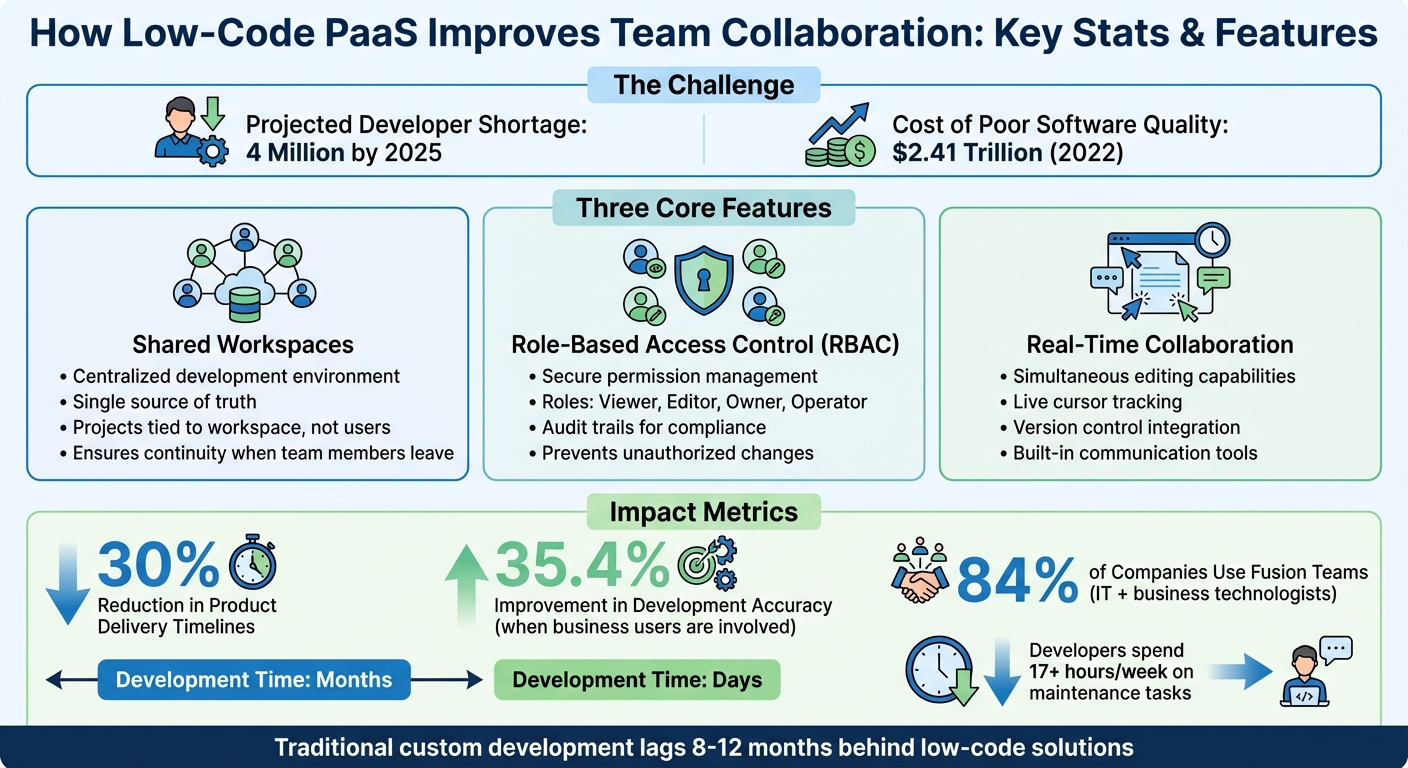
Low-Code PaaS Collaboration Benefits: Key Statistics and Features
Shared Workspaces for Team Collaboration
Centralized Infrastructure for proprietary development projects
Shared workspaces in low-code PaaS platforms bring together user groups, data sources, queries, app folders, and global includes like JavaScript and CSS - all in one place. This setup eliminates departmental silos by creating a unified environment where business and technical teams can collaborate without the need to translate requirements back and forth. Essentially, the workspace acts as a single source of truth, giving everyone involved clear visibility into what’s being built. Stakeholders can test features, provide feedback, and stay in sync - all without jumping between multiple tools.
One of the key benefits? Projects are tied to the workspace itself, not individual users. This means if a team member leaves, the codebase and project history remain intact and accessible. It’s a safeguard against the knowledge gaps that often arise when developers move on, ensuring continuity for the entire team.
This centralized system also lays the foundation for the real-time collaboration features outlined below.
Simultaneous Editing and Real-Time Updates
Low-code platforms take collaboration a step further with live editing capabilities. Platforms like Retool and Plasmic offer multiplayer editing, where multiple developers can work on the same application at the same time - similar to how teams collaborate in tools like Google Docs or Figma. Visual cues, such as cursor movements and highlighted components, show who’s actively editing.
To handle simultaneous edits, these platforms use Conflict-free Replicated Data Types (CRDTs) and WebSocket technology, employing a "last write wins" strategy to resolve conflicts. A great example of this in action is Bish’s RV, which used Retool’s multiplayer editing to create a technician portal for their dealerships in July 2024. Eric Tompkins, the company’s Director of Digital Transformation, shared:
"We do requirements gathering, write the scope, work with the technicians, and build the tool with rapid development with Retool. Custom development usually operates 8–12 months behind us".
Traditional custom development often lags by 8–12 months, but with Retool’s live collaboration, Bish’s RV completed the project in just a few weeks.
Shared workspaces also centralize integrations like GitHub, Stripe, and Supabase, along with data sources and API keys. By configuring these integrations at the workspace level, teams ensure consistency across all projects, saving time and reducing errors.
sbb-itb-33eb356
Enable every developer to collaborate with low code + pro code | BRK202
Role-Based Access Control for Secure Collaboration
When paired with shared workspaces, role-based access control (RBAC) plays a crucial role in keeping team contributions secure and traceable.
Permission Management for Teams
RBAC manages who can view and edit content in low-code environments by assigning permissions based on roles. Advanced platforms like NocoBase and Mendix provide detailed controls, allowing permissions to be set at levels ranging from individual fields or APIs to entire modules or processes. For example, a marketing operations team member could be allowed to modify specific workflows without accessing sensitive resources, such as production databases or shared query libraries.
The principle of least privilege is key here - users should only have access to what they need. Tridivesh Sarangi from Workato emphasizes this approach:
"Assign users the fewest number of permissions that allow them to get their work done".
This minimizes security risks and reduces the chances of accidental changes to critical data.
Most platforms organize roles into categories like Viewer (read-only), Editor (content modification), and Owner (full control). Some also include specialized roles, such as Operator, which allows support teams to run or stop processes without making edits.
To streamline management, folder-based permissions can be used. By grouping workflows or apps into folders and applying role-based permissions at the folder level, new items automatically inherit these settings. This reduces repetitive administrative tasks. Administrators can also duplicate and adjust roles to meet changing team requirements.
These role definitions not only enhance security but also improve project oversight and accountability.
Improved Visibility and Accountability
Clear role definitions naturally lead to better transparency and accountability. By specifying what each role can do - such as editing versus viewing certain elements - teams avoid overlapping efforts and unauthorized changes. This clarity reduces confusion over ownership and prevents duplicated work.
Another major benefit of RBAC is the creation of an audit trail. These trails document actions taken by each role, making it easier to troubleshoot issues and demonstrate compliance during audits. As Naresh from Infizo points out:
"RBAC provides a clear framework for compliance, making it easier to demonstrate adherence to standards during audits".
For projects involving highly sensitive data, such as HR or financial information, some platforms go a step further. They require even administrators to explicitly join a project before gaining access, with every access event being logged for full transparency. Pairing RBAC with multi-factor authentication (MFA) adds another layer of protection in case credentials are compromised.
Finally, conducting quarterly audits of role assignments is essential. Over time, team members may accumulate permissions they no longer need - a phenomenon called "role creep." Regular reviews ensure that access remains aligned with current responsibilities.
Real-Time Multi-User Collaboration Features
Real-time collaboration tools have transformed how teams work together, allowing multiple users to contribute without stepping on each other's toes. Many modern low-code PaaS platforms now offer a "Google Doc–like" experience, enabling developers to edit the same project simultaneously. Features like live cursor tracking show who is working on what, helping teams avoid accidental overlaps and better coordinate their efforts across different components of the application.
Johan den Haan, CTO at Mendix, highlights the value of this functionality:
"Multiple developers should be able to work on an application at the same time. The platform must support and synchronize their workstreams".
Platforms such as Retool and Xano take this a step further with real-time presence indicators - like avatars or user initials - showing who is active and where they are working within the application. Some even include collaboration panels listing all active users and their current locations in the workspace. These tools lay the foundation for seamless teamwork while supporting version control and change management.
Version Control and Change Management Integration
To handle changes effectively in collaborative environments, many platforms integrate with Git-based version control systems like GitHub or GitLab. This allows for branching, where developers can create separate project copies to work on independently before merging their updates into the main branch. Centralized repositories make it easier to reconcile contributions from multiple team members, minimizing manual effort.
Branch protection rules play a crucial role here. Requiring pull requests and peer reviews before merging ensures that only tested, high-quality code makes it into live environments. Additionally, diffing tools let developers compare different versions side-by-side, making it simple to track changes and identify who made specific updates. Regular syncing between local branches and the main repository ensures everyone is working with the latest version of the project.
By integrating version control systems, platforms improve workflows and help distributed teams maintain consistent code quality.
Integrated Communication and Feedback
Real-time collaboration is further strengthened by built-in communication tools, which streamline team coordination. Many platforms now incorporate communication features directly into the development environment. For instance, Xano provides a secure chat feature that allows team members to discuss specific tasks or functions without switching to an external tool.
Commenting systems also bridge the gap between developers, designers, and stakeholders. These systems often assign "Commenter" roles, enabling users to leave feedback directly on UI components or logic elements. Some platforms even include access request systems, which prompt users to seek permission before editing an element another team member is already working on, preventing accidental overwrites.
The benefits of these tools are clear. Studies show that real-time collaboration features in low-code platforms can reduce product delivery timelines by as much as 30% for large organizations. Considering that communication breakdowns and poor software quality cost U.S. businesses an estimated $2.41 trillion in 2022, the value of integrated communication tools becomes undeniable. Together with robust security, version control, and change management, these features create a powerful framework for efficient team collaboration in low-code environments.
Optimizing Team Workflows in Low Code PaaS
Defining and Automating Workflows
Low-code platforms use visual builders to bring technical and business teams together by providing a shared, visual language. This approach helps cut down development delays. Teams can combine drag-and-drop components with small code snippets - like Python - for custom logic, avoiding the need to code everything from scratch.
Designing effective workflows means fostering collaboration across departments to align automation with both technical requirements and business objectives. Before scaling, it's crucial to implement governance measures like Role-Based Access Control (RBAC) and Single Sign-On (SSO). These controls help prevent security vulnerabilities and "shadow IT" issues.
Modern platforms now offer AI-assisted prototyping to overcome the challenge of starting from scratch. By leveraging natural language processing, these tools can auto-generate application structures or SQL queries, speeding up the initial stages of workflow design and enabling teams to get to work more quickly. A good starting point for automation is focusing on high-impact processes like HR onboarding or IT ticketing. These areas not only deliver immediate value but also build confidence across the organization before tackling more complex tasks.
Once workflows are designed, the next step is monitoring their performance and integrating automation tools.
Monitoring Usage and Team Performance
Tracking metrics is key to identifying workflow inefficiencies and recognizing team strengths. Research shows that developers spend over 17 hours a week on maintenance tasks, which translates to billions in lost productivity. Real-time code scanning tools can help by flagging risky design patterns and suggesting better alternatives, reducing the accumulation of technical debt.
Organizations that involve business users in development report a 35.4% improvement in development accuracy compared to teams relying solely on IT. To assess workflow health, monitor how much time your team dedicates to building new features versus fixing existing ones. Simple pulse surveys can also identify bottlenecks in decision-making. Regular retrospectives after each release allow teams to evaluate successes, address failures, and propose actionable improvements.
Integration with CI/CD Pipelines
After monitoring performance, integrating workflows with CI/CD pipelines can further streamline operations. These pipelines automate repetitive tasks, cutting deployment timelines from months to days. While platforms handle the bulk of code generation, technical teams can focus on complex architectural decisions. Deployment approval gates add an extra layer of security by ensuring all changes are reviewed before going live.
AI-assisted debugging tools also play a major role by explaining errors in simple terms and offering actionable fixes, which significantly reduces the time spent on debugging and deployment cycles. As Forrester analysts point out:
"Enterprises that embraced low-code platforms, digital process automation, and collaborative work management reacted faster and more effectively than firms relying only on traditional development".
To further enhance efficiency, integrate your platform with identity management systems like OAuth or SAML. This automates tasks like revoking access during employee offboarding. Additionally, reusable templates for common data connections can minimize redundant setup efforts.
Conclusion
Low-code PaaS has reshaped how teams collaborate by centralizing workflows and enabling participation across various roles. By breaking down barriers between IT and business teams, these platforms create a shared visual development space that simplifies collaboration. With a global developer shortage projected to hit 4 million by 2025 and U.S. businesses incurring $2.41 trillion in costs from poor software quality in 2022, low-code PaaS directly tackles these pressing challenges. This unified approach fosters quicker development cycles and stronger team connections.
The rise of fusion teams - blending IT professionals with business technologists - has become a key part of this shift. In fact, 84% of companies have already implemented these teams to accelerate digital transformation efforts. As Gartner highlights:
"Low-code is not a shortcut for simple apps, as it's a force multiplier for complex enterprise systems".
Choosing the right platform is essential to leverage these benefits. Teams should prioritize platforms that align with their governance needs, integration capabilities, and functional requirements.
For those seeking guidance, the Low Code Platforms Directory (https://lowcodeplatforms.org) is a valuable resource. It offers tools to filter platforms based on features like multi-user editing, role-based access, and integrated communication. Whether your team needs private cloud deployment for data control or AI-assisted development tools, the directory can help you find the perfect match for your infrastructure.
To make the most of low-code collaboration, it's critical to establish governance early, train teams on security best practices, and focus on impactful internal tools that build confidence. Organizations that embrace this strategy not only enhance team productivity but also drive meaningful innovation.
FAQs
Which low-code PaaS features matter most for collaboration?
Low-code PaaS platforms come equipped with several tools designed to make teamwork easier and more productive. Here are some of the standout features:
- Multi-User Development with Real-Time Updates: Teams can work on the same project simultaneously, with changes reflected instantly, reducing delays and miscommunication.
- Role-Based Access Control: This feature helps manage permissions, ensuring that team members have access to the tools and data they need - nothing more, nothing less.
- Shared Workspaces: A centralized space allows team members to collaborate, share ideas, and stay aligned on project goals.
- Version Control: By tracking changes and maintaining a history of updates, version control ensures that teams can revert to previous iterations if needed, keeping workflows smooth and organized.
These tools work together to help teams stay coordinated, even when members have different roles or come from diverse backgrounds.
How do teams avoid conflicts with multi-user editing?
Teams manage to sidestep conflicts during multi-user editing by relying on version control systems. These tools help synchronize workstreams, ensuring that updates are coordinated and any potential clashes are handled efficiently during collaborative projects.
What governance should we set up before scaling low-code?
Before diving into scaling low-code platforms, it’s crucial to set up a governance framework to maintain security, compliance, and control. Start by defining role-based access controls (RBAC) to manage who can access and modify what. Next, establish clear policies for handling development, testing, and production environments. Finally, implement strict standards for data security and change management.
These steps act as guardrails, helping to avoid issues like platform sprawl or accumulating technical debt. They also ensure that low-code adoption stays secure, compliant, and aligned with your organization’s broader objectives.