Creating a web app that ranks well on search engines and is accessible to all users is easier with free low-code platforms. These tools simplify implementing semantic HTML, WCAG standards, and Core Web Vitals optimizations, which benefit both SEO and accessibility. Here's why this matters:
- Websites meeting WCAG standards see a 23% increase in organic traffic and 27% more keyword rankings.
- Semantic HTML improves content clarity for search engines and assistive technologies, speeding up indexing by 14%.
- Accessible navigation and ARIA landmarks enhance usability for users with disabilities, while also improving search visibility.
- Google prioritizes mobile-first design and Core Web Vitals, impacting rankings and user experience. Low-code platforms help meet benchmarks like LCP under 2.5 seconds and CLS below 0.1.
- Tools like Webflow, Lovable, and Caspio generate clean code, integrate ARIA roles, and support schema markup for better SEO and compliance. After the app meets those SEO and accessibility checks, OpenQuok can queue the launch posts while you still approve every draft before it publishes.
Quick accessibility wins that are easy to implement
sbb-itb-33eb356
How Semantic HTML Improves SEO and Accessibility
and<aside>, play a key role in organizing content logically. The <section>tag groups related content into meaningful blocks, while<aside>` is used for secondary or tangential content, such as sidebars, ensuring that it doesn’t interrupt the main flow of information.
| Element | Purpose | SEO/Accessibility Benefit |
|---|---|---|
<header> |
Introductory content or navigation aids | Highlights branding and key navigation elements, improving user and crawler understanding |
<nav> |
Contains navigation links | Helps screen readers skip to menus and aids search engines in mapping site structure |
<main> |
Primary content of the page | Indicates where the unique content begins, aiding both search engines and assistive tools |
<article> |
Self-contained, independent content | Signals discrete content to crawlers, ideal for featured snippets |
<section> |
Groups related thematic content | Improves content organization for indexing and navigation |
<aside> |
Secondary, tangential content | Marks additional information without disrupting main content flow |
<footer> |
Footer for a page or section | Provides metadata and secondary links in a consistent, predictable format |
This structured approach not only enhances content clarity but also sets the stage for better navigation, benefiting both accessibility and SEO.
Semantic elements often come with built-in ARIA roles, which assistive technologies recognize. For instance, <nav> inherently includes the "navigation" role, making it unnecessary to add role="navigation". As the first rule of ARIA states: "If you can use a native HTML element or attribute with the semantics and behavior you require already built in, instead of re-purposing an element and adding an ARIA role, state or property to make it accessible, then do so".
The benefits of semantic HTML go beyond accessibility. According to crawl statistics, pages using tags like <main> and <article> experience 14% faster indexing. Additionally, low-code platforms simplify semantic HTML implementation through visual editors, allowing developers to select the correct tags without needing advanced HTML skills.
Next, we’ll dive into how well-designed navigation can further enhance both accessibility and search rankings.
Building Navigation for Accessibility and SEO
Navigation plays a critical role in enhancing both user experience and website performance. As TestParty highlights:
"Navigation accessibility impacts every page on your site. Users who can't efficiently navigate can't use your site at all - making accessible navigation patterns a fundamental requirement, not an enhancement".
With 15% of the global population experiencing some form of disability and approximately 2.2 billion people worldwide living with vision impairments, creating accessible navigation isn't optional - it's essential.
Proprietary low-code platforms help simplify this process by automating technical aspects. Using UI libraries like gluestack, these platforms integrate ARIA roles and keyboard accessibility best practices, generating semantic HTML elements (like <nav> with <ul>) that improve screen reader functionality and boost search engine indexing.
Accessible Menus and Keyboard Navigation
Designing navigation that works for everyone means considering both mouse and keyboard users. Low-code platforms streamline this by managing focus automatically - handling tasks like trapping focus within mobile overlays or applying the inert attribute to hide off-screen navigation from keyboard users.
When building navigation, focus on making submenus accessible via click or the Enter key, rather than hover-based interactions. This ensures usability across keyboards and touchscreens. Page Laubheimer from NN/G underscores this point:
"Out of sight means out of mind. The hamburger menu is a necessary evil on smaller screens... Menus shouldn't be hidden when you have plenty of space to display them".
If your site uses multiple <nav> elements - such as for main navigation, footers, or breadcrumbs - assign unique aria-label attributes to each so screen readers can easily differentiate between them.
Low-code platforms often include components like "Skip to main content" links, enabling keyboard users to bypass repetitive navigation and meet WCAG compliance standards. Additionally, ensure custom focus styles using :focus-visible are easy to spot, helping users stay oriented. Avoid using tabindex values greater than 0, as they can disrupt the natural navigation order and confuse users. These small but important details improve accessibility while also enhancing search visibility.
Breadcrumbs and Structured Data
Breadcrumbs complement accessible menus by making site structure clearer for both users and search engines. They help users navigate more effectively, increasing click-through rates by 20–30% and reducing bounce rates by up to 30%. Low-code platforms can generate breadcrumb trails automatically, applying attributes like aria-label="Breadcrumb" and aria-current="page" to relevant links.
Pairing visible breadcrumbs with BreadcrumbList JSON-LD structured data takes this a step further, ensuring search engines can display breadcrumb trails in search results. While Google removed visual breadcrumbs from mobile SERPs in January 2025, the schema itself remains valuable for search crawlers. Many low-code platforms offer plugins or built-in tools to create both the visible breadcrumb trail and the required structured data, saving developers from manual coding.
When implementing breadcrumbs, use an ordered list (<ol>) to ensure proper navigation patterns for screen readers. Include absolute URLs in your structured data markup to help search engines resolve links accurately. If using visual separators like > or / between breadcrumb items, mark them with aria-hidden="true" to prevent screen readers from announcing them. Aim for a breadcrumb hierarchy of 3–5 levels; for deeper structures, consider skipping intermediate levels to keep the interface clean and user-friendly.
Performance Optimization for Core Web Vitals
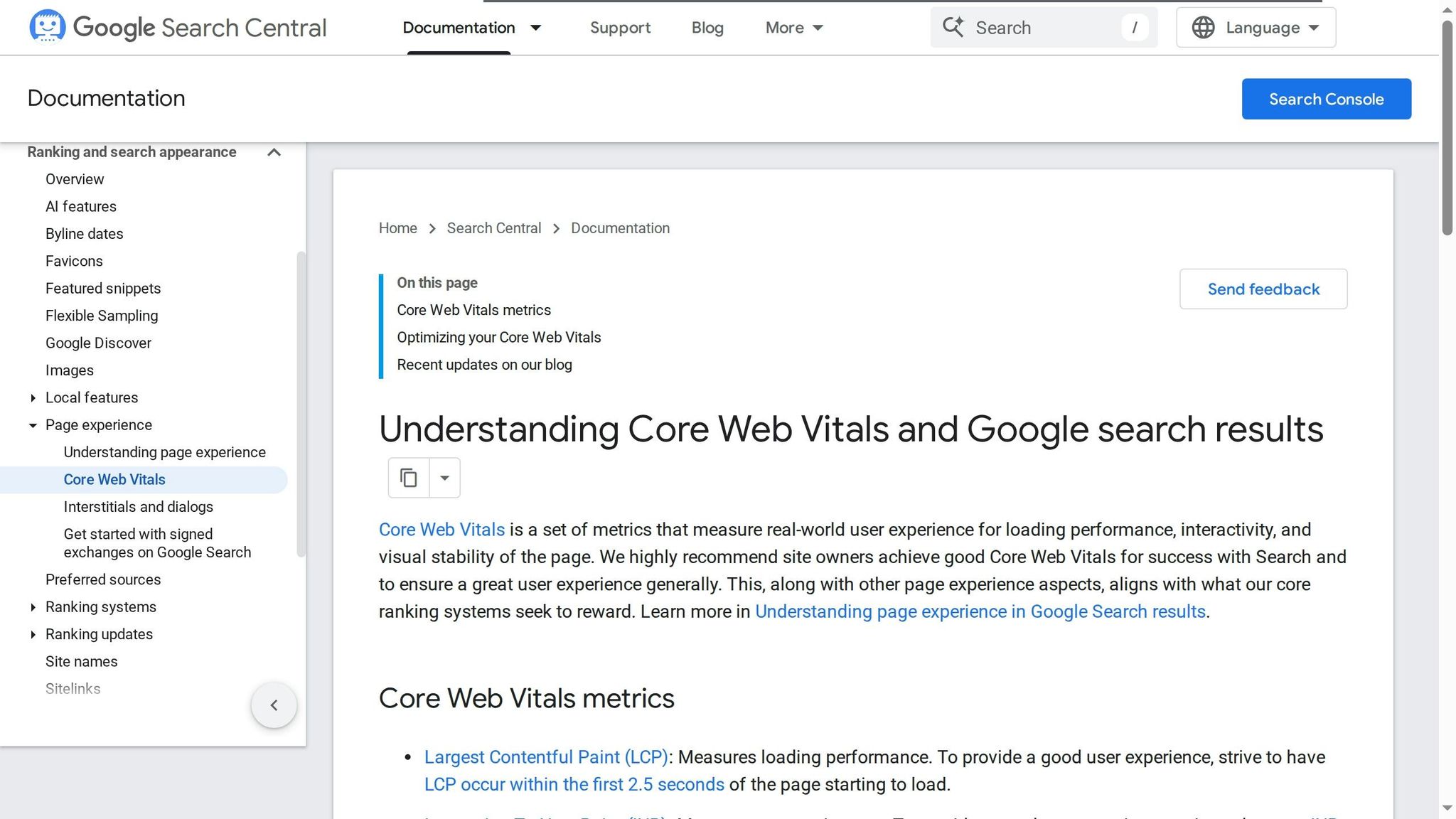
Performance is key to making websites accessible and user-friendly. Google's Core Web Vitals focus on three critical metrics: Largest Contentful Paint (LCP) for loading speed, Interaction to Next Paint (INP) for responsiveness, and Cumulative Layout Shift (CLS) for visual stability. To meet Google's standards, aim for LCP under 2.5 seconds, INP under 200 milliseconds, and CLS below 0.1.
The impact on business is undeniable. Take Vodafone, for example - they improved their LCP by 31%, which led to an 8% boost in sales. On the flip side, when page load time increases from 1 to 3 seconds, bounce rates climb by 32%. Low-code platforms help address these issues by generating clean, efficient HTML that browsers can process quickly.
Some platforms, like Webflow (which uses AWS and Fastly), deliver infrastructure that achieves up to 2.3× faster LCP scores compared to traditional page builders. And here's why it matters: websites that meet all Core Web Vitals thresholds are 2.3 times more likely to rank in the top three search results.
Responsive Design and Mobile-First Approach
Responsive design plays a big role in optimizing Core Web Vitals. Mobile devices accounted for about 62.54% of global website traffic in Q4 2024, and as of October 31, 2023, Google officially switched to mobile-first indexing. This means Google now prioritizes your site's mobile version when determining rankings. As the Lovable Team puts it:
"Your website's mobile version is now the primary version Google uses for search rankings".
Low-code platforms simplify responsive design by starting with the smallest screen size first, which forces you to focus on the most important content. This approach naturally improves LCP by reducing the initial load size. Tools like CSS Grid and Flexbox make it easy to create layouts that adapt to any screen size without needing complex media queries.
Additionally, container queries - now supported by 93.92% of browsers as of December 2025 - allow components to adjust based on their parent container's size rather than the entire viewport. This makes UI elements more stable and reusable, reducing layout shifts. Renault is a great example: they optimized their site to achieve an LCP of around 1 second, resulting in a 13% increase in conversion rate and a 14-point drop in bounce rates.
To further prevent CLS, always specify width and height attributes for images. Many platforms can automate this step for you, ensuring space is reserved for images before they load.
| Metric | Focus | Good | Needs Improvement | Poor |
|---|---|---|---|---|
| LCP | Loading | ≤ 2.5s | ≤ 4.0s | > 4.0s |
| INP | Interactivity | ≤ 200ms | ≤ 500ms | > 500ms |
| CLS | Visual Stability | ≤ 0.1 | ≤ 0.25 | > 0.25 |
Improving Page Load Speed and Stability
Low-code platforms excel in automating optimizations that would otherwise require manual coding. For example, they can convert images to efficient formats like WebP or AVIF, generate responsive image versions for different screen sizes, and set explicit dimensions to reduce layout shifts. Visual interfaces make it easy to configure these settings without diving into code.
In late 2025, Broworks optimized a corporate Webflow site by converting assets to WebP, compressing images in bulk, and cutting back on custom code. These changes resulted in a 45% improvement in LCP, a 60-millisecond reduction in INP, and CLS scores dropping below 0.08 on all key pages.
For critical elements like hero images, disable lazy loading and use fetchpriority="high" to ensure they load immediately. As Prerender Research explains:
"If it's not in the initial HTML, it doesn't exist".
Defer non-essential scripts, such as chat widgets or analytics, to prevent them from blocking the main thread. Many low-code platforms include tools to manage when these scripts execute, ensuring they don't interfere with user interactions.
To improve font loading, use font-display: swap in your platform settings. This ensures system fonts appear immediately while custom web fonts load in the background. For dynamic content, like CMS-driven sections or ads, use aspect-ratio containers or skeleton screens to reserve space and avoid layout shifts. These small adjustments create smoother, faster experiences that benefit all users, including those with cognitive disabilities, while also boosting search rankings. With these optimizations in place, you can further enhance your site's performance by incorporating ARIA and Schema Markup for better SEO and accessibility.
Using ARIA and Schema Markup for Accessibility and SEO
Building on the importance of semantic structure and navigation, ARIA and schema markup add layers of detail and context to low-code web apps. While semantic HTML sets the stage, these tools enhance both accessibility and SEO. For example, structured data can increase page citations by up to 3.1 times, and 65% of pages cited by Google AI Mode include structured data.
ARIA landmarks and schema markup complement semantic HTML by refining navigation for users and search engines. Low-code platforms make this easier through visual editors and custom code options. For instance, Webflow introduced schema markup integration in March 2026 via custom code or native embed components, and Rocket allows developers to request ARIA updates through its chat interface.
Using ARIA Landmarks for Dynamic Content
ARIA landmarks act as an invisible navigation guide, enabling users to skip directly to specific sections instead of navigating element by element. As Alexander Rule, Founder of Northrule SEO, explains:
"ARIA landmarks are invisible labels in your website's HTML that tell screen readers and assistive technologies what different sections of your page are... With landmarks, they jump directly to the section they want".
This feature not only improves accessibility but also helps search engines identify key content areas. In the United Kingdom alone, about 2 million people are blind or visually impaired, and another 1.5 million have motor impairments that hinder mouse use. Reliable keyboard navigation, supported by ARIA landmarks, is crucial for accessibility and compliance with the European Accessibility Act, which becomes enforceable in June 2025.
For dynamic updates like validation messages or shopping cart changes, use aria-live="polite" to announce updates without disrupting user focus. Tools like Storyblok help maintain proper landmark structure by limiting invalid nesting, such as placing a <main> element inside another <main>. If your page includes multiple navigation areas, use aria-label (e.g., aria-label="Primary") to help screen readers differentiate between them.
Adding Schema Markup for Rich Snippets
Schema markup is another essential tool for improving content visibility in AI-driven search results. What was once optional for SEO is now critical for AI optimization. JSON-LD is the preferred format, used by over 53% of websites and supported by major AI systems like Perplexity and ChatGPT. The benefits are clear: pages with FAQ or HowTo schema are 78% more likely to appear in AI search results, and products with detailed schema markup show up 3–5 times more often in AI-generated comparisons.
Low-code platforms simplify schema implementation by leveraging dynamic CMS fields to scale structured data across multiple pages. Place JSON-LD scripts in the "Before </body> tag" section or embed them in custom code blocks, using variables like {{Name}} or {{Price}} to pull information directly from your CMS. Select precise schema types, such as LocalBusiness instead of the more generic Organization, to unlock additional properties like openingHours. Also, ensure your dateModified field is up to date - 95% of ChatGPT citations come from content updated in the last 10 months. Finally, validate your schema using tools like Google's Rich Results Test and the Schema.org Validator to confirm proper formatting.
Low-Code Accessibility Features with SEO Benefits: A Comparison
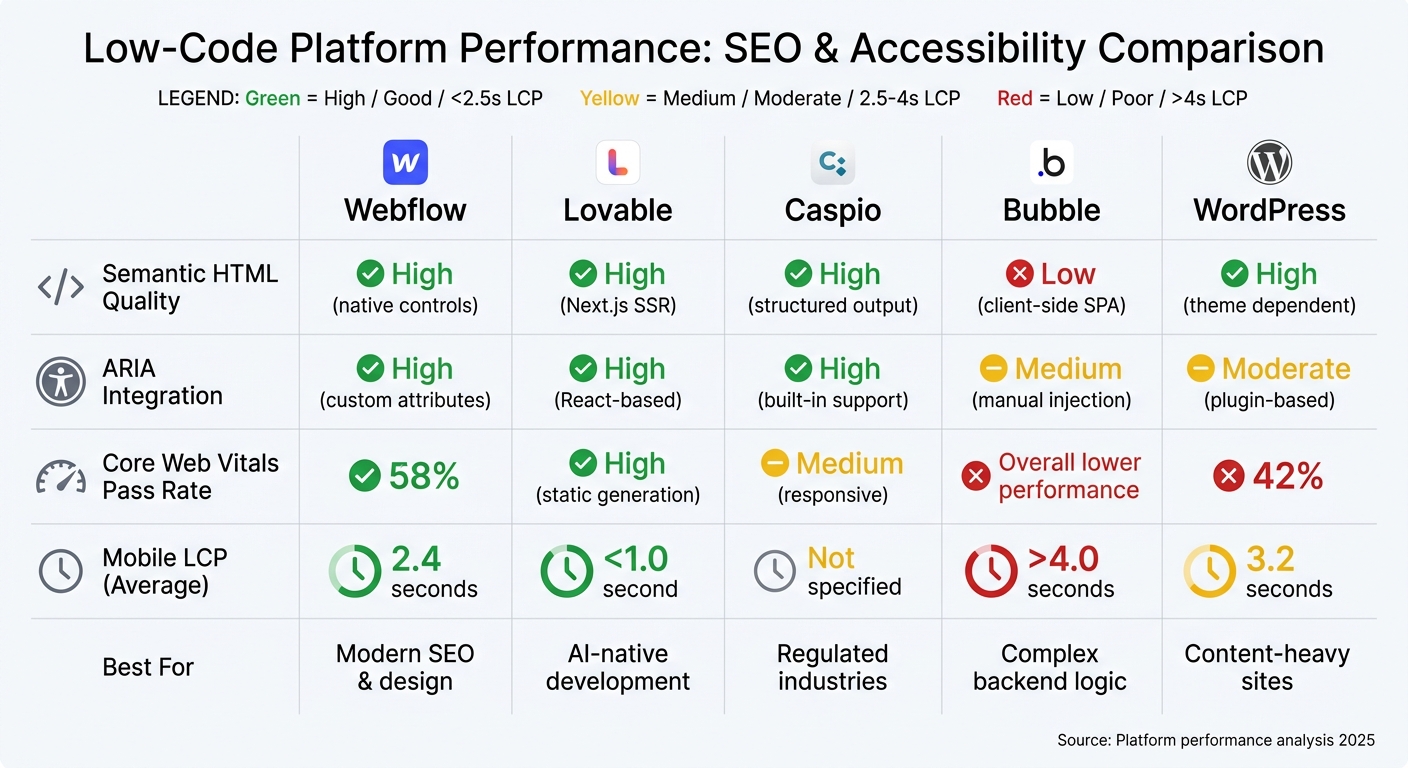
Low-Code Platform Comparison: SEO and Accessibility Performance Metrics
Expanding on the earlier discussion of semantic HTML, ARIA, and performance optimizations, let’s dive into how different low-code platforms incorporate these principles. The way these platforms handle code generation can significantly affect both SEO and accessibility.
Some low-code tools excel in producing clean, semantic HTML, while others rely heavily on client-side JavaScript, which can hinder search engine crawling. For example, platforms like Bubble often face performance challenges due to their runtime-heavy architecture, while others, like Webflow, prioritize clean code and faster load times.
Webflow stands out by generating native semantic HTML, allowing developers to assign heading tags and HTML5 elements separately from styling. It also offers features like a built-in schema markup generator and automatic sitemap updates. Its mobile Largest Contentful Paint (LCP) averages 2.4 seconds, making it a solid choice for modern SEO needs. On the other hand, Lovable, built using Next.js and React, leverages server-side rendering (SSR) to ensure fully crawlable pages and boasts an impressive LCP of under 1.0 second.
Meanwhile, Caspio focuses on structured HTML with logical headings and supports ARIA attributes for dynamic components, aligning with WCAG 2.1 Level A and AA standards. This makes it an ideal platform for industries with strict compliance needs. As Dustin Boss, Co-Founder of Emerge Apps, explains:
"We're in the insurance field and deal with cyber liability, and we're able to point to our Caspio site because the compliance is already covered."
In contrast, Bubble uses a client-side single-page application (SPA) approach, which complicates indexing and often results in an LCP exceeding 4 seconds. Around 30% of Bubble pages fail Core Web Vitals, and its reliance on JavaScript can limit accessibility and SEO, especially since 70% to 80% of crawlers - including AI tools like GPTBot and ClaudeBot - struggle with JavaScript execution.
Here’s a quick comparison of key metrics across platforms:
| Platform | Semantic HTML | ARIA Integration | Core Web Vitals | Mobile LCP (Avg) | Best For |
|---|---|---|---|---|---|
| Webflow | High (native controls) | High (custom attributes) | 58% pass rate | 2.4 seconds | Modern SEO & design |
| Lovable | High (Next.js SSR) | High (React-based) | High (static generation) | <1.0 second | AI-native development |
| Caspio | High (structured output) | High (built-in support) | Medium (responsive) | Not specified | Regulated industries |
| Bubble | Low (client-side SPA) | Medium (manual injection) | Overall lower performance | >4.0 seconds | Complex backend logic |
| WordPress | High (theme dependent) | Moderate (plugin-based) | 42% pass rate | 3.2 seconds | Content-heavy sites |
When deciding on a platform, think about your specific project requirements. For compliance-heavy projects, Caspio or Webflow provide reliable options. If speed and performance are your top priorities, Lovable’s SSR capabilities are hard to beat. To further explore your options, check out the Low Code Platforms Directory.
Conclusion
SEO and accessibility are deeply intertwined - they rely on semantic HTML, clear structures, and well-organized content to ensure search engines, AI systems, and assistive technologies can interpret your web app effectively. As Merrell Guzman from TestParty puts it:
"When you build with Web Content Accessibility Guidelines in mind, you're simultaneously optimizing for traditional search rankings and the AI-powered answers that increasingly shape how people discover content online."
Accessible websites tend to perform better, with a 22% longer average session duration and an 18% lower bounce rate compared to their non-accessible counterparts. With the global low-code market expected to hit $44.5 billion by 2026 - and Gartner forecasting that 75% of new application development will rely on low-code tools by that time - choosing the right platform becomes increasingly important.
Your platform choice doesn’t just affect search rankings; it also determines how well you serve the 15% of the global population living with disabilities, a demographic tied to a $13 trillion market. Platforms that provide clean, semantic code and ensure WCAG 2.1 AA compliance can help avoid costly remediation, especially as digital accessibility lawsuits have surged by over 300% between 2020 and 2025. This reinforces the earlier discussion about the importance of clean code and compliance in achieving both SEO and accessibility goals.
To make this process easier, the Low Code Platforms Directory offers a way to filter platforms based on compliance standards, performance, and accessibility features. Whether you need server-side rendering for better crawling, ARIA support for dynamic content, or automated schema markup generation, the right platform can help you create apps that excel for users and search engines alike - all without slowing down your development process.
FAQs
How do I know if my low-code app is actually crawlable by Google?
To make sure your low-code app is visible to search engines, start by confirming that its content is accessible and properly optimized. Tools like Google’s URL Inspection Tool can help you check if crawlers can see your app's content.
If your app relies on client-side rendering, such as single-page applications (SPAs), you might want to explore server-side rendering (SSR) or static rendering to enhance its visibility to search engines.
Additionally, keep an eye on your app's indexing status and crawl statistics by using Google Search Console. Regular monitoring ensures your app remains search-friendly.
When should I use ARIA instead of semantic HTML elements?
When creating accessible web content, always prioritize semantic HTML over ARIA. Native HTML elements inherently provide the necessary semantics and functionality for assistive technologies, making them the preferred choice.
Use ARIA sparingly - only in cases where HTML alone cannot deliver the desired behavior or accessibility enhancements. ARIA should act as a supplement, not a replacement, for what semantic HTML already offers.
What are the fastest fixes to improve Core Web Vitals in a low-code site?
To boost Core Web Vitals on a low-code site, prioritize loading speed and layout stability. Here’s how:
- Enhance LCP (Largest Contentful Paint): Compress images, use placeholders, and define explicit width and height for visuals.
- Reduce CLS (Cumulative Layout Shift): Allocate space for dynamic elements and prevent sudden layout adjustments.
- Improve FID (First Input Delay): Split lengthy JavaScript tasks into smaller chunks and delay non-critical scripts.
Implementing these strategies can greatly improve both performance and user experience.