Agile development is all about delivering features quickly through short cycles and constant feedback. But many teams struggle to align business goals with technical execution. This is where low-code platforms come in. These tools use visual modeling and drag-and-drop interfaces to simplify development, allowing both developers and business users to collaborate effectively. Here’s what you need to know:
- Faster Development: Low-code platforms reduce manual coding, enabling teams to deliver features in days instead of weeks.
- Improved Collaboration: Visual tools create a shared language between business and IT, breaking down silos.
- Scalable Integration: Pre-built APIs and connectors make it easy to link new features to existing systems.
- Automation: Built-in testing and deployment tools streamline workflows and maintain quality.
Low-code platforms empower teams to deliver functional, scalable features in line with agile principles. The result? Shorter cycles, better collaboration, and more efficient workflows. Let’s dive into how these platforms transform each stage of agile development.
Webinar: Agile for Low-Code Development
sbb-itb-33eb356
Benefits of Low Code for Agile Feature Development
Free low code platforms are a natural fit for agile methodologies, helping teams overcome common challenges like slow development cycles, limited collaboration, and scalability issues. By addressing these hurdles, proprietary low code platforms streamline feature delivery and improve overall efficiency.
Faster Development Cycles
With drag-and-drop tools and pre-built components, low code platforms eliminate much of the manual coding that slows down traditional development. This allows teams to deliver more features within each sprint - or even shorten sprint durations. Early visual prototyping also reduces costly rework by enabling immediate feedback from stakeholders and allowing teams to quickly adapt to changing requirements. What once took weeks can now be accomplished in just days.
"Low-code reduces the time required to update features or workflows, which accelerates each agile iteration. Changes that once took weeks can be addressed within a sprint." - Stackdrop
Another advantage is the reduced reliance on specialized roles for tasks like UI design, security, or architecture. This makes development teams more self-sufficient and flexible, which is crucial for maintaining momentum during fast-paced sprints. The result? Faster development cycles and better team alignment.
Better Team Collaboration
Low code platforms use visual models to represent workflows and business logic, making it easier for all team members - technical or not - to understand the project. This shared language breaks down silos and speeds up feedback loops, reducing the chances of misinterpreted requirements.
"Low code enables agile workflows by speeding up the software development process, giving business users the ability to prototype and build software components, and eliminating IT bottlenecks." - CLEVR
With a unified workspace, business users can create prototypes independently, while IT teams focus on more complex tasks like integration and security. By minimizing manual documentation and reducing hand-offs between teams, low code tools promote smoother collaboration and faster progress.
Scalability and Integration Options
Low code platforms come equipped with open APIs and pre-built connectors for a variety of systems, including ERPs, CRMs, RPA tools, and databases. Some platforms even support integration with over 125 services, such as AI/ML tools and IoT solutions. This allows teams to connect new features to existing systems without causing disruptions, ensuring data remains accessible and eliminating silos.
Cloud-native architectures further simplify scaling, offering one-click deployment across environments - whether on-premise, public, or private cloud. Reusable development assets also accelerate future projects, making it easier to keep up with agile demands. However, scaling effectively requires strong governance. IT oversight is essential to manage citizen development, maintain software quality, and avoid issues like app redundancy or technical debt. Reliable integration and thoughtful scaling ensure that agile workflows stay on track.
Core Features of Low Code Platforms for Agile Development
The core capabilities of low-code platforms are what make agile development so effective. These features influence how easily your team can move from an idea to a functioning prototype, connect to existing systems, and deploy updates without delay. Understanding these elements helps you evaluate whether a platform can truly speed up your development process.
Visual Modeling and Prototyping
low-code platforms often include drag-and-drop UI builders, allowing users to design application layouts by placing pre-built components like buttons, forms, and calendars onto a canvas - no coding required. Instead of writing complex business logic, teams can use visual tools like flowcharts to define application behavior. This approach bridges the gap between business stakeholders and IT teams, creating a shared language for collaboration.
Some platforms now feature AI-assisted prototyping, where natural language descriptions can generate initial application structures, cutting down the time it takes to create a working prototype. For instance, Mendix offers a free version for prototyping, while Microsoft Power Apps provides a no-cost developer plan. Responsive design tools are also included, ensuring layouts automatically adjust for various screen sizes during development.
Instant previews and real-time feedback further speed up the process. Teams can view applications as they’re built, gather input from stakeholders using built-in tools, and make adjustments on the spot - all within the same workspace. With predictions suggesting that nearly 70% of new applications will use low-code or no-code platforms by 2025, this visual-first approach is becoming essential for rapid development. Building on this foundation, pre-built integrations make it easier to connect new features to existing systems.
Pre-Built Integrations and APIs
Pre-built connectors simplify the process of linking applications to third-party services like CRMs, ERPs, and payment gateways. These tools enable low-code platforms to act as bridges between diverse software systems, eliminating the need for extensive manual coding. RESTful APIs ensure smooth data flow across systems, reducing errors often caused by manual data handling.
"Low-code gives developers the flexibility to automate and streamline large portions of workflows, applications, and end-to-end processes while still allowing room for high-code development." - Dan O'Keefe, Appian
The idea of "composability" allows teams to reuse components and connectors from a shared library. Additionally, data fabric functionality simplifies data integration and access across multiple sources, enabling real-time analytics in agile environments. For older systems lacking modern APIs, platforms often include Robotic Process Automation (RPA) bots to interact with legacy applications.
These tools also encourage greater involvement from business users, improving development accuracy by 35.4%. Meanwhile, 66% of developers report that low-code platforms help them complete projects up to 10 times faster than traditional methods.
Automated Deployment and Testing
Agile development thrives on short cycles and quick releases, making automation a must. Automated testing ensures quality at every step, catching issues early and reducing the risk of major problems at the end of a project. Many platforms offer one-click deployment options for cloud, on-premise, or hybrid environments, streamlining the process of moving features into production.
Built-in Continuous Integration and Continuous Deployment (CI/CD) features, like automated code reviews and package managers, help maintain consistency and speed. Advanced platforms also provide testing suites that identify errors and ensure adherence to best practices during the modeling phase. Automated rollback features add another layer of reliability, letting teams revert to a stable version if a new update causes issues.
"Enterprise low-code application platforms (LCAPs) provide features essential for application delivery and maintenance... These features include support for high performance, availability and scalability of applications, disaster recovery, security, API access... and usage monitoring." - Gartner
Low-code platforms handle infrastructure tasks like auto-scaling, database management, and security certifications, freeing your team to focus solely on building features. When choosing a platform, opt for one that integrates seamlessly with third-party CI/CD pipelines and external test automation tools through APIs.
Agile Workflow Stages with Low Code Platforms
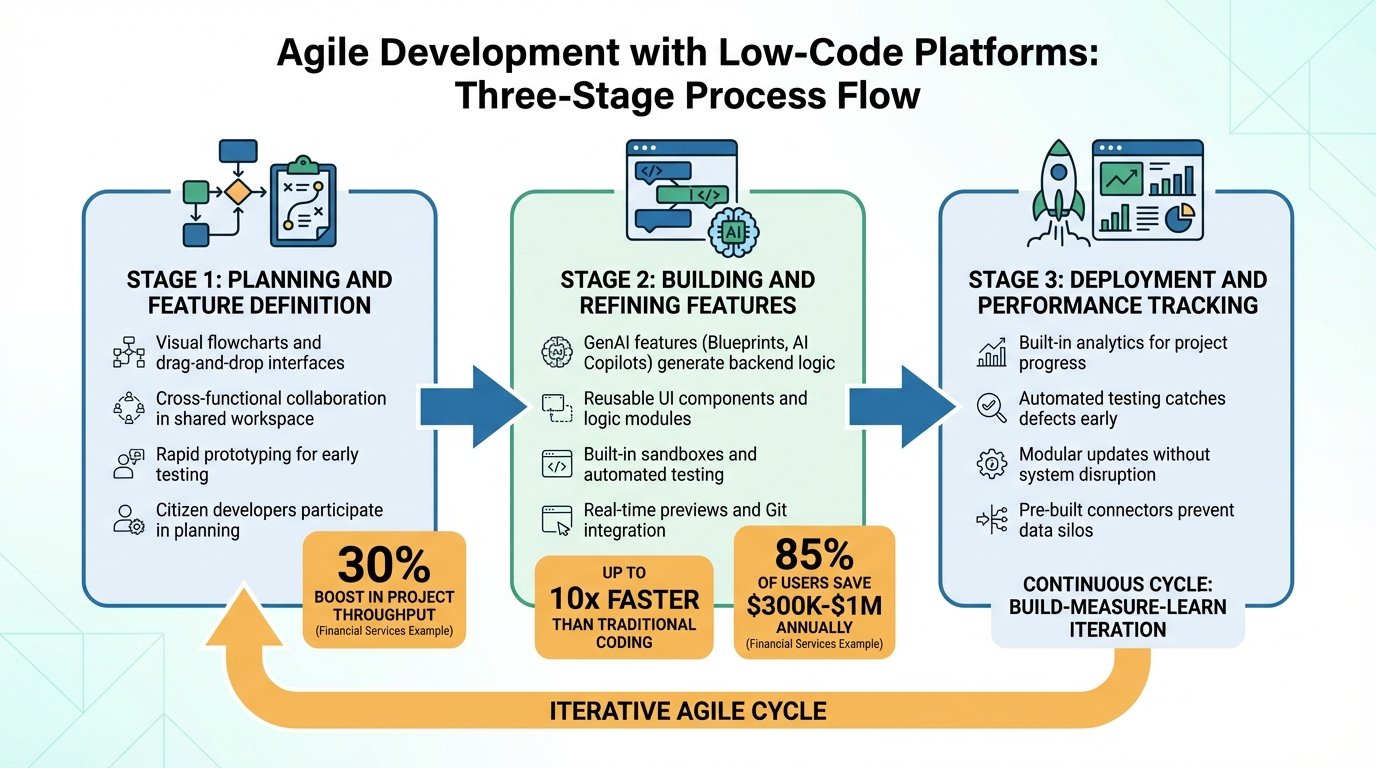
Agile Development Workflow Stages with Low-Code Platforms
Agile development follows a series of distinct phases, and low-code platforms are changing how teams tackle each one. By streamlining planning, building, and deployment, these tools help teams move faster while maintaining high-quality output.
Planning and Feature Definition
Low-code platforms simplify the planning phase by using visual tools like flowcharts and drag-and-drop interfaces to outline processes and application logic. These visual aids make it easier for cross-functional teams to understand complex requirements. Business users and IT professionals can collaborate in the same digital workspace, breaking down communication barriers and enabling rapid prototyping. This shared environment allows teams to visualize ideas instantly, fostering better alignment across departments.
Even non-technical contributors, often called "citizen developers", can actively participate in planning. By using intuitive interfaces, they can kickstart the creation process, offering visual feedback and suggestions for improvement. Rapid prototyping tools also allow teams to test concepts early, helping to prioritize must-have features for the initial release. For example, a financial services company saw a 30% boost in project throughput and cut operational costs by 20% after adopting agile practices with low-code platforms.
Visual modeling tools ensure that both technical and non-technical stakeholders agree on feature requirements before development begins. A dynamic backlog, informed by feedback from prototypes, helps teams focus on high-value deliverables. Planning should also address how new features will integrate with core systems like CRMs or ERPs to avoid creating data silos. Once the features are clearly defined, teams move into the building phase.
Building and Refining Features
Low-code platforms often include advanced tools like GenAI features - such as Blueprints, AI page designers, and AI Copilots - that can generate backend logic, speeding up early development. Developers can create reusable UI components or logic modules, which can be deployed across multiple apps, ensuring consistency and reducing iteration time. For more complex needs, these platforms also support pro-code extensions, giving developers the flexibility to add custom functionality.
Features like built-in sandboxes, automated testing, and real-time previews allow teams to test changes in isolated environments before deployment. Integrated Git support and shared workspaces enable multiple developers to collaborate simultaneously. Low-code development is significantly faster than traditional coding methods, with some estimates suggesting it can be up to 10 times faster. Additionally, 85% of enterprise users report annual savings ranging from $300,000 to $1 million due to low-code adoption.
"Low-code allows business and IT users to work in the same digital space, build feedback loops, and share ownership of digital transformation initiatives." – CLEVR
Deployment and Performance Tracking
Once features are refined, the focus shifts to deployment and monitoring performance. Low-code platforms include built-in analytics tools that provide insights into project progress, resource usage, and overall performance. These tools enable teams to quickly act on user feedback, supporting the iterative "build-measure-learn" cycle that is central to agile methods.
The modular nature of low-code platforms allows teams to update software without disrupting critical systems, speeding up iteration cycles even further. Automated testing features catch defects early in the process, while pre-built connectors and APIs ensure smooth integration with existing systems, preventing data silos. While low-code empowers business users to take an active role in development, IT oversight is crucial to ensure software quality, maintain security, and avoid redundant applications.
Best Practices for Agile Development with Low Code Platforms
Building on agile workflow stages, these practices can help improve collaboration and ensure the right platform is selected for your needs.
Include Stakeholders Throughout Development
Low-code platforms make it easier for technical teams and business stakeholders to work together by offering visual development environments. These tools create a shared understanding, minimizing the risk of miscommunication. Business analysts and subject matter experts can even prototype directly alongside IT professionals, breaking down traditional communication barriers.
This collaborative model delivers real results. Studies show that involving business users in development through low-code platforms improves development accuracy by 35.4%. Platforms like Bizagi have also been shown to boost business user efficiency by 73.1% compared to traditional methods. By fostering cross-functional teams that include both professional and citizen developers, organizations can share ownership of projects and speed up feedback loops - key elements of any agile workflow.
Select Platforms with Flexibility and Growth Potential
Agile development thrives on iteration, so choosing a platform with flexibility is critical. When evaluating platforms, look for those that integrate well with tools like SAP, Salesforce, GitHub, and Asana, and offer deployment options such as SaaS, on-premises, or hybrid cloud. For example, AgilePoint provides integration connectors for over 125 services, including RPA, ERP systems, and AI/ML cloud tools.
"Integration tooling is the most crucial evaluation factor for an enterprise-grade low-code development platform." – Sharjeel Shohaib, AgilePoint
Governance features like role-based access control and low-code QA automation tools and automated testing are equally important. Pricing models also matter - value-based or consumption-based pricing often scales better than expensive per-user fees as adoption grows across your organization.
To ease into low-code adoption, start with a small pilot project to showcase value before tackling more complex applications. As Kevin Guerrero, Product Marketing Director at Bizagi, puts it: "Start small. Think big. Scale fast".
Use the Low Code Platforms Directory
Once you’ve outlined your platform requirements, take advantage of resources like the Low Code Platforms Directory. This tool allows you to filter platforms based on features like AI capabilities, automation tools, CRM integration, and cross-device functionality. The directory simplifies the comparison process, helping you find platforms that align with your agile development goals and workflow needs.
Conclusion
Key Takeaways
Low code platforms have become essential to modern software delivery as of 2026. By using drag-and-drop tools and pre-built components, these platforms shrink development timelines from months to mere weeks - or even days. Despite this speed, quality remains intact. Visual interfaces create a shared understanding between business and IT teams, boosting development accuracy by 35.4% when business users are directly involved.
The flexibility of agile development allows teams to make changes within a single sprint, adapt quickly to shifting requirements, and validate their work iteratively. While citizen developers handle simpler tasks, IT professionals can focus their expertise on complex areas like architecture and enterprise-grade security.
However, only 43% of IT professionals in large enterprises report effectively implementing agile practices. This highlights the challenge of balancing speed with governance. The issue isn't the technology itself but ensuring proper oversight. Strong governance not only maintains software quality but also prevents issues like redundant applications and isolated data. These insights pave the way for thoughtful, incremental improvements.
Next Steps
To capitalize on these takeaways, start with a low-risk pilot project to showcase the value of low code platforms before scaling organization-wide. As Kevin Guerrero from Bizagi suggests, "Start small. Think big. Scale fast". When you're ready to explore platforms that align with your agile goals, the Low Code Platforms Directory is a helpful resource. It allows you to compare platforms based on AI capabilities, automation tools, CRM integration, and cross-device functionality.
From the outset, plan for seamless integration with your existing systems to avoid workflow disruptions. When selecting a platform, focus on factors like vendor roadmaps, ecosystem support, and enterprise-grade security. Avoid basing your decision solely on upfront costs; instead, consider the total cost of ownership over time.
FAQs
When should we use low-code vs pro-code in agile?
In agile workflows, low-code platforms are perfect for speeding up development. They encourage teamwork between business and IT teams and allow for quick updates and feature tweaks without requiring extensive coding. These platforms also let non-technical users play a more active role, cutting down on delays and boosting collaboration.
On the other hand, pro-code is the go-to choice for projects that are complex, need heavy customization, or demand high performance. It’s particularly suited for scenarios where precise control, scalability, or compatibility with older systems is crucial - especially when managed by skilled developers.
How do we prevent “shadow IT” with citizen developers?
To address the risks of shadow IT among citizen developers, it's essential to establish clear governance strategies. Start by defining specific user roles, which helps clarify what each individual is allowed to do within the system. Next, set clear guidelines that outline acceptable practices and boundaries for development activities.
Additionally, implementing regular review processes ensures that all activities are monitored and remain within approved limits. By creating a structured framework, you can help citizen developers work effectively while reducing the chances of unapproved or unmanaged technology being introduced into your organization.
What integrations should we validate before scaling?
Before expanding low-code projects, it's crucial to confirm that all key integrations are functioning properly. Pay special attention to third-party APIs, cloud services, automation tools, and CRM systems. Strong integrations help keep workflows efficient, preserve data accuracy, and avoid technical hiccups. Making sure these integrations can scale will support future growth and align with the best practices of low-code development.