Low-code deployment in DevOps combines the speed of low-code platforms with the efficiency of DevOps workflows. Here's a quick summary of what you need to know:
- Low Code Basics: Low-code platforms use metadata (like XML or JSON) for app development, enabling faster delivery with drag-and-drop interfaces.
- Why It Matters: Low-code can reduce development time by up to 90%, with 70% of new apps expected to be low-code by 2025.
- Key Practices:
- Use version control to track metadata changes (unpack files like
.zipinto readable formats for Git). - Implement branching strategies (e.g., feature branches) to manage collaboration and avoid conflicts.
- Automate CI/CD pipelines for testing, building, and deploying low-code apps.
- Ensure testing and quality assurance through workflows, cross-team collaboration, and performance monitoring.
- Synchronize and secure environments with RBAC, environment variables, and Infrastructure as Code (IaC).
- Use version control to track metadata changes (unpack files like
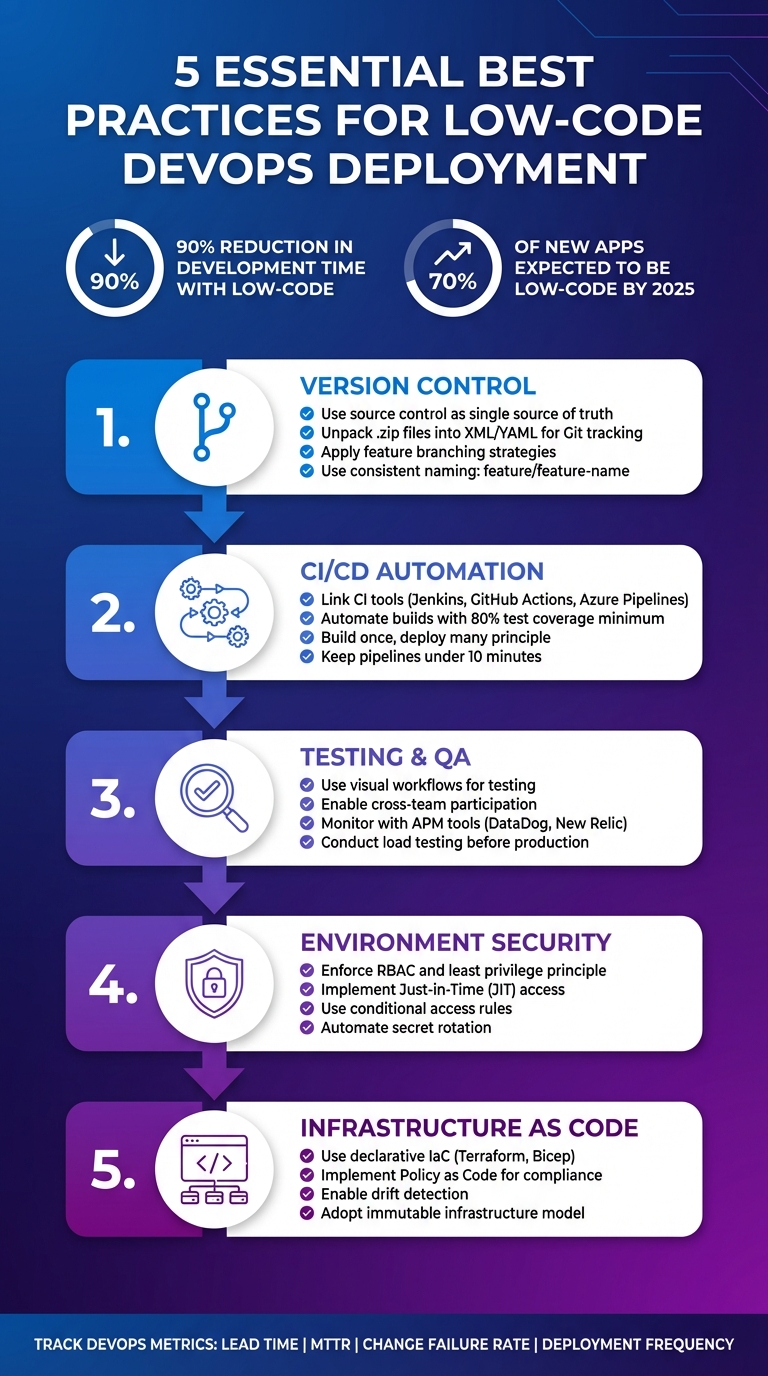
5 Essential Best Practices for Low-Code DevOps Deployment
DevOps for Salesforce and Other Low-code Platforms - Andrew Davis

sbb-itb-33eb356
Checklist: Version Control for Low Code
After introducing low-code deployment, here’s a checklist of crucial version control practices to ensure smooth integration into DevOps workflows. Proper version control helps streamline the deployment of low-code applications while maintaining order and efficiency.
Use Source Control for Low Code Metadata
Low-code applications are built as metadata objects - think visual models, configurations, and business logic - rather than traditional code. A source control repository should act as your single source of truth, enabling you to track changes and recover from errors when needed.
However, low-code solution files are often packaged as compressed .zip files, which don’t work well with Git. To address this, unpack these files into readable formats like XML or YAML before committing them to your repository. This step allows Git to track changes at a granular level, making it easier to identify and resolve conflicts when multiple developers work on the same components.
"Low-code version control is about preserving order as teams innovate at speed. It ensures that every modification... can be tracked, reviewed, and, if necessary, reversed." – Javeria Husain, Content Writer, Quickbase
Apply Branching Strategies for Team Development
Assign specific Git branches to each low-code environment - Development, Testing, and Production - and merge metadata changes through these branches. This strategy minimizes the risk of overwriting changes and improves conflict detection.
For better collaboration, use feature branching. Developers can create temporary branches for individual tasks and merge them into the main branch via pull requests. Consistent naming conventions, such as feature/feature-name or fix/bug-name, make it easier to track changes and maintain organization. On platforms like Power Platform, use unmanaged solutions in development branches to allow flexibility, while deploying managed solutions from source control to downstream environments to prevent unauthorized edits.
Automate Version Control Processes
Streamline version control by automating tasks like metadata export, unpacking, and commits using CI/CD tools such as GitHub Actions or Azure Pipelines. This reduces manual work and minimizes errors.
For merges into the main branch, enforce pull requests. This ensures peer reviews of visual changes and automated checks for metadata integrity. Avoid committing sensitive data like API keys or credentials within your low-code metadata. Instead, use tools like Azure Key Vault or Google Secret Manager to manage secrets externally, referencing them through data sources. Pre-commit hooks can also help scan for sensitive information before changes are added to your repository.
Once version control is in place, the next step is automating your CI/CD pipeline for low-code applications.
Checklist: Automating CI/CD for Low Code Applications
Once version control is in place, the next step is to build automated pipelines that handle builds, tests, and deployments without requiring manual effort. Automating CI/CD ensures that low-code applications transition through environments in a consistent and reliable manner.
Set Up Automated CI Tools
Start by linking your CI tool - such as Jenkins, GitHub Actions, or Azure Pipelines - to the Git repository where your low-code metadata is stored. Make sure to include build definitions and workflow manifests (commonly in JSON or XML format) alongside the metadata.
For secure communication between CI tools and the platform, use API tokens or service clients. For instance, Web Modeler API tokens or Zeebe clients can facilitate this connection. Configure triggers to automatically initiate builds when pull requests are created or when the CI system detects new versions through scheduled polling.
Validation should also be automated using low-code QA automation tools. Tools like bpmnlint, unit tests, and credential scans can help ensure quality. Many teams enforce a minimum test coverage threshold of 80%, automatically failing builds that don’t meet this standard. To keep everyone informed, send build status updates to your team and include a build status badge in your project’s README file.
Once builds are automated, the focus shifts to deploying artifacts smoothly and efficiently.
Configure CD Pipelines for Automated Deployments
To maintain governance, disable manual deployment options within your low-code platform. This ensures that all changes flow exclusively through the pipeline.
Stick to the "build once, deploy many" principle. During the build stage, create a single deployable artifact - such as a Power Platform managed solution - and move that exact version through development, staging, and production environments.
Automate the retrieval of linked resources to ensure the complete application is deployed. Incorporate rollback mechanisms that automatically revert to the last stable version if a deployment fails. For faster iterations, aim to keep CI pipelines running in under 10 minutes.
Once deployment pipelines are set, the next step is to streamline processes with standardized scripts.
Create Modular and Reusable Scripts
Store pipeline templates in a shared Git repository to centralize resources. Create templates for common tasks, such as cleanup, health checks, deployment stages, or even entire pipelines. This avoids duplicating code across projects.
Use parameters and variables in templates to make them adaptable across different services and environments. For example, placeholders like <+input> can allow runtime configuration of target environments.
Version control for templates is crucial. Use labels such as "stable" for production-ready pipelines and "experimental" for development work. Additionally, bulk processing scripts can streamline workflows by cycling through folders of JSON definitions and uploading multiple files in one go. To maintain security, enforce role-based access control, specifying who can create, modify, or use templates at the account or project level.
Checklist: Testing and Quality Assurance for Low Code
Testing low-code platforms means ensuring both the business logic created through visual tools and the underlying architecture function as expected. As John Kodumal, CTO and cofounder of LaunchDarkly, puts it: "Testing a low-code solution focuses on testing two different things: testing the business logic that the low-code user is expressing and testing that the structure supporting the low-code solution is working properly". This dual focus aligns well with automated CI/CD validation, which is a cornerstone of DevOps workflows.
Use Visual Workflows for Testing
Visual workflows make test creation more intuitive by allowing you to capture and replay real user interactions. These record-and-replay features simulate user journeys without requiring code, ensuring consistent behavior even after updates. For workflows involving AI, you can use wildcard or "$contains" matching to account for variations in output.
To keep testing organized, define workflows in YAML files, covering success, error, and skipped scenarios. This structured approach makes it easier to maintain as your application grows. Following the single responsibility principle, each test should focus on one feature - like user login or form submission - making it easier to diagnose issues when a test fails.
By building tests around workflows, teams can collaborate more effectively, improving the overall quality of testing.
Enable Cross-Team Participation in Testing
Low-code platforms make it easier for both technical and non-technical team members to contribute to testing. Business analysts, product owners, and other stakeholders can directly participate without needing advanced automation skills. For instance, non-technical contributors can describe behaviors in plain language, which can then guide the creation of accurate test cases.
Agile acceptance criteria, written as clear user stories, act as functional agreements between teams. Additionally, using parameters to override default values at the test set level allows tests to adapt to various scenarios and environments. This reduces redundancy and ensures quality remains consistent across the board.
Effective testing also relies on real-time monitoring to catch issues as they arise.
Monitor Errors and Performance Issues
Real-time monitoring complements automated deployment by offering immediate insights into application health. Martin Laporte, Senior Vice President of R&D at Coveo, explains: "In a world where components of SaaS platforms are being updated multiple times per day, observability is key in order to detect any change in behavior, like increased error rates or variations in response times".
Integrating low-code applications with APM tools like DataDog, New Relic, or Dynatrace helps track performance and identify bottlenecks. Your CI/CD pipelines should also be configured to alert development teams immediately when tests fail. Before launching to production, load testing tools like JMeter or BlazeMeter can simulate high user traffic, helping you identify scalability issues early.
| Tool Category | Examples | Purpose |
|---|---|---|
| Native Platform Tools | Mendix Metrics, Power Platform Test Engine | Basic health monitoring and logic validation |
| Third-Party APM | DataDog, New Relic, Dynatrace | Advanced performance tracking and bottleneck identification |
| Load Testing | JMeter, BlazeMeter, LoadRunner | Simulating high traffic to test scalability |
Checklist: Securing and Synchronizing Low Code Environments
To keep low-code deployments consistent and secure, it's crucial to synchronize environments and enforce strict access controls. This approach eliminates manual interventions, ensuring that what’s tested in staging is exactly what goes live in production. By doing so, you maintain deployment integrity and avoid configuration drift.
Synchronize Development and Production Environments
Use source control as your single source of truth for environment synchronization. Export low-code metadata and solutions into a Version Control System (VCS) like Git to track every change and maintain a complete history. This eliminates confusion about which version is current and provides a safety net for rolling back changes when issues arise.
In development, work with unmanaged solutions, then export them as managed solutions for production. This prevents tampering and ensures deployment consistency. As AWS DevOps Guidance advises:
"Humans should not have access to the target environments or have the ability to inject code, parameters, configuration, or interfere with the integrity of the artifact in any way".
Externalize configuration details using environment variables or parameter stores. Deploy the same build artifact across all stages - development, staging, and production. The AWS Well-Architected Framework supports this approach:
"The version of your workload that you test is the version that you deploy, and the deployment is performed consistently every time".
To streamline this process, adopt Just-in-Time (JIT) build environments that automatically convert unmanaged solutions into managed artifacts. During synchronization, run tools like Power Platform Solution Checker to flag performance or security issues.
Once environments are synchronized, securing them with robust identity and access controls becomes the next priority.
Define and Enforce Security Policies
Effective security starts with identity. Enforce role-based access control (RBAC) and conditional access to safeguard low-code deployments. As Microsoft Learn puts it:
"Identity is always the primary perimeter".
Begin by defining personas - specific roles or job functions with clear responsibilities. This allows for granular RBAC that aligns with business needs. Apply the least privilege principle rigorously, ensuring that no identity has more access than necessary. As Microsoft Learn emphasizes:
"An identity must not be allowed to do more than it needs to do".
Simplify access management with group-based permissions, ensuring consistency as team members join or leave. Use conditional access rules to grant or deny access based on real-time signals like device health, location, network status, or time of day.
For administrative tasks, implement Just-in-Time (JIT) access, granting elevated privileges only when required and for a limited time. Automate secret rotation for API keys and certificates to minimize exposure if credentials are leaked. Store all secrets securely in systems like HashiCorp Vault or AWS Secrets Manager, never embedding them in your low-code artifacts.
| Security Concept | Definition | Enforcement Method |
|---|---|---|
| Authentication (AuthN) | Verifying an identity's legitimacy | Multi-factor authentication (MFA), Passwordless |
| Authorization (AuthZ) | Ensuring an identity has the right permissions | Role-Based Access Control (RBAC), Data Policies |
| Conditional Access | Granting access based on specific criteria | Device health checks, IP whitelisting |
| Just Enough Access (JEA) | Limiting privileges to only what's necessary | Granular scopes, Column-level security |
With security policies in place, the next step is ensuring consistent resource deployment through Infrastructure as Code.
Use Infrastructure as Code
Infrastructure as Code (IaC) ensures that resources supporting your low-code applications - databases, storage, networking - are configured consistently across environments. Tools like Terraform, Bicep, or AWS CloudFormation allow you to define your desired end state in a declarative format, reducing complexity over time.
Store IaC templates in version control alongside your low-code metadata. This creates an audit trail and allows for code reviews before changes are applied. Organize templates into reusable modules to simplify complex configurations and maintain uniformity across development, staging, and production.
Integrate Policy as Code (PaC) tools like Open Policy Agent (OPA), AWS CloudFormation Guard, or Azure Policy to automatically block non-compliant configurations before deployment. AWS highlights the importance of this approach:
"Using templates to define your standard security controls allows you to track and compare changes over time using a version control system".
To catch unauthorized changes, implement drift detection to identify and reconcile manual modifications that bypass IaC pipelines.
Adopt an immutable infrastructure model, where resources are built to exact specifications and replaced entirely when updates are needed. This eliminates configuration drift, as OWASP explains:
"The idea behind immutable infrastructure is to build the infrastructure components to an exact set of specifications. No deviation, no changes".
This ensures every deployment starts from a tested, reliable state, maintaining consistency and reliability.
Conclusion: Improving Low Code Deployment in DevOps
Key Takeaways
Integrating low-code platforms into DevOps workflows demands the same level of discipline as traditional development. Microsoft's Power Platform Documentation puts it best:
"Don't treat low-code workloads as low complexity. You still benefit from formalizing the development and management of low-code workloads."
To ensure smooth and effective deployments, focus on practices like version control, automated CI/CD pipelines, shift-left testing, environment synchronization, and security enforcement. These elements are essential for building reliable and scalable systems. Automated pipelines and structured version control, in particular, play a crucial role in streamlining deployments. Instead of custom-built solutions, rely on proven, ready-made tools.
Managing risks effectively means isolating environments across development, staging, and production phases. Additionally, governance should bring both citizen and professional developers under a unified set of standards.
To measure progress, track DevOps metrics like Lead Time, MTTR (Mean Time to Recovery), Change Failure Rate, and Deployment Frequency. These indicators help pinpoint areas for improvement and assess the overall effectiveness of your processes. Proactively addressing technical debt through scheduled maintenance is another critical step for long-term success.
By following these practices, you lay the groundwork for selecting tools that further optimize your process.
Explore the Low Code Platforms Directory
To put these best practices into action, choose a low-code platform that aligns with DevOps principles. The Low Code Platforms Directory is a valuable resource, offering a curated selection of platforms with features like built-in source control integration, automated pipelines, and robust environment management. These tools simplify CI/CD automation, making Application Lifecycle Management accessible to both technical and non-technical team members.
Platforms with native DevOps support reduce the need for custom solutions, allowing your team to focus on delivering value instead of managing infrastructure. This directory can help you find the right platform to streamline your workflows and enhance your deployment strategy.
FAQs
How do I cleanly add low-code metadata to Git?
To integrate low-code metadata into Git effectively, it's crucial to transform it into a version-control-friendly format. Tools like Salesforce Extensions for VS Code can help by converting older metadata into a source format in smaller, manageable chunks. This approach not only improves revision tracking but also minimizes potential issues with Git. After the conversion, you can commit the files to Git, ensuring a clean, traceable workflow.
What should a CI/CD pipeline for low-code apps include?
A proper CI/CD pipeline for low-code applications needs to cover environment management, version control, automated testing, and deployment automation. It should effectively manage development, staging, and production environments while maintaining security and keeping resources isolated.
Version control systems, such as Git, play a key role by enabling tracking of changes and seamless collaboration among team members. Automated testing ensures workflows and metadata function as intended, catching issues before deployment. Meanwhile, deployment tools handle tasks like builds, configurations, database migrations, and rollbacks. This setup simplifies releases and minimizes the chances of errors, making the process smoother and more reliable.
How do I keep low-code environments secure and in sync?
To maintain security and consistency in low-code environments, it's important to implement security-by-design practices. These include measures like role-based access control (RBAC) to manage permissions effectively and strong encryption to safeguard sensitive data. Regularly conducting both static and dynamic security tests can help uncover potential vulnerabilities before they become issues.
For synchronization, tools like Git and automated deployment pipelines are invaluable. They allow you to track changes systematically and reduce the risk of manual mistakes. Additionally, continuous monitoring paired with real-time alerts can help you quickly identify threats and ensure the system remains stable.