Interoperability in low-code platforms is essential to avoid proprietary vendor lock-in and ensure smooth data exchange. Without it, switching platforms can become a costly and time-consuming challenge. Here’s what you need to know:
- Key Challenges: Vendor lock-in and incompatible data exchange formats are the biggest hurdles.
- Statistics: 62% of IT leaders worry about vendor lock-in, and 83% of data migration projects fail or go over budget.
- Solutions:
- Choose free or open-standard platforms supporting open standards like JSON, XML, and REST APIs.
- Standardize data exchange formats to preserve relationships and data integrity.
- Test integrations thoroughly to identify and fix compatibility issues early.
Low-Code/No-Code and APIs: Make the most out of your API Landscape
sbb-itb-33eb356
Main Barriers to Interoperability
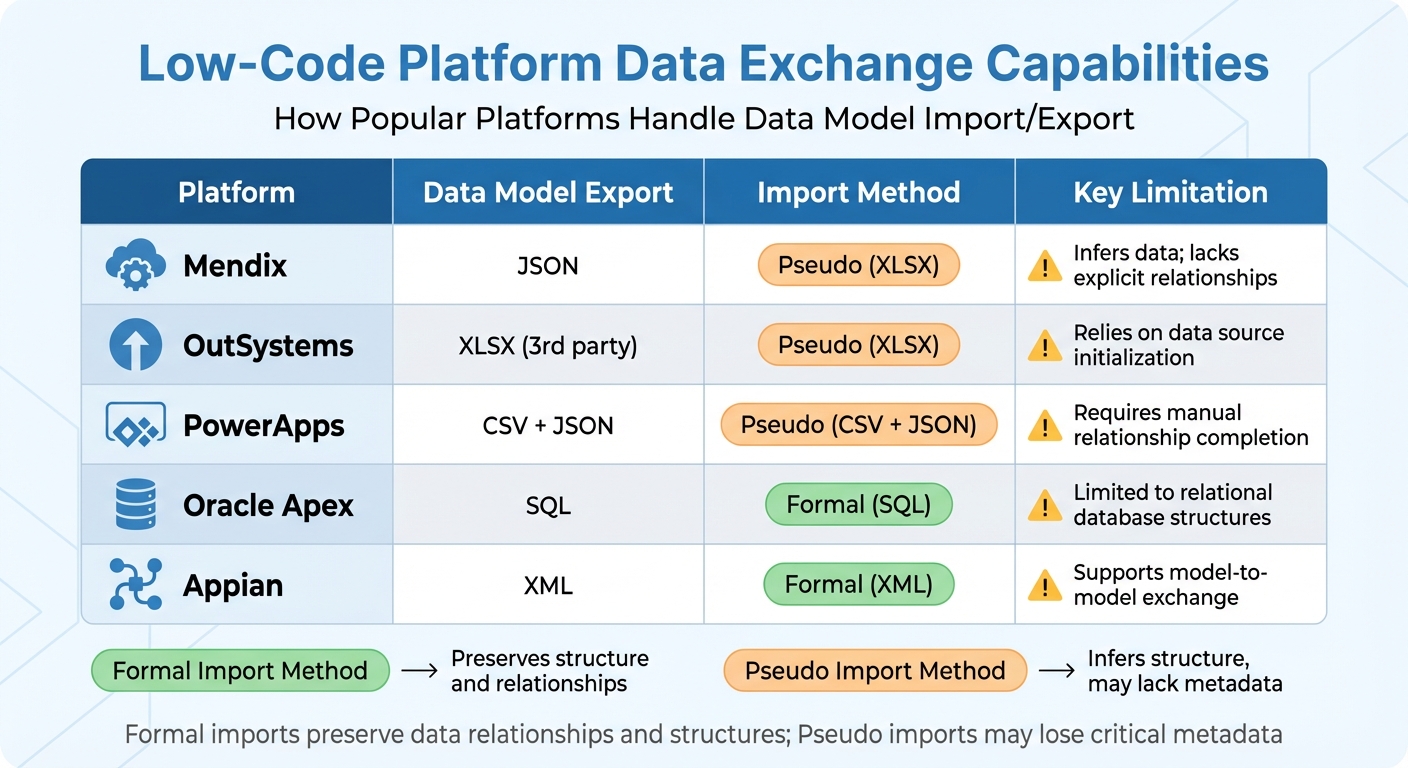
Low-Code Platform Data Exchange Capabilities Comparison
Recognizing the challenges to interoperability can save you from costly mistakes when selecting a low-code development platform. The two biggest hurdles? Vendor lock-in and data exchange problems. These issues stem largely from how platforms are structured, not just how they're marketed. Let’s break them down, starting with vendor lock-in.
Vendor Lock-In Risks Explained
Vendor lock-in isn't just about contracts - it's rooted in the architecture of the platform. Many platforms rely on proprietary runtime engines and closed ecosystems that deeply embed their technology into your codebase.
"Vendor lock-in is often blamed on contracts or purchasing decisions. In reality, it is usually the result of architecture. When systems rely on proprietary data formats, custom APIs, or closed identity models, switching vendors becomes risky."
- Elissa Litvinau, Marketing Lead, SpruceID
This dependency is why 70% of companies are actively exploring alternative platforms. It's also why failures in large-scale tech programs can cost organizations upwards of $20 million annually.
A lot of platforms operate like "black boxes", keeping source code inaccessible and customization options limited. If you need a feature the vendor doesn’t prioritize, you’re forced to create workarounds. These workarounds often break when the vendor updates their system, leading to a buildup of technical debt over time.
But vendor lock-in isn’t the only problem. Issues with data exchange make interoperability even harder.
Data Exchange Problems
Even when platforms support common formats like JSON or XML, their internal data schemas can vary wildly. You can’t just export a data model from one platform and import it into another without going through a complex transformation process to map every field and relationship.
The situation gets worse with platforms that lack formal import capabilities. These platforms often "infer" data models from CSV or Excel files, which can lead to major information loss. Critical elements like relationships between data classes, validation rules, and data types often disappear during this process.
Here’s how some popular platforms handle data exchange:
| Platform | Data Model Export | Import Method | Key Limitation |
|---|---|---|---|
| Mendix | JSON | Pseudo (XLSX) | Infers data; lacks explicit relationships |
| OutSystems | XLSX (3rd party) | Pseudo (XLSX) | Relies on data source initialization |
| PowerApps | CSV + JSON | Pseudo (CSV + JSON) | Requires manual relationship completion |
| Oracle Apex | SQL | Formal (SQL) | Limited to relational database structures |
| Appian | XML | Formal (XML) | Supports model-to-model exchange |
The challenges multiply when you consider that 75% of enterprises use four or more low-code platforms simultaneously. Each platform has its own "language", creating governance headaches and increasing the risk of failure. To mitigate this, 77% of organizations prefer to maintain their own data models rather than rely on platform-native schemas, ensuring better data portability.
How to Implement Interoperability Standards
To address the challenges of interoperability, follow these steps to integrate it effectively into your low-code strategy.
Choose Platforms with Open Standards Support
Start by selecting platforms that use open, non-proprietary formats like JSON, XML, YAML, and SQL for application models and data.
Before committing to a platform, test its "formal export" capabilities. Can it export models in a readable format like JSON schema that other tools can interpret? Or does it lock you into proprietary, obfuscated files? Platforms such as Corteza allow unrestricted importing and exporting of app configurations in formats like YAML and JSON. On the other hand, platforms like Mendix and PowerApps may rely on pseudo-imports that could lose critical relationship data during the process.
Also, check for API-centric architecture. Platforms with built-in support for REST, SOAP, OData, and GraphQL make it easier to connect with third-party services. Ensure the platform adheres to standard authentication protocols as well. Tools like the Low Code Platforms Directory can help you filter out platforms based on these criteria, streamlining your search for tools that align with your interoperability needs.
Once you've chosen a platform with open standards, the next step is to standardize how data is exchanged.
Set Up Standard Data Exchange Formats
Establish both the structure (syntax) and the meaning (semantics) of your data. Use structured formats like JSON, XML, or CSV, and apply standardized vocabularies to preserve data relationships and meaning.
"Maintaining a coherent, data-exchange, semantic model is an important, yet non-trivial task. A coherent, semantic model... supports reuse, promotes interoperability, and, consequently, reduces integration costs."
- NIST (National Institute of Standards and Technology)
When migrating data between platforms with different schemas, consider using a "pivot" model like B-UML to transform data from the source platform’s format to the target’s expected syntax. For platforms that depend on CSV or Excel imports, create "bridge sheets" to represent complex many-to-many relationships, as most platforms cannot infer these from single-sheet imports. Always validate your data exchange formats with sample data to ensure they aren’t overly restrictive or missing essential fields.
With standardized formats in place, you can now optimize your APIs to utilize these standards effectively.
Configure APIs and Integration Protocols
Use documented, version-controlled APIs to ensure secure and flexible system integrations.
"APIs form the backbone of system integrations, and as such, adopting an API-first approach ensures that your integrations are scalable, maintainable, and flexible."
Here are some essential steps for API configuration:
- Use API Gateways like Azure API Management or Kong to manage rate limiting, caching, monitoring, and security.
- Enforce OAuth2/OIDC with short-lived tokens and ensure all data transfers use TLS 1.2+.
- Include major versions in API URLs (e.g.,
/v1/) and provide a 6–12 month deprecation window for breaking changes. - Implement idempotency to avoid unintended side effects when requests are repeated.
- Use ETags to handle optimistic concurrency, preventing data overwrites during simultaneous updates.
For example, in August 2025, healthcare provider Luz Saúde used the OutSystems low-code platform to unify patient data across legacy hospital systems and new mobile apps, bridging data silos to deliver a seamless patient experience. Similarly, Corporate One Federal Credit Union leveraged low-code tools to integrate core banking systems, credit bureaus, and document management platforms, significantly streamlining loan processing. These integrations, which traditionally would have cost between $20,000 and $200,000, were achieved at 50–70% lower costs using low-code platforms.
Test and Validate Interoperability
Once you've set up your standards and APIs, the next step is thorough testing to confirm that everything integrates as expected. Testing helps catch compatibility issues early, preventing disruptions in production and ensuring seamless data exchange across your platforms. Simulating data exchanges is especially useful for uncovering hidden integration problems.
Run Data Exchange Simulations
Create a test environment that closely mirrors your production setup, including cloud applications, legacy systems, and simulated endpoints. This kind of realistic testing environment can reveal integration issues that simpler, isolated tests might miss. A 2021 survey found that 97% of organizations face integration challenges, often due to legacy systems, mergers, or migrations.
For complex integrations, consider using an intermediate modeling language like B-UML to translate models into a neutral format before adapting them for the target system. If you lack formal export tools, visual Large Language Models can help convert graphical models into structured formats like PlantUML.
Test data ingestion by generating structured XLSX or SQL files from your source models. Then, verify that structures, relationships, and data types are accurately interpreted. To ensure robustness, perform negative testing by introducing malformed data or protocol violations. This step helps confirm that your system can handle unexpected inputs without causing widespread errors.
"Interoperability testing evaluates how well external integrations perform under real-world conditions. It checks protocols, data formats, APIs, and communication standards between interconnected systems."
- Jan Bodnar, Programmer, ZetCode
While running simulations, keep an eye on key performance metrics like latency, throughput, and error rates between systems. Test across multiple layers - syntactic (data formats), semantic (data meaning), and protocol (standards compliance). Use test data that mimics the complexity of your production environment rather than simplified samples.
Review Exported Data for Standards Compliance
After simulations, review the exported data to ensure it aligns with your established standards at every level. Start with syntactic validation, which checks that data formats like XML, JSON, or Protocol Buffers match schema requirements.
Semantic validation ensures that the meaning of your data remains consistent between systems. This involves mapping data to standardized vocabularies and ontologies. This step is especially crucial in fields like healthcare, where misinterpreted data can lead to serious issues. Even if two platforms use the same format (like JSON), their internal schemas may differ, requiring careful migration or transformation to maintain compatibility.
Next, confirm protocol compliance by verifying that communication adheres to standards like REST, SOAP, gRPC, or OpenAPI specifications. Check data integrity to ensure that information remains accurate and unaltered during transfer, and that mapping and transformation logic is preserved. Regular audits - monthly or quarterly - can help identify security risks, outdated processes, or inaccuracies in data workflows.
Here’s a quick reference for validating each interoperability layer:
| Interoperability Layer | Focus Area | Validation Method |
|---|---|---|
| Syntactic | Structure and Format | Checking XML/JSON/CSV structure against schemas |
| Semantic | Meaning and Context | Mapping terminologies to a standard vocabulary |
| Protocol | Communication Rules | Verifying API conformance to OpenAPI or REST specs |
To streamline integration, establish metadata standards that define data structure and formatting clearly. This reduces confusion and improves data quality. Automated low-code QA tools for regression testing can also speed up the process, allowing you to verify fixes quickly and ensure updates don’t disrupt existing workflows. Starting these evaluations early in the design phase helps you pinpoint essential requirements and avoid costly changes later. By validating interoperability, you’ll keep your low-code ecosystem adaptable and reliable as your business evolves.
Conclusion
Interoperability goes beyond being a technical necessity - it's a strategic imperative. Without it, businesses risk vendor lock-in and data silos that hinder the seamless flow of information, creating operational bottlenecks and inefficiencies. By adopting open standards, implementing well-designed APIs, and rigorously testing integrations, you lay the groundwork for a system that adapts and grows with your business needs.
Low-code integration platforms offer a practical solution, slashing costs by 50–70% compared to custom-coded alternatives, which typically cost between $20,000 and $200,000. These platforms also eliminate manual data entry, minimize errors, and free up your team to focus on more strategic priorities.
This approach doesn't just enhance operational efficiency - it also delivers measurable financial benefits. Beyond internal operations, these strategies are essential for low-code CX transformation to ensure a unified customer journey.
"Low-code should be viewed as a strategic tool for accelerating digital transformation efforts, but with the same level of architectural discipline as any other enterprise solution."
- Axops
To avoid vendor lock-in and ensure flexibility, center your interoperability strategy around open standards like OpenAPI, OAuth, JSON, and RESTful APIs. Resources like the Low Code Platforms Directory (https://lowcodeplatforms.org) can guide you in finding platforms with the right integration features, pre-built connectors, and adherence to these standards.
With 88% of organizations already running low-code projects and 75% of large enterprises predicted to use at least four low-code tools by 2025, adopting this strategic approach positions your business for long-term success.
FAQs
How can I spot vendor lock-in before choosing a low-code platform?
To spot vendor lock-in, look for signs like the use of proprietary systems, exclusive data formats, or limited portability - any of which can make switching platforms difficult. Instead, choose platforms that prioritize open standards, offer reusable components, and provide data export options. It's also a smart move to check if the platform includes features for interoperability or migration tools that can ease the transition process. Identifying these issues early on can save you from long-term dependency headaches.
What’s the best way to keep data relationships intact during platform migration?
To keep data relationships intact during a platform migration, focus on thorough data validation, precise mapping, and a well-structured migration process. Start by assessing your existing data inventory to understand what you're working with. Then, reconcile the data to address discrepancies and ensure everything aligns properly. Parallel testing is another critical step - it helps confirm that data remains consistent across both the old and new platforms.
Additionally, implement formal migration controls at every stage - before, during, and after the transition. These controls act as safeguards, protecting data integrity throughout the entire process.
Which interoperability tests should I run before going live?
When it comes to interoperability, testing is all about ensuring systems can communicate effectively and securely. Here are the core areas to focus on:
- Data Exchange Protocols: Make sure systems can share and process data without errors.
- APIs and Data Formats: Verify that APIs and data structures align, allowing smooth integration.
- Security Measures: Test encryption and authentication methods to confirm secure communication.
- Workflow Compatibility: Ensure workflows between systems align to prevent bottlenecks or disruptions.
To go a step further, simulate real-world scenarios to see how the system performs under typical conditions. This approach helps identify potential issues early, ensuring everything runs smoothly and securely before launch.