Localization in low-code platforms transforms apps into tools that feel natural for users worldwide. It’s not just about translating words - it’s about tailoring every aspect of an application to match local expectations, from date formats and currency symbols to navigation styles and visual elements.
Key Takeaways:
- Localization improves user satisfaction by aligning apps with local preferences.
- It reduces errors, boosts task completion, and increases engagement.
- Businesses see measurable results: lower bounce rates, higher conversions, and revenue growth.
- Examples: IKEA Korea increased revenue by 29%, and Alconost reduced bounce rates by 30%.
By focusing on user needs - like supporting right-to-left languages or offering region-specific payment methods - localization makes apps more intuitive and trustworthy, driving low-code CX transformation. For businesses, it’s a proven way to drive growth and expand into global markets.
UX Localization: Design for the global audience
sbb-itb-33eb356
How Localization Affects User Experience Metrics
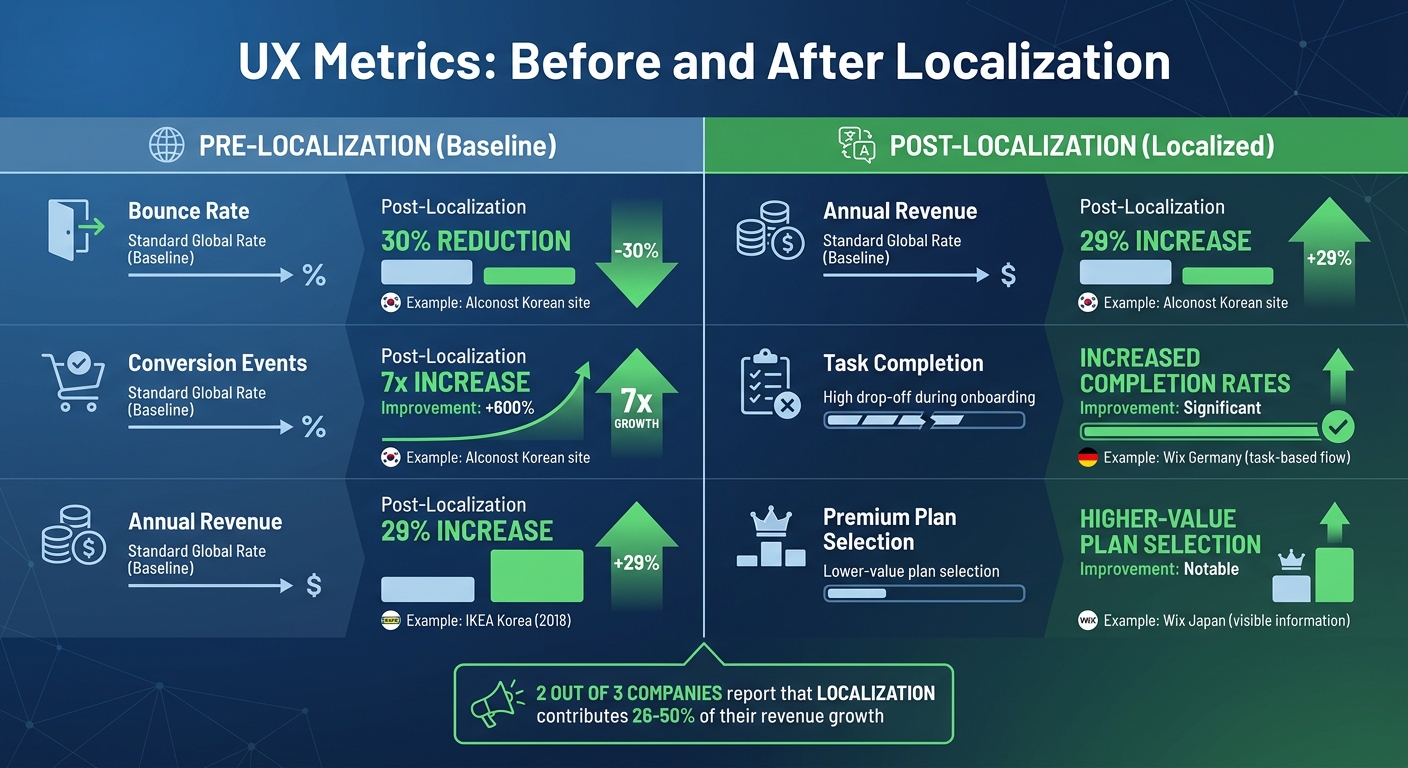
Impact of Localization on User Experience Metrics: Before and After Comparison
Localization has a clear and measurable impact on user experience metrics. Studies reveal that when platforms are tailored to local preferences - like adjusting date formats or navigation layouts - users complete tasks more efficiently and feel more satisfied with their interactions. By reducing friction and confusion, these localized elements naturally decrease user errors and enhance the overall experience.
Take error rates, for example. Localization reduces cognitive strain by aligning forms and workflows with regional norms. For instance, Spanish-speaking users may need fields for multiple surnames, while in some Asian cultures, a single-field input suffices. Adapting to these conventions not only prevents data entry mistakes but also minimizes frustration. Pair this with localized payment options - such as Pix in Brazil or AliPay in China - and you’re removing checkout hurdles while fostering long-term user loyalty.
"Research has shown that culturally adapted website designs can allow users to perform their tasks more successfully and experience greater satisfaction with the interaction, whereas improperly handling cultural differences in websites can result in poor user experience." - Lokalise Report
To support localization, low-code platforms must offer flexible UI components. This includes handling text expansion (e.g., German text often being 2-3 times longer than its English counterpart) and accommodating right-to-left navigation for languages like Arabic or Hebrew. Even navigation structures require cultural adjustments. Depending on the market, users may prefer either deeper or broader navigation hierarchies, which can significantly influence task completion rates. Notably, two out of three companies report that localization efforts contribute between 26% and 50% of their revenue growth.
UX Metrics Before and After Localization
The benefits of localization are evident in the numbers. Platforms that implement comprehensive localization strategies often see bounce rates drop dramatically and conversion events skyrocket. Below is a breakdown of specific improvements:
| UX Metric | Pre-Localization | Post-Localization | Improvement | Example |
|---|---|---|---|---|
| Bounce Rate | Standard global rate | 30% reduction | -30% | Alconost Korean site |
| Conversion Events | Standard global rate | 7x increase | +600% | Alconost Korean site |
| Annual Revenue | Standard global rate | 29% increase | +29% | IKEA Korea (2018) |
| Task Completion | High drop-off during onboarding | Increased completion rates | Significant | Wix Germany (task-based flow) |
| Premium Plan Selection | Lower-value plan selection | Higher-value plan selection | Notable | Wix Japan (visible information) |
These gains are directly tied to addressing cultural nuances that affect user engagement. For instance, Wix made onboarding smoother for German users by rephrasing personal questions into task-based prompts and adding reassuring language. This change led to a marked increase in completed onboarding flows. Similarly, in Japan, Wix adjusted typography and moved critical information from hidden tooltips to visible text, encouraging users to opt for higher-value premium plans. In Brazil, integrating Boleto Bancario, a widely used offline payment method, boosted premium product purchases.
Localization isn’t just a nice-to-have - it’s a game changer for improving user satisfaction and driving growth.
Regional and Cultural Adaptations in Low Code Interfaces
Low code platforms make it easier to handle regional differences by separating data storage from how it's displayed. For instance, dates are stored using ISO-8601 standards, and currencies are kept in minor units. When a user opens an app, the platform adjusts the display based on their locale settings. Tools like Power Apps and Retool can automatically detect the operating system or browser's language preferences to format things like decimals, dates, and times appropriately. This approach ensures data is displayed in a way that feels natural to the user.
Interestingly, users can often customize their locale settings independently from their chosen interface language. Imagine someone using an English interface but preferring Dutch date formatting (DD-MM-YYYY). This flexibility can prevent misunderstandings. One European travel platform discovered how crucial this is when ambiguous date formats led to 12% of international bookings being made for the wrong dates. In just one week, this caused over 3,400 clarification tickets and cost $2.3 million in refunds and rebooking fees. This example highlights how proper localization can significantly reduce errors and enhance user satisfaction.
"Dates without context are a ticking time bomb for any global product." - OpenL Team
Beyond data formatting, interface layout plays a big role in localization. Right-to-Left (RTL) language support is essential for languages like Arabic and Hebrew. This involves mirroring the entire interface - navigation bars, progress indicators, and directional icons all need to flip. Even interactive elements like carousels and buttons must align with the natural flow of these languages.
Cultural nuances also come into play with symbols and colors. For example, a thumbs-up icon is fine in the U.S. but can offend in some Middle Eastern countries. Similarly, red often signifies danger in Western cultures but is associated with good fortune in China. To avoid these pitfalls, developers can use region-specific icon libraries and color schemes. When localization is done well, users don’t feel like they’re using a translated interface - it feels like it was designed just for them.
Testing Methods and Frameworks for Localization
Testing localized low-code applications moves away from traditional end-of-cycle quality checks. Instead, it adopts a continuous quality framework that integrates testing into every stage of development. This shift aligns with agile workflows, ensuring that translation and testing progress alongside development sprints rather than being left as a final step. The idea is simple: catching issues early is far less costly than fixing them later.
One key tool for early testing is pseudo-localization. This automated technique swaps source text with accented and expanded versions to uncover potential issues, such as hard-coded strings, text expansion problems, or font rendering glitches, before actual translation begins. This step is crucial because languages like German or Finnish can expand text by up to 30–50% compared to English, often causing UI layout problems.
Next comes Linguistic Quality Assurance (LQA). Here, in-country linguists review the content in its final context, ensuring it resonates with the target audience and maintains the appropriate tone. The goal is to make the localized version feel natural, not like a literal translation.
"No matter how well your translation is written, if it breaks the layout, confuses users, or displays the wrong tone, it's still a failed experience." - Yana Kolesnikova, Localization Manager
Modern frameworks also leverage automated QA gates integrated into CI/CD pipelines. These tools perform real-time checks for issues like broken HTML tags, mismatched placeholders, and character limit violations. For example, Smartling customers who use integrated localization tools report 48% fewer change requests and a 42% faster time to market. Finally, User Acceptance Testing (UAT) involves end-users to validate cultural alignment, uncover friction points, or spot cultural insensitivities that automated testing might miss.
Another metric gaining traction is Time to Edit (TTE), which measures how long a professional linguist takes to refine a machine-translated segment. A lower TTE indicates better AI translation quality and faster delivery. This approach reflects the growing collaboration between AI and human expertise, where AI handles the bulk of translations while humans focus on refining the final product. Feedback from these edits is then used to improve AI models, creating a feedback loop for continuous improvement.
Localization Framework Comparison
The table below highlights key localization frameworks and their benefits:
| Framework Type | Scalability | Cost-Effectiveness | Performance Data / Research-Backed Benefits |
|---|---|---|---|
| Translation Management System (TMS) | High; centralizes all assets and automates workflows. | Moderate; high initial setup but reduces long-term manual labor. | Reduces change requests by 48% and speeds up time-to-market by 42%. |
| Machine Translation (MT) with Human Review | Very High; handles massive volumes of content instantly. | High; significantly lowers cost-per-word compared to fully manual. | Measured by Time to Edit (TTE); lower TTE indicates higher AI efficiency. |
| Continuous Localization (CI/CD Integrated) | High; scales with rapid agile development cycles. | High; prevents bottleneck costs and late-stage bug fixes. | Prevents localization from becoming a bottleneck in modern agile workflows. |
| Linguistic Quality Assurance (LQA) Frameworks | Moderate; requires structured human intervention. | Low to Moderate; focuses on high-value/high-visibility content. | Uses standardized metrics (TAUS DQF-MQM) to track quality trends over time. |
Case Studies and Future Trends in Low Code Localization
With improved user experience metrics and tailored regional strategies, these examples showcase how AI-driven localization is accelerating the growth of low-code platforms.
One standout case is Curipod. In January 2026, Product Developer Drew Hoover led the launch of their app in 22 languages using Tolgee and GPT-5. By applying AI context rules to refine terminology - like adjusting the Norwegian word for "lesson" - Curipod saw impressive results: 143% year-over-year growth in Arabic-speaking markets and 83% growth in Spanish-speaking regions. Their platform even caught the attention of the Saudi Arabian Ministry of Education. On top of that, switching to AI-driven localization eliminated about 300 daily React crashes caused by browser-based translation tools. This success highlights the potential for similar efficiency in large-scale projects.
Another example is Life360, which used AI-powered translation to expand its global presence. During the 2024 holiday season, Localization Manager Joaquín Muñoz spearheaded the translation of 500,000 words into five languages - Finnish, Norwegian, Swedish, Danish, and Dutch - in less than a month. Lokalise AI handled the bulk translation in under 32 hours, followed by human post-editing. This approach delivered 80% cost savings and shaved two months off the traditional timeline.
"AI is a powerful tool that significantly reduces time and cost."
- Joaquín Muñoz
In April 2026, Bitrefill took localization efficiency to the next level. Localization Manager Sam Kuritzén integrated Crowdin with Anthropic's Claude Sonnet 4.6, using custom prompts and GitHub integration to replace manual Slack handoffs. This streamlined process allowed them to add four new languages in just days instead of weeks.
"Beyond time and cost savings, the biggest unlock has been adding new languages. We simply enable a language in Crowdin, let the LLM generate the initial translations, and they flow back into the codebase."
- Sam Kuritzén
Looking ahead, fully autonomous AI workflows are becoming more plausible. Self-learning AI agents that adapt translation instructions based on pull request feedback and Translation Quality Scoring models to assess regional performance are on the rise. Additionally, "Bring Your Own API Key" (BYOAK) models are gaining traction, giving companies greater control over their data and AI performance. For example, Code.org leveraged AI-assisted workflows to cut its localization cycle time by over 50%, replacing a one-to-two-week publishing delay with real-time updates.
These examples clearly show the transformative impact of AI-powered localization. Companies that embrace these tools are achieving faster deployment, greater cost efficiency, and expanded market access. By shifting from manual processes to AI-first workflows with targeted human oversight, teams are setting new benchmarks - launching in multiple markets with unprecedented speed and precision.
Conclusion
Localization in low-code platforms goes beyond simple translation - it builds trust and eliminates barriers for users. By aligning platforms with local norms, payment methods, and user expectations, businesses create deeper engagement. For instance, localization can increase organic traffic by 47% and boost conversion rates by 20%, with 72% of shoppers preferring to buy in their native language.
This trust directly enhances usability. For example, German users are more responsive to task-based onboarding rather than personal questions, while Japanese users prefer all necessary information displayed upfront instead of hidden in tooltips.
"Good localization builds trust with users which has long-term benefits for the business".
The technical side of localization is just as critical. Internationalization (i18n) ensures a codebase can handle challenges like text expansion - German text can be 10% to 35% longer than English - and supports Right-to-Left (RTL) layouts for languages like Arabic and Hebrew. Without these preparations, layouts can break, leading to higher costs and user frustration. Combining cultural and technical strategies ensures a seamless, native experience.
The payoff is clear. Success stories like IKEA Korea, which saw a 29% revenue increase, and Alconost, which achieved a 30% lower bounce rate, highlight the tangible benefits of research-driven localization. Companies that prioritize localization early - designing adaptable interfaces and accommodating regional needs like Brazil's Pix payment system - position themselves for global growth.
For developers and businesses using low-code platforms, the takeaway is simple: localization is user empathy at scale. Starting with strong localization strategies isn’t just about reaching more markets - it’s about creating experiences that users everywhere find intuitive, trustworthy, and genuinely helpful.
FAQs
What’s the difference between localization and internationalization (i18n)?
Internationalization (i18n) is all about designing software in a way that makes it ready to support multiple languages, formats, and cultural norms right from the start. This approach ensures that the software doesn’t require significant changes down the line when expanding to global markets. Think of it as laying the groundwork for worldwide usability.
Localization (l10n), on the other hand, focuses on tailoring a product for a specific market. This involves translating text and adjusting key elements like currency, date formats, symbols, and even cultural nuances. While internationalization ensures the software is adaptable, localization fine-tunes the experience to make it feel natural and relevant for users in a particular region.
What should I localize first to get the biggest UX lift?
Start by tailoring date, number, and currency formats to align with local conventions. For example, in the United States, dates are typically written as MM/DD/YYYY, numbers use a period as a decimal separator (e.g., 1,000.50), and currency is displayed with the dollar sign before the amount (e.g., $1,000.50). These small but important adjustments can go a long way in building trust, ensuring clarity, and complying with local legal standards. By fine-tuning these elements, you make applications feel more intuitive and relatable for users.
How do I test localization in a low-code app before launch?
Localization testing plays a crucial role in ensuring that your low-code app delivers a smooth experience tailored to the target audience. Here's how to approach it:
- Check formatting: Make sure currency, date, time, and measurement formats align with the locale (e.g., using the U.S. dollar, MM/DD/YYYY date format, and imperial measurements for en-US).
- Validate translations: Test the app's language settings to confirm that translations are accurate and reflect cultural nuances.
- Conduct cross-device/browser testing: Ensure the app functions properly across different devices and browsers.
- Leverage native speakers: Perform user acceptance testing with native speakers to catch any overlooked issues.
By covering these steps, you can deliver an app that feels natural and intuitive to users in your target locale.