Low-code platforms are transforming testing by simplifying processes, reducing time, and integrating seamlessly into modern development workflows. Here's why they matter:
- Continuous Testing: Ensures quality throughout development by testing code as it's written, not just at the end. This aligns with CI/CD pipelines for faster releases.
- Low-Code Benefits:
- Impact:
- Speeds up testing, cutting creation time from hours to minutes.
- Reduces manual testing bottlenecks, allowing frequent updates without compromising quality.
- Supports multiple testing strategies, including UI, API, and service virtualization.
Low-code platforms make testing faster, more efficient, and accessible to broader teams, enabling organizations to maintain quality in fast-paced development environments.
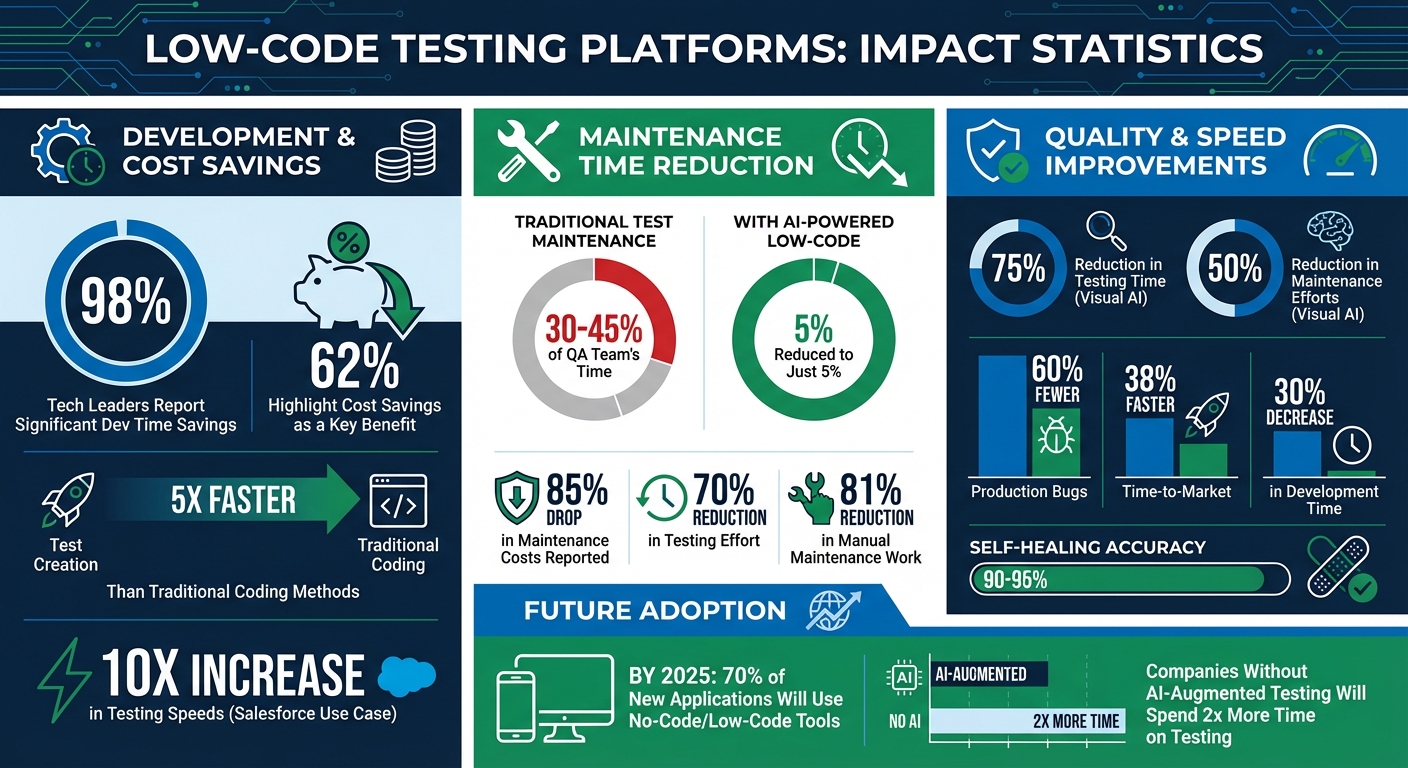
Low-Code Testing Platforms: Key Benefits and Time Savings Statistics
Key Features of Low-Code Platforms for Continuous Testing
Visual Test Creation Without Code
Low-code platforms take the complexity out of test creation by offering drag-and-drop interfaces that let users visually arrange UI elements, data connections, and workflows. This means testers can see changes in real-time - no coding required. Many platforms also include record-and-playback tools, pre-built templates, and Natural Language Processing (NLP) capabilities. With NLP, users can simply describe test scenarios in plain English, and a Generative AI agent converts these descriptions into executable test scripts. This opens up testing to a broader range of users, including business analysts and product managers, not just QA engineers.
Here’s a compelling stat: 98% of tech leaders report saving significant development time with low-code tools, and 62% highlight cost savings as a key benefit.
"Low-code automation testing is the process of designing, building, and running test cases using visual interfaces and reusable components instead of writing scripts from scratch".
Vincent N., a QA Consultant, explains that low-code testing often includes features like visual workflow modeling using flowcharts and reusable test components. These tools allow organizations to scale testing across various scenarios with minimal effort. And beyond simplifying test creation, low-code platforms significantly cut down on maintenance time through self-healing automation.
Self-Healing Test Automation
Traditional test maintenance can eat up 30% to 45% of a QA team’s time. Low-code platforms address this challenge with AI-driven self-healing capabilities. These systems automatically adapt when application changes occur. Instead of relying on static identifiers like a single element ID, they assess multiple HTML attributes such as text, color, and position [20, 21].
For example, if a button is renamed from "Add to Cart" to "Buy", the platform uses weighted scoring algorithms to match the element based on other attributes. Testim explains that this approach ensures tests don’t fail unnecessarily when minor changes happen.
By adopting AI-powered low-code tools, organizations can slash test maintenance time to just 5%, compared to the traditional 30%–45%. Gartner even predicts that by 2025, companies that skip AI-augmented testing will spend twice as much time and effort on testing and fixing defects compared to their competitors. Some platforms report an 85% drop in maintenance costs, while Visual AI has been shown to reduce testing time by 75% and maintenance efforts by 50%.
This adaptability ensures continuous testing runs smoothly in CI/CD pipelines, even as applications evolve.
Integration with DevOps Tools
Low-code platforms also shine when it comes to integrating with DevOps tools, enabling fast feedback loops that are vital for CI/CD workflows. These platforms often support native CLI and API integration, making it easy to connect with tools like Jenkins, GitHub Actions, and Azure DevOps. For example, platforms like Katalon, Sedstart, and Testsigma provide CLI executables that allow automated test suites to be triggered as part of the build process. Test results - complete with pass/fail statuses, performance metrics, and detailed logs - are sent back to CI/CD dashboards for centralized tracking.
These tools also support parallel test execution at scale, using cloud-based grids to run tests across multiple browsers and environments simultaneously. This reduces overall test execution time within the pipeline. Automated reporting integrates with collaboration tools like Slack, Microsoft Teams, and Jira, delivering instant alerts (complete with screenshots and videos) when tests fail. Additionally, many platforms sync with Git-based repositories (such as GitHub, GitLab, and Bitbucket) to align test versioning with code changes, ensuring a cohesive development and testing workflow.
sbb-itb-33eb356
How Low-Code Enables Continuous Testing in DevOps - Juliette MacPhail, TestJS Summit 2021
Testing Strategies Supported by Low-Code Platforms
Proprietary low-code platforms open the door to various testing strategies, offering tools to ensure thorough test coverage. These platforms allow testing at multiple levels - from the user interface to backend services and external dependencies - helping teams maintain both frontend and backend reliability within CI/CD workflows. Here's a closer look at how these strategies come together to boost efficiency and accuracy.
Automated UI Testing
Low-code platforms make UI testing faster and easier with tools like visual recorders and AI-based locators. Instead of writing scripts from scratch, testers can simply record user actions - like clicking buttons, filling out forms, or navigating menus - and the platform automatically converts these into executable test scripts. These tests can then run across a wide range of devices and browsers (e.g., Chrome, Safari, iOS, Android) using cloud-based integrations.
This approach saves a ton of time. Tasks that would take hours with traditional frameworks can now be completed in minutes. With this efficiency, teams can expand their test coverage without needing extra automation specialists, making it easier to ensure that applications work seamlessly across platforms.
API and Backend Testing
Low-code platforms don't stop at UI testing - they also streamline API and backend testing to verify that the core services behind an application function correctly. These platforms often support visual tools for validating REST and SOAP services with minimal setup. Testers can integrate API calls into their UI test flows to handle tasks like setting up test data, checking backend states, or resetting databases after tests.
This is particularly useful for end-to-end (E2E) testing. For instance, in an order-to-delivery workflow for an ERP or warehouse system, testers might use UI interactions to place an order, API calls to confirm inventory updates, and additional UI steps to verify shipment tracking. Combining these layers helps catch integration issues that standalone UI tests might miss. Low-code platforms also offer data-driven testing, enabling the same test logic to run with varied inputs, covering more scenarios. To further isolate application logic, they support service virtualization, which reduces reliance on live systems.
Service Virtualization for Independent Testing
Service virtualization is another key feature of low-code platforms, allowing teams to test without depending on live backend systems or third-party services. By simulating external services like payment gateways, shipping APIs, or authentication providers, testers can focus solely on the application’s behavior.
This method ensures test stability by eliminating the unpredictability of external systems. Additionally, it enables teams to simulate challenging edge cases, such as payment failures or network timeouts, that might be hard to replicate in a live environment. With these simulations, tests remain reliable and provide consistent feedback during every build. Together, these capabilities ensure that continuous testing stays solid and adaptable throughout the CI/CD process.
Use Cases for Continuous Testing with Low-Code Platforms
Low-code platforms are transforming how testing is done, driving faster development cycles and improving product quality in both enterprise and agile settings.
Faster Development in Enterprise Applications
Enterprise tools like Salesforce and ServiceNow often face hurdles like frequent updates, dynamic user interfaces, and intricate integrations. Low-code platforms tackle these challenges with features like metadata-driven connections and AI-powered self-healing, which adapt to changes in elements automatically.
The results speak for themselves: organizations using low-code testing for Salesforce report testing speeds increasing by 10x, a 70% reduction in testing effort, and a 30% decrease in development time. A QA Manager shared their experience:
"We had no tool to automate our Salesforce Lightning backend, and Testsigma fit the bill well as it was able to cope with changing element IDs. Their support is outstanding and their delivery model rapid." - John O, QA Manager
These gains come from empowering analysts and subject matter experts to create tests on their own, democratizing the QA process with free low-code platforms. By embedding automation directly into Salesforce workflows, companies also report 60% fewer production bugs and 38% faster time-to-market. These improvements allow agile teams to iterate more efficiently.
Shorter Feedback Loops in Agile Teams
Agile teams rely on rapid iteration, but traditional testing methods can slow them down. Low-code platforms integrate seamlessly with CI/CD pipelines, enabling automated tests to run with every code commit. This "fail fast" strategy catches defects early, lowering the cost of fixing issues later in the development cycle.
With visual workflows and business-readable scripts, low-code platforms foster a shared understanding between developers, testers, and business stakeholders. This alignment ensures everyone is on the same page regarding acceptance criteria. Modular test steps, like login sequences, can be reused across hundreds of test cases, speeding up test creation and reducing duplicate efforts.
"Quality isn't something to check at the finish line - it's something to incorporate from the start. Shift left, test early, and deliver with confidence." - Taras Oleksyn, AQA Lead, TestFort
As collaboration improves, these efficiencies translate into better end-user experiences.
Better Quality in Customer-Facing Applications
For customer-facing apps, delivering consistent, high-quality experiences across various browsers and devices is critical. Low-code platforms allow the same test scripts to run across multiple browsers (e.g., Chrome, Safari, Firefox) and devices (mobile, desktop, tablet), catching platform-specific problems before they reach users.
AI-driven self-healing further simplifies the process by automatically updating test scripts when UI elements - like button IDs or layouts - change. This reduces false failures and cuts maintenance efforts by up to 70%. In traditional automation, maintaining tests can consume about 45% of a tester’s time, but low-code platforms free up this time for more impactful work.
These platforms also provide end-to-end visibility, testing UIs, APIs, and backend integrations simultaneously. For complex workflows, such as order-to-delivery processes, this ensures every step functions correctly across interconnected systems. The result? Fewer production issues and a smoother experience for users.
Choosing Tools for Continuous Testing in Low-Code Environments
Picking the right low-code testing tool can make or break your continuous testing efforts. With 48% of QA teams grappling with tool fragmentation and nearly 20% citing poor CI/CD integration, the pressure to choose wisely is undeniable. Evaluating these tools effectively is key to leveraging continuous testing and optimizing CI/CD pipelines.
How to Evaluate Low-Code Testing Tools
Start by focusing on CI/CD integration. The tool you choose should seamlessly integrate with systems like Jenkins, GitHub Actions, or Azure DevOps. Stability within your pipeline is non-negotiable.
Next, look at self-healing capabilities. A tool should have a self-healing accuracy of over 90%, with platforms like Virtuoso boasting a 95% accuracy rate for AI-augmented self-healing. This feature can reduce up to 81% of manual maintenance work, a major time-saver.
Platform coverage is another critical factor. Your tool should support your entire tech stack, including Web, Mobile (iOS/Android), API, and Desktop apps like SAP or Salesforce. Tools with Natural Language Programming (NLP) allow even non-technical team members to create complex tests in plain English.
Scalability is essential. Look for tools that support parallel execution and real-device grids. Avoid relying solely on emulators - tools with access to real-device clouds provide more authentic testing experiences.
Lastly, evaluate the Total Cost of Ownership (TCO). Beyond licensing fees, consider training, infrastructure, and maintenance costs, which can account for 70-80% of the overall expense. Test the tool on your application’s most complex scenarios to ensure it meets your needs.
"Before BrowserStack, it took eight test engineers a whole day to test. Now it takes an hour. We can release daily if we wanted to." - Martin Schneider, Delivery Manager
These steps provide a solid framework for selecting the right solution.
Examples of Low-Code Testing Tools
Several tools stand out based on these evaluation criteria:
- Parasoft Selenic: Known for its focus on Salesforce and Guidewire applications, this tool integrates AI-powered self-healing into existing Selenium tests. In 2021, Caesars Entertainment modernized its Salesforce-based loyalty program using Parasoft, achieving significant cost savings.
- Katalon Studio: Offering a balance of low-code speed and enterprise governance, Katalon supports over 3,000 environment combinations for web, mobile, and API testing. It provides both free and paid plans, earning a 4.9/5 rating for its usability and features.
- Tricentis Tosca: Aimed at enterprise-level end-to-end testing, this tool uses model-based testing and integrates deeply with various ecosystems. Pricing starts at around $1,200 per user annually.
- Testim: Specializing in UI automation, Testim uses AI-driven smart locators to stabilize brittle tests. Pricing ranges from $90 to $1,000/month.
- Testsigma: This tool allows tests to be written in plain English and offers AI-driven insights. Rated 4.9/5, it starts at approximately $349/month.
- TestSprite: Rated 5/5, it features autonomous AI testing that has improved pass rates from 42% to 93% within a single iteration.
Using the Low Code Platforms Directory
The Low Code Platforms Directory (https://lowcodeplatforms.org) is a valuable resource for narrowing down your options. It offers a detailed filtering system to help you find tools tailored to your specific testing needs, whether you’re prioritizing AI, automation, or CRM integrations.
You can compare platforms side-by-side, filtering by features like API testing, UI automation, or service virtualization. This simplifies the evaluation process, saving time and ensuring you focus on tools that align with your technical and budgetary requirements. Plus, you can contribute by submitting new platforms, helping the community discover emerging solutions.
Conclusion
Low-code platforms are reshaping the way continuous testing operates within CI/CD pipelines. By speeding up development cycles and making quality assurance more accessible, these tools enable teams to create visual tests quickly and integrate seamlessly into DevOps workflows.
Key Takeaways
Low-code testing directly tackles common bottlenecks in software delivery. With testing consuming 25–35% of a developer's time, these platforms allow teams to write and maintain test cases up to five times faster than traditional coding methods. What's more, they open the door for manual testers, business analysts, and product owners to actively contribute to automation - no coding expertise required. This reduces reliance on specialized automation engineers and brings critical domain knowledge into the testing process. When paired with shift-left testing approaches, teams can identify and resolve bugs earlier in development, cutting down on costly fixes later.
Gartner estimates that by 2025, 70% of new applications will be developed using no-code or low-code tools. This trend highlights the growing importance of these platforms and their potential to revolutionize software delivery.
Next Steps for Implementation
To get started, focus on a pilot project with a straightforward, frequently used workflow - like login processes or user permissions validation. This approach minimizes risk while showcasing the platform's value. Assign an automation expert to establish a solid test architecture and reusable components, ensuring long-term scalability and avoiding maintenance headaches.
Choose a platform that integrates effortlessly with your existing CI/CD tools, such as Jenkins, GitHub Actions, or Azure DevOps. Many vendors provide free trials or freemium options, letting you test the platform with your most challenging scenarios before committing. For guidance, the Low Code Platforms Directory (https://lowcodeplatforms.org) offers a detailed comparison tool to help you find a solution tailored to your needs - whether you're focused on API testing, mobile automation, or enterprise-level governance. By adopting these tools, your team can achieve consistent quality and gain a competitive edge in the fast-paced world of software development.
FAQs
How do low-code tests stay stable when the UI changes?
Low-code testing platforms make it easier to maintain stability during UI changes by leveraging AI-powered visual validation and adaptive algorithms. These tools can identify UI elements even when there are minor updates, which helps cut down on false positives and reduces the need for constant maintenance.
Another advantage is the use of reusable components and modular test blocks. These features allow you to quickly update tests without having to rewrite entire scripts. Some advanced platforms take it a step further by automating how tests adapt to UI changes, ensuring your tests stay reliable with minimal manual effort.
Which CI/CD tools should a low-code testing platform integrate with?
A low-code testing platform needs to work smoothly with popular CI/CD tools to streamline automation, provide quick feedback, and support efficient deployments. Tools like Jenkins, GitHub Actions, GitLab CI, and Azure DevOps are essential in this process. These integrations make it possible to automate test execution, analyze results, and report issues directly within the pipeline. This not only cuts down on manual tasks but also speeds up release cycles, aligning perfectly with the principles of continuous testing in CI/CD workflows.
What’s the best first workflow to automate using low-code testing?
The ideal starting point for automating workflows with low-code testing is something straightforward and frequently used - like a login process or form submission. These types of workflows are perfect for low-code tools because they can be automated using drag-and-drop interfaces and pre-built components, minimizing the need for complex scripting. By kicking things off with a reusable and visual test flow, teams can efficiently incorporate testing into CI/CD pipelines while laying the groundwork for broader test coverage down the line.