Legacy systems often lack modern APIs and operate on outdated protocols, making integration a challenge. Fully replacing these systems can cost between $70,000 and $170,000, so integration is a more practical solution. Low-code platforms with custom connectors enable businesses to interact with legacy systems by wrapping APIs, managing authentication (like OAuth 2.0), and transforming data formats. This approach can reduce delivery times by up to 90% and costs by 50–70%.
This article evaluates five low-code platforms - Adalo, Microsoft Power Platform, OutSystems, Mendix, and Boomi - based on their ability to integrate legacy systems. Key criteria include supported protocols, authentication methods, on-premises support, scalability, and custom build features. Here's a quick breakdown:
- Adalo: Best for small teams, supports REST APIs but relies on middleware for older protocols.
- Microsoft Power Platform: Great for Microsoft ecosystems with over 1,000 prebuilt connectors and on-premises data gateways.
- OutSystems: Ideal for complex ERP and CRM integrations, offering direct database connections and SAP support.
- Mendix: Flexible deployment options, suitable for regulated industries needing on-premises or hybrid setups.
- Boomi: Designed for large-scale integrations with extensive protocol support and automation capabilities.
Each platform has unique strengths and limitations, making the choice dependent on your organization's specific needs. For example, Adalo is cost-effective for smaller projects, while Boomi excels in high-volume enterprise scenarios. Selecting the right platform ensures smoother modernization and cost-effective digital transformation.
Integrating Legacy Systems with Modern Low-Code Platforms in Manufacturing
sbb-itb-33eb356
1. Adalo
Adalo connects legacy systems through REST APIs and JSON, utilizing middleware to bridge gaps in compatibility. While it doesn’t natively support older protocols like SOAP or COBOL, or direct database connections to systems like SQL Server and Oracle, it overcomes these limitations with tools like DreamFactory. DreamFactory converts legacy systems into modern RESTful APIs, making integration smoother. Adam Dunn, Senior Director of Global Identity Development & Engineering at McKesson, highlighted its effectiveness:
"DreamFactory is far easier to use than our previous API management provider, and more cost-effective".
Supported Protocols
Adalo supports essential HTTP methods such as GET, POST, PUT, PATCH, and DELETE. For systems relying on outdated protocols, it offers three main integration options:
- Direct API Integration: Works for systems already providing REST API capabilities.
- Middleware Translation: Converts SOAP or SQL into REST-friendly formats.
- Batch Synchronization: Uses CSV files or tools like Google Sheets (via SheetBridge) to sync data.
A notable example of this flexibility is the US Ski and Snowboard Team. In July 2026, they built a custom API wrapper to unify fragmented legacy athlete data with their e-commerce platform.
Authentication Methods
Adalo supports a variety of authentication methods, including API keys, Bearer tokens, OAuth 2.0, Basic Auth, and SAML-based SSO. For added security, it also allows JWT-based session management and multi-factor authentication. Developers can securely wrap legacy systems in a modern front-end layer connected to identity providers like Okta or Auth0. Additionally, Adalo’s Custom Actions interface lets developers define authentication headers directly, ensuring secure communication without altering the original legacy systems.
Scalability
Adalo is built to scale, handling over 20 million daily requests with 99%+ uptime and supporting more than 1 million monthly active users. The 2025 Adalo 3.0 update significantly boosted performance, offering a 3–4× improvement. Paid plans start at $36/month and include unlimited database records with no action limits, making it a cost-effective solution for managing large legacy datasets. Mazda Motor Corporation saw impressive results using similar middleware approaches, achieving a fourfold increase in developer productivity and deploying systems 70% faster.
Custom Build Features
Adalo’s development tools make it easier to integrate and modernize legacy systems. Key features include:
- Custom Actions: Configure REST endpoints with dynamic JSON using Magic Text.
- External Collections: Enable full CRUD operations for legacy data .
- X-Ray Tool: Identify and resolve bottlenecks in backend connections.
- AI-Powered Tools: Magic Start creates app foundations from simple text inputs, and Magic Add lets users implement features using natural language prompts.
When updating legacy records, the PATCH method is recommended over PUT to avoid overwriting unintended fields, ensuring data integrity. These features streamline the integration process, maintaining harmony between modern applications and legacy systems.
2. Microsoft Power Platform
Microsoft Power Platform addresses the challenge of integrating legacy systems by using custom connectors. These connectors wrap around REST and SOAP APIs, creating a bridge between older enterprise systems and modern cloud services. With over 1,000 prebuilt connectors for Microsoft and third-party services, the platform also allows custom connectors to handle the unique protocols and formats required by legacy systems. Below is a closer look at the platform's capabilities.
Supported Protocols
Custom connectors on the Power Platform support protocols like REST, SOAP, AS2, and Edifact. There are also dedicated connectors for specific systems, such as BizTalk Server, IBM DB2, and Dynamics NAV. Developers can create these connectors using OpenAPI 2.0 (Swagger) definitions, Postman collections, or a manual wizard. However, OpenAPI 3.0 is not supported at this time. For more advanced needs, developers can embed C# code directly into a connector, with limits of 5 seconds for execution time and a 1 MB file size.
Authentication Methods
The platform supports a variety of authentication methods, including OAuth 2.0 (both generic and service-specific), Basic Authentication, and API Keys. For secure enterprise use, Microsoft Entra ID (formerly Azure AD) is the preferred option, especially for private APIs. Authentication happens in two stages: first with the Power Platform service and then with the data source using API Hub credentials. Additionally, OAuth 2.0 connections require a specific redirect URI for each connector. This security measure must be implemented by February 17, 2024, for existing connectors.
On-Premises Support
Connecting on-premises legacy systems behind corporate firewalls is made possible with an on-premises data gateway. This gateway ensures secure data transfer between private networks and Power Platform services. The gateway supports both explicit authentication (using the app user's credentials) and implicit authentication (using credentials provided by the app maker). For added security, Virtual Network (VNet) linking is available. This feature allows custom connectors to access private resources while adhering to enterprise security standards.
Scalability
Power Automate and Power Apps are designed to handle up to 10,000 requests per minute for each custom connector, making them suitable for high-volume enterprise tasks. For example, NOKIA’s Care Program Management team drastically reduced its reporting preparation time from two weeks to just 20 minutes using automated connectors. Similarly, Coca-Cola UNITED improved its order processing systems, and QuoteWizard streamlined its development ticketing system with a custom Azure DevOps connector in Power Automate. To maintain data governance, administrators can enforce Data Loss Prevention (DLP) policies at the tenant or environment level. These features ensure the platform can meet the demands of modern enterprises while supporting legacy system integration.
Custom Build Features
Custom connectors are solution-aware, enabling deployment through Azure DevOps and CI/CD pipelines. Developers can use policy templates to adjust host URLs and parameters at runtime, which is crucial for adapting to dynamic legacy environments. The platform supports a maximum request content-length of 3,182,218 bytes through its gateway, while OpenAPI definitions must stay under 1 MB. While Azure Logic Apps allows up to 1,000 custom connectors per subscription, Power Automate and Power Apps limit users to 50 custom connectors per user plan.
3. OutSystems
OutSystems provides robust integration capabilities, offering native support for REST and SOAP protocols, as well as direct database connections for popular systems like SQL Server, Oracle, MySQL, PostgreSQL, and IBM DB2. It also integrates seamlessly with SAP using OData and ABAP, and supports custom logic written in .NET or C# when necessary. These features make it an adaptable solution for various integration needs.
Supported Protocols
OutSystems includes more than 400 pre-built connectors for platforms like SAP, Salesforce, and ServiceNow. In addition to REST and SOAP, it supports ODBC and JDBC connections, making it compatible with legacy data sources, including non-relational databases. A notable example is Beeztees, a Dutch pet supplies wholesaler, which used OutSystems to integrate its legacy SAP system. IT Manager Germa Zijlmans highlighted the effectiveness of this integration:
"By combining SAP with add-ons and custom applications, developed using OutSystems, we can exploit the full potential of SAP and still make all our data applicable for web and mobile."
Authentication Methods
OutSystems simplifies the management of integration authentication credentials, offering support for OAuth and Identity Provider (IdP) connectors. For SAP integrations, the platform uses Integration Builder to handle SAP authentication and service account credentials. This allows administrators to manage endpoints and credentials across environments without requiring code changes.
On-Premises Support
OutSystems strengthens on-premises integrations through direct database connections and secure API layers. For older systems that lack modern APIs, it uses ODBC drivers to connect to legacy data sources. The Integration Builder further streamlines the process by automating connector creation for systems like SAP ECC, SAP S/4HANA, and Microsoft platforms. It also generates error logs and performance metrics, simplifying troubleshooting.
Custom Build Features
To address complex integration challenges, OutSystems allows developers to extend functionality using .NET or C#. The Integration Builder can cut connector setup time to about 15 minutes. Fernando Moitinho, Director of Product Management at OutSystems, explained:
"Integration Builder... removes the complexity of building integrations, dramatically changing the integration process from a development task to a configuration step."
The OutSystems Forge repository provides thousands of reusable libraries and plugins, while its AI Mentor System continuously monitors integrations for issues like technical debt, security risks, and performance inefficiencies often found in legacy systems.
4. Mendix
Mendix supports REST, SOAP, OData, and SQL connections via its External Database Connector, making it compatible with most legacy integration scenarios. For proprietary protocols, developers can create custom Java or JavaScript actions to convert legacy libraries into drag-and-drop microflow activities. This method is particularly effective for SAP integrations, where Mendix manages RFC calls and presents JSON data. Below, we’ll explore Mendix’s protocol support, authentication methods, on-premises capabilities, and custom build features.
Supported Protocols
With the Mendix Connector Framework, developers can wrap external services into published OData services, making them accessible as External Entities in the Mendix Catalog. This abstraction enables integrations without requiring deep protocol expertise. Additionally, the Mendix Marketplace provides pre-built connectors for systems like Amazon SNS and SAP, significantly reducing development time.
Authentication Methods
Mendix ensures secure authentication through client certificates and detailed security models embedded in its connector modules. When exposing APIs to legacy systems, the platform supports REST versioning, ensuring stable contracts during updates. For sensitive credentials, the Mendix Encryption module securely stores authentication data in the database, avoiding the use of plain-text constants.
On-Premises Support
The Database Connector enables direct execution of SQL queries and stored procedures on existing on-premises relational databases, such as Oracle. For file-based integration, Mendix connects to on-premises file systems through Samba shares. Its containerized applications are portable by default, allowing for one-click deployment across public, private, hybrid clouds, or on-premises environments. For complex setups, Mendix integrates with message buses like Apache Kafka or Redis, decoupling applications from legacy backends to enhance uptime and scalability.
Custom Build Features
The Mendix Connector Kit offers a structured framework for developing custom connectors that function as native microflow actions in Studio Pro. Developers can leverage type parameters to create type-safe, generic actions for various entity types. Product Manager Andrej Koelewijn highlighted the benefits of this approach:
"Mendix connectors hide the complexity of using a service in a similar way for the users of a connector, typically Business Engineers".
Custom actions can also integrate Mendix Import and Export mappings to handle intricate JSON or XML structures from legacy systems. For large datasets, Mendix recommends paginating between 25 to 100 objects to optimize memory usage efficiently.
5. Boomi
Boomi's custom connector capabilities offer an interesting approach to integrating legacy systems, complementing the strategies seen in other low-code platforms.
Boomi supports a variety of technology and legacy connectors to integrate both on-premises and web applications. These connectors work with protocols like HTTP/HTTPS, FTP, SFTP, AS2, MLLP, OFTP2, JMS, MQTT, LDAP, and JDBC. The platform includes specialized legacy connectors (e.g., Database Legacy, Disk Legacy, FTP Legacy, LDAP Deprecated) to maintain existing integrations while transitioning to newer V2 versions. For industries like healthcare and B2B, Boomi supports MLLP for HL7 and OFTP2 for ODETTE messaging.
Authentication Methods
Boomi ensures secure connections with a range of authentication options, including Basic Authentication, Password Digest, Client Certificates, OAuth, and AWS Signature Authentication. For older enterprise systems using SOAP - like SAP or Oracle E-Business Suite - Boomi supports WS-Security and WS-Transaction standards. The platform simplifies configuration with two key components: the "Connection" component, which defines physical connection details (e.g., URL and credentials), and the "Operation" component, which specifies actions like Create, Get, Update, or Delete. These components are reusable across various legacy endpoints.
On-Premises Support
Boomi also supports on-premises integration through its runtime deployment, known as the Atom, which can operate behind a firewall. This allows direct interaction with local file systems and databases. Technology Connectors facilitate connectivity to on-premises applications using standard protocols, while the Database V2 connector handles data processing for any JDBC-supported database. For file-based integration, the Disk and Disk V2 connectors manage file operations directly on the host machine.
Custom Build Features
For developers looking to extend functionality, the Boomi Connector SDK provides tools to create custom connectors in Java for REST, SOAP, and third-party libraries. The OpenAPI Connector Builder further streamlines this process, reducing development time by approximately 80%, as highlighted by Fotis Drakos, Product Manager at Hypatos:
"With the new Boomi OpenAPI Connector Builder, our team was able to create an initial, fully-functional version of our Hypatos.ai – Partner Connector in a few hours, saving over 90% of the time and effort that would have been required if we were not using it!"
To manage large legacy datasets, Boomi includes features like automatic paging, file splitting, and batch processing, ensuring optimal performance. Additionally, all custom connectors must be thread-safe to function properly within the Boomi runtime environment.
Pros and Cons
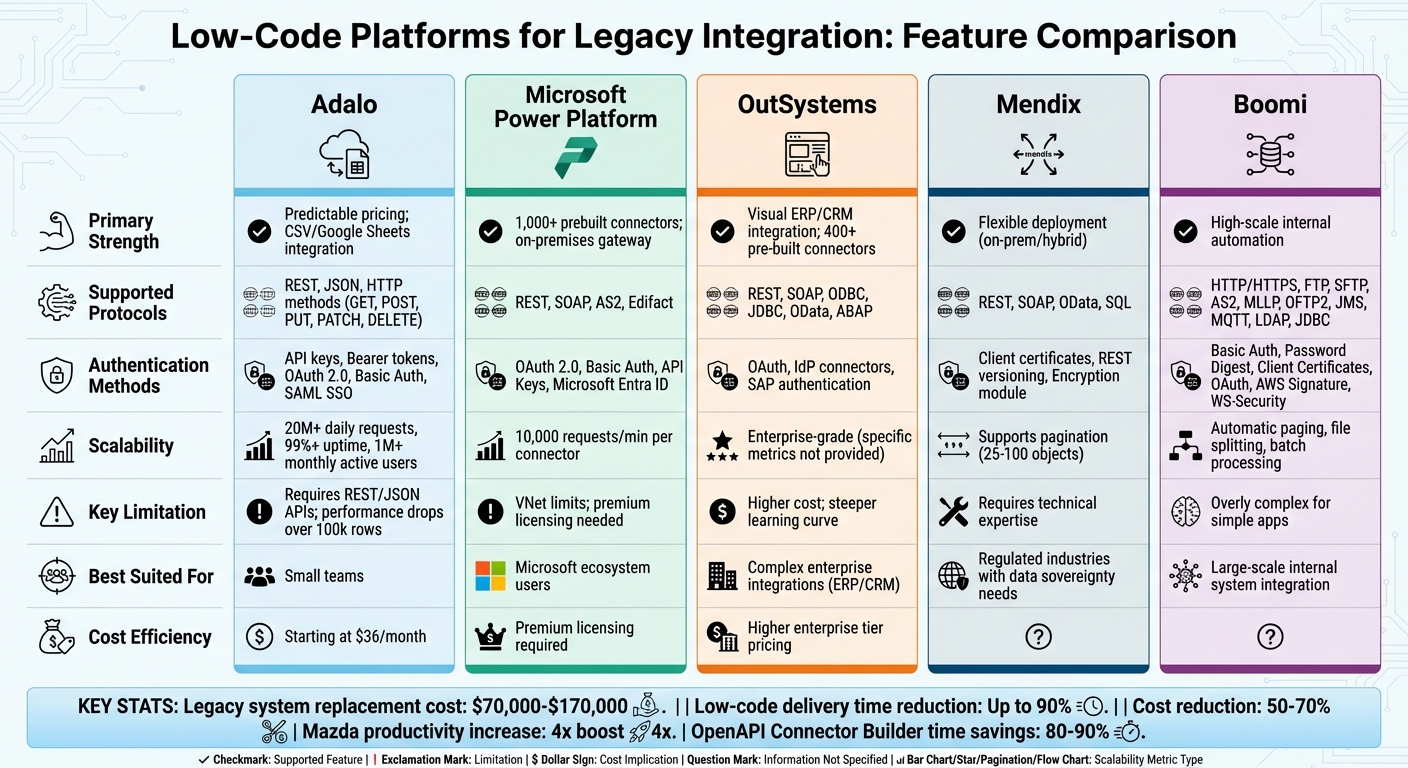
Low-Code Platform Comparison for Legacy System Integration
When evaluating integration capabilities, it's clear that each platform has its own strengths and trade-offs, making them suited for different needs. Here's a closer look at the key points for each platform:
Adalo is known for its straightforward pricing and its ability to integrate with CSV files and Google Sheets effectively. However, it requires legacy systems to support REST/JSON APIs, and its performance can falter when working with spreadsheet data exceeding 100,000 rows.
Microsoft Power Platform stands out with over 1,000 prebuilt connectors and an on-premises data gateway, which allows private network APIs to remain secure without cloud exposure. On the downside, its VNet associations can restrict custom code and trigger capabilities, and custom connectors often require premium licensing.
OutSystems shines in complex ERP and CRM integrations, offering a visual, drag-and-drop interface tailored for these scenarios. That said, it comes with a higher price tag for enterprise tiers and a steeper learning curve compared to pure no-code tools.
Mendix offers flexible deployment options, including on-premises and hybrid configurations, making it a strong choice for organizations prioritizing data sovereignty. However, this flexibility demands more technical expertise than simpler no-code platforms.
Boomi is built for large-scale automation, seamlessly integrating with complex systems like ERPs and HR platforms. For example, Mazda Motor Corporation achieved a fourfold productivity boost by using it to connect 500 legacy systems. That said, Boomi's complexity can be overkill for simpler front-end application needs.
The following table provides a quick comparison of each platform's strengths, limitations, and ideal use cases:
| Platform | Primary Strength | Key Limitation | Best Suited For |
|---|---|---|---|
| Adalo | Predictable pricing; CSV/Google Sheets integration | Requires REST/JSON APIs; performance drops over 100k rows | Small teams |
| Microsoft Power Platform | 1,000+ connectors; on-premises gateway | VNet limits; premium licensing needed | Microsoft ecosystem users |
| OutSystems | Visual ERP/CRM integration | Higher cost; steeper learning curve | Complex enterprise integrations |
| Mendix | Flexible deployment (on-prem/hybrid) | Requires technical expertise | Regulated industries with data sovereignty needs |
| Boomi | High-scale internal automation | Overly complex for simple apps | Large-scale internal system integration |
Conclusion
Choose the platform that fits your technical setup and integration requirements. Microsoft Power Platform is an excellent choice for Microsoft-focused environments, offering seamless integration through its secure on-premises data gateway. This enables connectivity with Azure, Dynamics 365, and SQL Server, ensuring smooth operations within a Microsoft ecosystem.
If your organization depends on SAP or requires high-performance database connections, OutSystems has a proven track record in SAP integrations, making it a reliable option, as IT leaders have noted.
Platforms like Mendix and Boomi cater to specific deployment needs. Mendix's flexible architecture addresses data sovereignty concerns, particularly in regulated industries. Meanwhile, Boomi shines with its visual integration tools and on-premises runners, making it ideal for hybrid deployment scenarios.
For API-driven environments, focus on platforms that support robust custom connector development to enhance project productivity. With 65% of organizations now treating integration capabilities as strategic investments - up from 40% in 2019 - choosing a platform that bridges legacy systems and modernization efforts is more critical than ever.
The growing trend toward composable architectures is pushing enterprises to move away from monolithic systems in favor of best-of-breed applications connected by a low-code integration layer. With 89% of enterprises operating in multi-cloud setups, your chosen platform must ensure consistent data across distributed systems. Begin by assessing your legacy integration needs, prioritizing reusable custom connectors available through private marketplaces or Forge repositories, and implementing strong data governance practices to drive your digital transformation forward.
FAQs
When should we build a custom connector instead of using middleware?
When your project involves highly specific integrations - like interacting with legacy systems, custom fields, or APIs without prebuilt solutions - consider building a custom connector. These connectors offer the flexibility to handle unique or complex needs that traditional middleware often can't manage efficiently.
How do we connect low-code apps to on-prem legacy systems behind a firewall?
To link low-code apps with on-premises legacy systems hidden behind a firewall, custom connectors are a go-to solution. These connectors facilitate secure communication by utilizing methods such as authentication protocols and API endpoints.
Another approach involves using secure gateways or micro-service architectures. These act as intermediaries, allowing cloud platforms to interact with on-prem systems while keeping data safe and secure.
Key steps in this process include:
- Developing custom connectors to establish communication between systems.
- Configuring secure gateways to ensure a protected bridge between cloud and on-prem environments.
- Setting up middleware to handle communication and data exchange within the firewall.
This setup ensures seamless integration while prioritizing security.
What should we check before scaling legacy integrations to high request volumes?
Before expanding legacy integrations, it's important to assess the connector's performance, hosting capabilities, and scalability limits imposed by the platform. Factors like API throughput and service level agreements (SLAs) play a critical role in ensuring smooth operations. This step helps maintain stability and avoids service disruptions when handling high volumes of requests.