Real-time data sync ensures updates happen instantly across platforms like iOS, Android, and web apps. For example, if a delivery driver marks a package as delivered on their mobile app, the update is immediately reflected on the customer's tracking page and the warehouse system using a low-code backend. This synchronization saves time, simplifies workflows, and eliminates data inconsistencies.
Key points:
- How it works: Syncing uses tools like WebSockets, gRPC, and APIs to detect and apply changes in real time.
- Benefits: Improves data consistency, speeds up development, and enhances team collaboration.
- Setup: Takes 30–60 minutes using platforms like Airtable, Firebase, or FlutterFlow, with REST API endpoints for CRUD operations.
- Security: Encryption (TLS, AES-256), Personal Access Tokens, and Role-Based Access Control protect data.
- Performance: Techniques like Change Data Capture (CDC), delta syncing, and conflict resolution ensure fast, reliable syncs.
Real-time sync is increasingly critical as app usage grows, with modern platforms handling millions of requests daily while maintaining high uptime. This article explores setup, tools, and best practices for seamless integration.
Benefits of Real-Time Data Synchronization in Low-Code Workflows
Better Data Consistency Across Platforms
Real-time synchronization ensures that data stays consistent across all systems, effectively breaking down silos. For instance, when a customer record gets updated in your CRM, that update instantly reflects in your ERP, marketing tools, and billing system. This creates a single source of truth, allowing teams across the organization to work with the most current information available.
Many modern platforms achieve this using Change Data Capture (CDC). CDC tracks every insert, update, or deletion at the row level in real time. By combining CDC with conflict-resolution logic or machine learning, these platforms can handle simultaneous edits and even propagate deletions instantly.
"Syncing breaks down silos. It brings together tools that were never designed to work together. It makes sure every system and every person, works with the same facts in real time."
– Edwin Sanchez, Skyvia
This seamless data flow not only boosts accuracy but also speeds up development processes.
Faster Development Cycles
With real-time synchronization, low-code platforms eliminate the need for developers to write complex API scripts. Instead, systems can be connected in just minutes, saving days of manual coding.
Pre-built connectors further simplify integration, enabling instant connections between IoT devices, SaaS applications, and even legacy databases. This eliminates the need for custom-built solutions, making it easier to prototype ideas quickly. Developers can move from concept to implementation swiftly, fostering a more agile approach to experimentation and development.
Better Team Collaboration
Real-time updates ensure that any change made to a record is visible to everyone within milliseconds. This immediacy prevents accidental overwrites and reduces the confusion caused by outdated data. Teams like sales, support, and finance can all work with the same up-to-date customer information, avoiding the inefficiencies of reconciling conflicting data versions - a problem often referred to as the "data silo tax".
Automated workflows also enhance collaboration across departments. For example, when a sales rep closes a deal in the CRM, the billing system can instantly generate an invoice without requiring manual intervention. These instant feedback loops allow teams to catch and fix errors early, long before they would surface in traditional batch processing. By enabling such seamless data sharing, real-time synchronization supports the robust workflows that modern low-code projects demand.
sbb-itb-33eb356
Building real-time data sync solutions with Remix
Setting Up Real-Time Data Sync in Low-Code Platforms
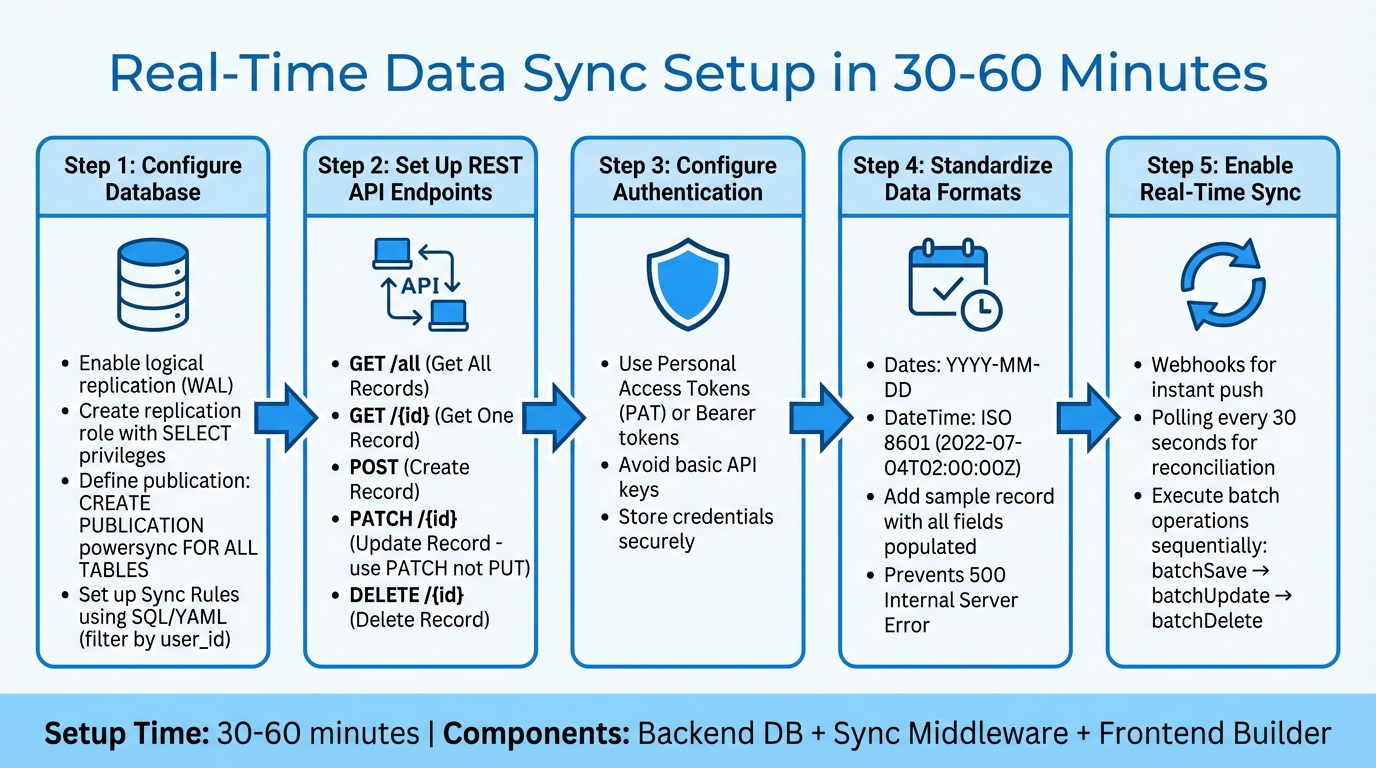
Real-Time Data Sync Setup Guide: 5-Step Implementation Process
You can set up real-time sync in just 30–60 minutes by combining three key components: a backend database (like Supabase, Airtable, or Firebase), synchronization middleware (such as PowerSync, Zapier, or Nango), and a low-code frontend builder (like FlutterFlow or Adalo).
To get started, configure your database for real-time updates. Enable logical replication through the Write Ahead Log (WAL). Then, create a replication role with SELECT privileges and define a publication using CREATE PUBLICATION powersync FOR ALL TABLES. Use SQL-like syntax or YAML to set up Sync Rules, which can filter data based on parameters like user_id.
Next, set up five essential REST API endpoints for external data collections:
- Get All Records (GET)
- Get One Record (GET /{id})
- Create Record (POST)
- Update Record (PATCH /{id})
- Delete Record (DELETE /{id})
Always use PATCH instead of PUT for updates, as it only modifies the fields that have changed.
For authentication, rely on Personal Access Tokens (PAT) or Bearer tokens instead of basic API keys. Before testing, add a sample record with all fields populated - this ensures the low-code platform maps all columns correctly. Also, standardize date formats to either YYYY-MM-DD or ISO 8601 (e.g., 2022-07-04T02:00:00Z) to avoid "500 Internal Server Error" issues.
To achieve real-time functionality, combine webhooks with periodic polling. Webhooks instantly push data changes, while polling every 30 seconds reconciles any updates missed due to network interruptions. For batch operations, execute batchSave, batchUpdate, and batchDelete one after another to prevent data conflicts and race conditions.
Choosing the Right Low-Code Platform
Selecting the right low-code platform is crucial for maintaining efficient, real-time data integration.
Not all platforms handle real-time data synchronization equally. Some offer built-in features like External Collections and Custom Actions for direct REST API connections, while others depend on third-party middleware for integration. Start by identifying your needs: are you looking for a low-code development platform (to build apps from scratch, such as Adalo or Bubble) or a low-code integration platform (to connect existing tools, like Whalesync or Stacksync)?
Ensure the platform supports two-way or multi-directional sync, so changes are instantly reflected across systems without requiring custom code. Platforms with strong connectors - covering SQL, NoSQL, and popular cloud databases - can simplify and speed up the setup process. Additionally, check for support for partial updates, which modify only the changed fields instead of overwriting entire records.
Security is another critical factor. Look for features like Role-Based Access Control (RBAC), OAuth integration, and encryption standards such as AES-256 for data at rest and TLS for data in transit. Tools like real-time dashboards, audit logging, and automated alerts can help you monitor sync status and quickly address any issues.
Finally, examine pricing models to ensure you’re getting the best return on investment. For example, Adalo’s Professional plan starts at $52/month (billed annually) with unlimited records, Bubble’s plans begin at $69/month with usage-based fees, and FlutterFlow charges $70/month per user, plus additional database costs. Flat-rate plans with unlimited records can be more predictable for scaling real-time sync operations.
To help narrow down your options, the Low Code Platforms Directory (https://lowcodeplatforms.org) offers filtering tools to find platforms with features like External Collections, REST API connectivity, and native two-way synchronization. Balancing technical capabilities, security features, and cost will put you on the right path for an effective real-time data sync strategy.
Connecting and Authenticating Data Sources
After choosing your platform, the next step is linking your external data sources. Most low-code platforms rely on External Collections or Data Sources to establish connections via REST JSON APIs to services like Airtable, Firebase, Google Sheets, or Xano. This requires creating a connector to define how the platform communicates and structures data.
For authentication, you have several options:
- OAuth 2.0: Best for user-specific permissions, such as accessing personal data from Google Drive.
- API Keys: Ideal for service-to-service communication.
- Basic Authentication: Commonly used for legacy databases.
By early 2026, platforms like Airtable have transitioned from static API keys to Personal Access Tokens (PAT) to improve security. To protect sensitive information, always store credentials in a backend vault rather than embedding them in frontend code, which could expose them to users.
Once your connection is secure, set up endpoints to enable real-time synchronization. Focus on these five CRUD endpoints:
- Get All Records (GET)
- Get One Record (GET)
- Create (POST)
- Update (PATCH)
- Delete (DELETE)
When updating records, use the PATCH method instead of PUT. PATCH only modifies specific fields that have changed, which minimizes data transfer and reduces the chance of conflicts. If you're working with older databases like SQL Server or Oracle that lack native APIs, middleware tools like DreamFactory can create an API layer compatible with your low-code platform.
Testing your connection is essential. Use a fully populated record to verify proper field mapping. Additionally, standardize date formats to avoid errors - use YYYY-MM-DD for dates and ISO 8601 (e.g., 2022-07-04T02:00:00Z) for date-time values.
Pay attention to API rate limits. For instance, Airtable allows up to five requests per second per base, and exceeding this limit triggers a 429 "Too Many Requests" error. To handle larger datasets, implement pagination, as many APIs cap responses at 100 records per request. For high-volume applications, platforms like Adalo demonstrate the reliability of modern infrastructure, processing over 20 million daily requests with 99% uptime.
Defining Data Mapping and Sync Rules
Once secure connections are in place, mapping and sync rules ensure that data moves and transforms correctly between platforms. Start by identifying a unique key column - like an email address, SKU, or order number - to match records and avoid duplicates.
Many low-code platforms simplify this process with automated mapping tools. For instance, Exact Field Name matching links fields with identical labels, while Smart Map identifies fields with similar names. That said, you’ll need to confirm field compatibility. For example, a Date picker field can map to a Datetime field, but a text field won’t sync to a number field. If fields don’t align, use transformation rules to adjust the data. This could mean splitting a "Full Name" into "First Name" and "Last Name" or converting date formats to match the target system. Once you’ve addressed compatibility and transformations, the next step is defining the sync direction.
When setting the sync direction, you have two main options:
- One-way sync: Data flows from a primary source to a secondary target.
- Two-way sync: Updates occur automatically in both systems. Keep in mind that read-only fields in the target system will enforce a one-way sync.
You’ll also need to set up conflict resolution logic. For example, HubSpot allows users to decide whether the CRM or a third-party app takes priority when simultaneous updates occur. Popular strategies include Last-Write-Wins (LWW), which prioritizes the most recent change based on timestamps, and field-level LWW, where conflicts arise only if the same field is edited in both systems.
Before launching your setup, ensure data integrity through thorough testing and regular metadata updates. Use your platform’s testing tools to simulate how source data will transform without impacting live records. Additionally, refresh metadata frequently to keep the mapping interface aligned with the latest field attributes.
Best Practices for Secure and Efficient Real-Time Sync
Data Security and Compliance
When it comes to securing real-time sync, encryption is a non-negotiable cornerstone. For data in transit, use TLS protocols, and for data at rest, rely on AES-256 encryption to align with GDPR and similar regulations. For apps that work offline, secure local databases by using tools like SQLCipher or ChaCha20, and store encryption keys in secure environments such as iOS Keychain or Android Keystore.
Instead of relying on static API keys, implement Personal Access Tokens (PATs). These tokens allow fine-grained permissions, such as data.records:read, minimizing data exposure and leaving a clear audit trail. Pair this with Role-Based Access Control (RBAC) and database-level permissions, ensuring users only access their own data - for instance, restricting access to "records created by the user."
"Data protection by design is about considering data protection and privacy issues upfront in everything you do." - ICO
Keep detailed logs of all data transfers, including what was moved, when, and why. This ensures accountability and simplifies compliance audits. Under GDPR, if a personal data breach occurs, it must be reported to regulatory authorities like the ICO within 72 hours of discovery. To further protect data, add a "Sanitizer/Mapper" step in your sync process to strip unnecessary fields or hash sensitive information, such as email addresses, before sending it downstream. Use the PATCH method instead of PUT for updates, so only modified fields are transmitted, cutting down on unnecessary data flow and improving accuracy.
These measures not only enhance security but also streamline the flow of data.
Optimizing Sync Performance
Once security is in place, the next step is ensuring that your sync processes run efficiently and without delays.
Change Data Capture (CDC) is a game-changer here. Instead of syncing entire datasets, CDC identifies and syncs only the changes made to the source data. This approach dramatically reduces bandwidth usage and processing demands. For dashboards with complex queries, materialized views can help by pre-aggregating data as it arrives, delivering sub-100ms latency.
For real-time collaboration, aim for a maximum latency of 300ms. Modern platforms can handle over 5 million concurrent WebSocket connections, but you’ll need to manage these connections wisely to avoid overloading servers. Use connection pools and set limits to scale WebSocket connections effectively.
Another key strategy is using filtered views to sync only the most relevant data. For example, instead of syncing your entire inventory, focus on "Items in Stock." This reduces latency and limits unnecessary data exposure. For multi-platform or offline-first apps, Conflict-free Replicated Data Types (CRDTs) are invaluable. They allow independent updates and ensure consistency without requiring a central coordinator.
These practices ensure efficient, real-time collaboration across platforms while keeping resource use in check.
Testing and Monitoring the Sync Process
Even with strong security and optimized performance, testing and monitoring are critical to maintaining a reliable real-time sync experience.
Start by validating your connections. Many platforms, such as Adalo, offer tools like the "Run Test" feature to confirm API credentials, base URLs, and headers before you go live. In staging environments, systematically test Create, Read, Update, and Delete operations to ensure data flows correctly in both directions.
Always test with a fully populated record. Some platforms only detect and map fields that contain data during the initial scan. If the schema changes, re-run connection tests to update the field mapping.
Monitoring is equally important. Keep an eye on specific error codes to catch problems early. For example:
- 429: Indicates rate limiting.
- 500: Points to data formatting issues.
- 401: Signals expired tokens.
Standardize data formats to avoid errors. Use MM/DD/YYYY for dates, ISO 8601 for date-time values (e.g., 7/4/2022, 2:00:00 AM), and lowercase "true" or "false" for booleans. Some platforms, like Adalo, provide performance tools such as X-Ray to identify bottlenecks in your data flow before they affect users. For production-grade infrastructure, aim for 99.9% uptime, and set up continuous monitoring to track data freshness and catch schema anomalies in real time.
Troubleshooting Common Issues in Real-Time Data Sync
When real-time data synchronization runs into problems, addressing these issues methodically ensures smooth cross-platform functionality.
Handling Data Conflicts
Data conflicts happen when simultaneous edits, offline changes, or network delays disrupt the order of updates. Adding to the complexity, clock drift can skew last-write decisions.
For straightforward conflict resolution, you can use Last Write Wins (LWW), though it may lead to data loss. For collaborative applications, Conflict-Free Replicated Data Types (CRDTs) are a better choice, as they automatically merge concurrent updates to maintain consistency. In real-time text collaboration, Operational Transformation (OT) dynamically adjusts and reorders operations to ensure all clients reach a shared state.
"Conflicts aren't failures, they're information. This mindset shift from preventing concurrency to designing for concurrency is key to building an offline-ready architecture." - Rae McKelvey, Staff Product Manager, Ditto
To minimize conflicts, consider using objects or maps instead of arrays to avoid position-based issues. Soft deletes, implemented with "tombstones" or "isDeleted" flags, allow deletion states to propagate smoothly, avoiding the pitfalls of hard deletes. For critical data, like medical or financial records, log conflicts separately and let users manually resolve them.
Next, let’s tackle challenges caused by network delays and inconsistencies.
Dealing with Latency and Network Failures
A local-first architecture makes the local database (e.g., SQLite, Realm) the primary source of truth, ensuring your app remains functional even when the network is unreliable. Pair this with the outbox/inbox pattern, which logs local changes separately from remote updates, to keep retries safe and synchronization predictable.
To optimize performance, use delta synchronization, which sends only incremental changes. Low-latency protocols like WebSockets or MQTT are ideal for real-time communication. Additionally, implement exponential backoff with jitter to handle mobile network fluctuations and prevent retry storms.
Reduce roundtrip times by deploying backend components closer to users with serverless edge functions (e.g., Cloudflare Workers). For faster data transmission, switch to binary serialization formats like Protocol Buffers or MessagePack instead of JSON. Lastly, design idempotent operations so updates can be safely applied multiple times, a crucial safeguard during network retries.
Now, let’s explore how to scale synchronization as your project grows.
Scaling Sync for Large Projects
To handle growing demands, use partial replication to limit the data synced by user, team, or project. Combine this with delta syncing to reduce payload sizes and ease network strain.
For heavy processing tasks, integrate message queues like RabbitMQ or Kafka. These tools help manage workloads without overwhelming your APIs. The outbox/inbox pattern also supports resumable sync sessions, ensuring reliability even with interruptions. Additionally, GraphQL allows clients to fetch only the data they need, while gRPC delivers high-performance binary communication for low-latency scenarios.
Use text-based primary keys, such as UUIDs or ULIDs, to avoid conflicts across distributed devices. For more complex setups, apply cascade logic at the application level to prevent errors. Finally, monitor your system with tools like New Relic or Datadog to track API health and identify latency issues in real time.
Conclusion and Key Takeaways
Real-time data synchronization streamlines cross-platform development, potentially saving developers up to 15 hours per week. Techniques like Change Data Capture (CDC) and PATCH updates ensure data consistency across platforms like web, iOS, and Android by creating a single, reliable source of truth.
Selecting the right low-code platform plays a crucial role in achieving these efficiencies. Take Adalo's Infrastructure 3.0 update as an example - it delivers a 3–4× performance boost while managing over 20 million daily requests with a 99% uptime. Adriano Raiano, Founder & CTO of Vaultrice, emphasizes this point:
"Choosing the right tool is critical. The wrong choice can lead to brittle hacks, over-engineering, or a bloated budget".
When evaluating platforms, focus on key factors like architecture (native apps vs. web wrappers), pricing models (flat-rate or usage-based), and technical features such as two-way sync and API rate limits. For a tailored comparison, the Low Code Platforms Directory (https://lowcodeplatforms.org) offers a detailed filtering system. This tool helps you identify the best platform for your needs - whether you're looking for AI integration, CRM functionality, or app-building capabilities.
FAQs
Do I need real-time sync or is batch syncing enough?
When deciding between real-time syncing and batch syncing, it all comes down to what your app needs.
Real-time syncing is a must-have when instant updates are critical. Think about collaborative tools or live dashboards - users expect data to stay current without hitting a refresh button.
On the other hand, batch syncing is better suited for situations where delays are acceptable. For instance, periodic reporting or apps operating in areas with spotty network connections can handle updates in chunks rather than constantly.
Ultimately, the choice hinges on balancing how fresh the data needs to be with the complexity and resources your system can handle.
How do I prevent data conflicts when two users edit the same record?
When two users edit the same record at the same time, conflicts can arise. To handle this, you’ll need effective conflict resolution strategies. For straightforward situations, a "last write wins" method might suffice - where the most recent update takes precedence. However, for more intricate cases, custom strategies tailored to your application's needs can help manage these concurrent updates.
For collaborative applications, more advanced techniques like operational transformation or conflict-free replicated data types (CRDTs) are worth considering. These methods help maintain consistency across edits and reduce the risk of data loss when multiple users make changes simultaneously.
What’s the simplest way to add offline support without losing data?
The easiest method is adopting an offline-first approach using local databases that sync with the server once the connection is restored. Tools such as PowerSync and TanStack DB prioritize local data as the main source, ensuring smooth synchronization and consistent data across devices. This approach lets users continue working offline, with changes automatically syncing to the cloud later, reducing the risk of data loss during interruptions.