Version control is essential for managing changes in low code development. It ensures teams can track modifications, collaborate effectively, and revert to stable versions when needed. Low code platforms have adapted version control to handle visual models, workflows, and business logic instead of low-code vs traditional coding. Here's what you need to know:
-
Types of Version Control Systems:
- Local: Best for solo work but lacks team collaboration tools.
- Centralized (e.g., SVN, TFS): Simple setup but reliant on server availability.
- Distributed (e.g., Git): Ideal for team collaboration with offline support and robust branching.
-
Platform-Specific Tools:
- Bubble: Offers branching, changelogs, and savepoints. Retention depends on the subscription plan.
- Webflow: Focuses on staging but lacks advanced branching.
- FlutterFlow: Uses a Git-like commit system, with retention tied to plan tiers.
-
Best Practices:
- Commit frequently with clear messages.
- Use structured branching for teamwork.
- Test and merge changes regularly in staging environments.
-
Advanced Features:
- Git integration allows syncing with repositories like GitHub.
- CI/CD pipelines streamline deployments and maintain consistency.
Mastering version control in low code platforms ensures smooth collaboration, minimizes errors, and supports scalable development. Whether you rely on built-in tools or external Git workflows, having a clear process is key.
Make the Most out of Version Control for Low-Code Apps
sbb-itb-33eb356
Types of Version Control Systems in Low Code Platforms
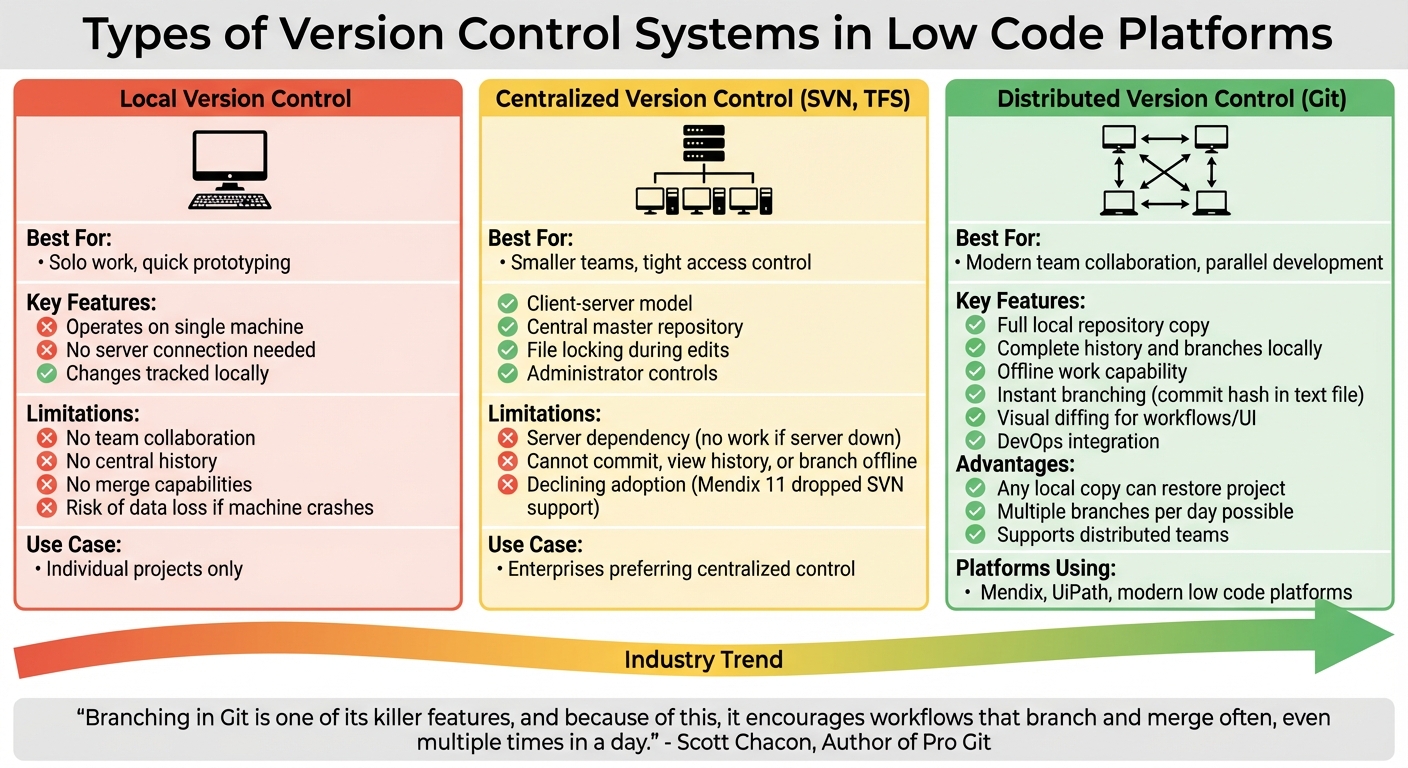
Version Control Systems Comparison for Low Code Platforms
Version control systems come in three main types, each offering distinct benefits for low code development. Knowing these differences helps teams pick the right approach for their specific needs.
Local Version Control Systems
Local version control operates on a single machine, managing changes without connecting to a server. Developers make copies of files and track changes in their own environment. While this works well for quick prototyping or individual projects, it falls apart in team settings. Issues like inconsistent file naming, lack of a central history, and no way to merge work make it impractical for collaboration. Plus, there's no safeguard if your machine crashes. Centralized systems, on the other hand, address these challenges by providing a shared master repository for team collaboration.
Centralized Version Control Systems
Centralized systems, such as Subversion (SVN) and Team Foundation Server (TFS), rely on a client-server model. A central server stores the master repository, and developers "check out" files to work on them. To avoid conflicts, files are often locked during edits. This setup is straightforward for smaller teams and allows administrators to control access tightly. However, if the server goes down, work grinds to a halt - developers can't commit changes, view history, or create branches. While platforms like UiPath still support SVN and TFS for enterprises that prefer centralized control, the trend is shifting away from this model. Mendix 11, for example, dropped Subversion support entirely, forcing users to adopt Git-based systems. For modern collaboration, distributed systems have become the go-to choice.
Distributed Version Control Systems
Distributed systems like Git give every developer a full local copy of the repository, including its entire history and branches. This setup means you can commit changes, create branches, and review history even without internet access. If a server fails, any developer's local copy can restore the project. Git's branching capabilities are a standout feature - it allows new branches to be created almost instantly by recording a simple commit hash in a text file. Low code platforms like Mendix and UiPath have embraced Git, as it supports parallel development and integrates seamlessly with DevOps tools. These platforms also enhance Git's functionality with "visual diffing", which highlights graphical changes in workflows and UI elements, not just text.
"Branching in Git is one of its killer features, and because of this, it encourages workflows that branch and merge often, even multiple times in a day." - Scott Chacon, Author of Pro Git
The move from centralized to distributed systems mirrors how modern low code teams operate. With developers and citizen developers collaborating across different locations, distributed systems offer the flexibility and reliability needed for today's dynamic projects. This evolution reflects the growing demand for workflows that can handle the complexities of modern low code development.
Built-in Version Control Features in Low Code Platforms
Low code platforms often integrate native version control features directly into their development environments. These tools simplify change tracking and team collaboration, though the specific functionalities and limitations can differ between platforms.
Bubble's Version History and Rollback Features
Bubble offers a structured version control system with two distinct environments: Development (editable) and Live (read-only), each tied to its own database. It uses a branching structure, with the "Main" branch serving as the default for deployments, while teams can create custom branches to work on specific features independently.
To track changes, Bubble provides a detailed changelog, complete with timestamps, user attributions, and thumbnail previews of modifications. During branch merges, developers can view side-by-side comparisons and manually select which changes to keep. For urgent fixes, a dedicated "hotfix" branch allows immediate deployment to production without affecting ongoing work.
Retention of change history depends on the subscription plan. For instance, the Starter plan ($32/month) retains history for just 2 days, while the Enterprise Dedicated plan extends this to 1 year. Bubble also supports savepoints, which are snapshots created automatically during deployments, merges, or syncs - or manually during critical moments. However, a shared development database for all branches can lead to data conflicts during testing.
Webflow's Staging and Revision Tracking
Webflow takes a simpler approach to version control, focusing on a staging system that separates draft versions from published sites. This setup allows designers to experiment with layouts and content in a staging environment before making changes live. While this system works well for design-heavy workflows, it lacks the branching capabilities needed for more complex, parallel development. By contrast, FlutterFlow employs a commit-based system that aligns more closely with Git workflows.
FlutterFlow's Collaboration and Versioning Tools
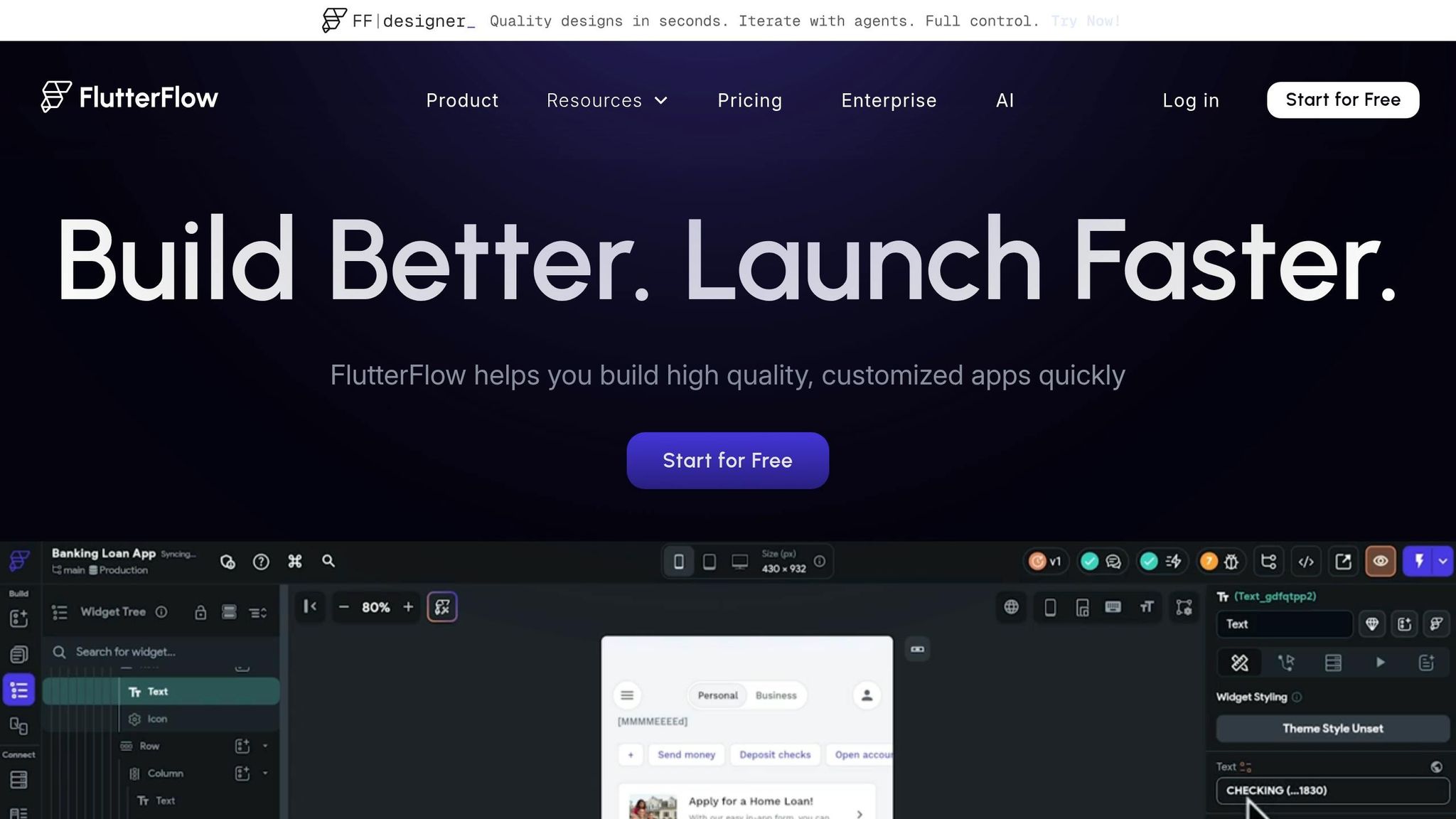
FlutterFlow has transitioned from its older "Versions" feature to a Git-like commit-based system. Each branch maintains a history of changes, enabling teams to coordinate and revert to previous states as needed. Snapshot retention varies by plan: Free users get a rollback window of just 1 hour, Basic users 1 day, Growth plans 3 days, and Business plans 7 days. While higher-tier plans improve collaborative capabilities, FlutterFlow's conflict resolution tools are less robust compared to Bubble.
| Platform | Plan Tier | History/Snapshot Retention Window |
|---|---|---|
| Bubble | Starter | 2 days |
| Bubble | Growth | 14 days |
| Bubble | Team / Agency | 20 days |
| Bubble | Enterprise (Standard) | 30 days |
| Bubble | Enterprise (Dedicated) | 1 year |
| FlutterFlow | Free | 1 hour |
| FlutterFlow | Basic | 1 day |
| FlutterFlow | Growth | 3 days |
| FlutterFlow | Business | 7 days |
While native version control features in low code platforms are improving, the short retention windows and limited branching options in lower-tier plans may push teams to upgrade or explore external Git solutions for handling more complex projects.
Best Practices for Version Control in Low Code Development
Adapting version control for low code development means tweaking traditional practices to fit visual workflows and configuration-heavy logic. The core principles - tracking changes, enabling collaboration, and maintaining rollback options - still hold, but the approach must account for graphical components and business logic outside standard code files.
Commit Frequently and Use Descriptive Messages
Frequent commits with clear, descriptive messages are essential. In low code platforms, this often involves documenting the purpose behind visual changes, like modifying a workflow trigger, updating a UI element, or adjusting an integration. Stick to the imperative mood for commit messages, such as "Add validation logic to contact form."
"Commit messages that describe the 'what' and 'why' of a change make it easier for future maintainers to understand the historical context." - Harness
Keep summary lines under 50 characters and link them to project management tickets for better traceability. Before committing, review the specific visual or configuration changes to avoid bundling unrelated fixes. For example, a remote team using nightly snapshot scripts reported a 40% drop in operational errors and reduced rollback times to under a minute.
Use Branching Strategies for Team Collaboration
Structured branching is key to smooth teamwork. Branching allows developers to work on separate features or fixes without disrupting the main project. Platforms like Mendix or Bubble, which offer native Git-style branching, let teams create dedicated branches for features, bug fixes, or experiments. For platforms without built-in branching, teams can mimic this by cloning the application into separate lanes.
Use consistent naming conventions like "feature-login" or "bugfix-payment-YYYYMMDD" to make branch purposes immediately clear. Define retention policies - e.g., keeping old branches or snapshots for 30 to 60 days - to maintain a tidy workspace. Additionally, many low code platforms can send Slack or email alerts when multiple users edit the same component, enabling side-by-side comparisons before merging.
"Governance in low-code development is about setting guardrails, not roadblocks." - Quickbase
Branching also makes early conflict detection during merges much easier.
Merge and Test Changes Regularly
Frequent merging helps catch and resolve conflicts early. Always test changes in a cloned staging environment before merging to identify potential issues. Separating environments - dedicating lanes for development, staging, and production - can minimize deployment risks. Automating testing in staging environments and setting up hourly, daily, or weekly backups adds another layer of security. Clearly define roles and conditions for reverting to previous versions to maintain stability and compliance.
Regular merges paired with thorough testing integrate version control into a proactive quality assurance process.
Advanced Version Control Features and Challenges
Low code platforms have grown to compete with traditional development environments, now offering advanced version control features. Platforms like Microsoft Power Platform and Mendix include native Git integration, allowing teams to sync applications directly with repositories such as Azure DevOps or GitHub.
Integrating Git with Low Code Platforms
Modern low code platforms provide two main methods for Git integration: environment binding and solution binding. Environment binding connects an entire environment to a single repository folder, while solution binding links specific solutions to individual branches or folders, offering greater flexibility for complex projects.
For example, Mendix 11 has fully embraced Git-based versioning, moving away from older systems like Subversion (SVN). Users are required to migrate their projects, and Mendix offers 1 GB of free storage for company accounts that aren’t yet tied to a commercial license.
The integration of Git enables collaborative workflows, where low code developers and traditional coders can work together in the same repository. In this setup, traditional code assets like JavaScript or C# plugins coexist with low code YAML files, creating a single source of truth. This also allows organizations to quickly create temporary development environments directly from source control, minimizing dependency on permanent setups. This efficient approach helps streamline team collaboration and prepares teams to handle conflicts effectively.
Resolving Conflicts in Team Projects
Conflict resolution in low code environments introduces unique challenges compared to traditional coding. For instance, component conflicts occur when two developers modify the same UI element, while configuration conflicts arise when overlapping changes affect app settings. Platforms like Retool and Anvil provide built-in IDE tools to handle merging, ensuring that files remain valid and configurations aren’t corrupted.
"Trunk-based development best practices recommend branches are used for short-term feature work and kept open for a week or less." – Retool Docs
When dealing with conflicts in metadata or positioning files (e.g., .positions.json), the resolution depends on the nature of the changes. If two developers move the same component, one change must be selected. However, if they move different components to the same position, both changes can often be retained. To minimize such conflicts, teams can modularize their work by dividing responsibilities. For example, one team can focus on executable logic while another handles visual components, reducing overlap and maintaining isolation.
Using CI/CD Pipelines in Low Code Development
CI/CD pipelines automate the deployment process by moving changes from Git repositories to live environments, eliminating the need for manual exports and imports. These pipelines treat the Git repository as the single source of truth, ensuring live environments are restored from it to avoid configuration drift. The pipeline structure typically follows three stages - Development, Staging, and Production - ensuring only tested changes make it to live operations.
| Environment | Purpose | Git Branch | Deployment Trigger |
|---|---|---|---|
| Development | Building and initial testing | develop |
Direct push or manual sync |
| Staging | Pre-production validation | staging |
Merge from develop |
| Production | Live business operations | main |
Merge from staging (with approval) |
To maintain secure deployments, teams should configure branch protection rules requiring pull request reviews and successful status checks before merging into the production branch. Automated validation steps, such as syntax checks on low code files, can be added to the CI pipeline using tools like GitHub Actions or GitLab CI. Sensitive configuration details, like API base URLs, should be stored as environment variables rather than hardcoded, allowing workflows to adapt across environments. Additionally, secrets (e.g., API keys) should be managed separately in each environment to ensure that development credentials never reach production.
These advanced version control features show how low code platforms now support enterprise-level development workflows, blending ease of use with robust practices for teams of all sizes.
Conclusion
Version control has become a cornerstone for managing low code projects. Whether you're leveraging built-in snapshot tools in platforms like Bubble and Webflow or opting for advanced Git-based workflows in Mendix, version control provides the safety net to track, review, and reverse changes when necessary.
The results are undeniable. Take, for example, a case study from early 2026: a remote team at Scale By Tech reduced workflow errors by 40% within six months by adopting a three-workspace system. They incorporated nightly snapshots and Slack-based conflict alerts, cutting rollback time to under one minute. This example highlights how effective version control can enhance both efficiency and reliability in low code environments.
"Low-code version control is about preserving order as teams innovate at speed. It ensures that every modification... can be tracked, reviewed, and, if necessary, reversed." - Quickbase
By using the tools and strategies outlined in this guide - like frequent commits, branching workflows, and low-code QA automation tools - you can maintain a balance between flexibility and control. Whether you rely on native snapshots or advanced Git integrations, having a clear and consistent version control process is vital for sustainable development.
As low code platforms evolve with features like visual diffing, AI-driven governance, and native Git compatibility, mastering version control will only grow in importance. Whether you're working solo or managing a team, these practices can help you innovate with confidence while maintaining the safeguards needed to experiment and scale effectively.
FAQs
When should a low code team move from built-in snapshots to Git?
When a low-code team requires more advanced version control, improved collaboration, or structured workflows like pull requests and code reviews, it's time to move from built-in snapshots to Git. Git offers robust tools for managing complex projects, ensuring scalability, and maintaining a detailed version history - capabilities that basic snapshots simply can't match. Making this switch allows teams to better handle increasing project demands while refining their development processes.
How do you resolve merge conflicts for visual changes instead of code?
Resolving visual merge conflicts often means diving into the platform's tools to tackle the issues directly within its interface. Generally, you'll review conflicting components side-by-side, decide which version to keep, or make manual adjustments to align elements. Tools offered by platforms like Anvil and Mendix allow you to resolve conflicts at the component level, giving you the precision needed to manage visual changes effectively.
What’s the safest branching and environment setup for low-code CI/CD?
Creating a safe and reliable low-code CI/CD pipeline requires careful planning and specific practices. Here's what you need to know:
- Use Short-Lived Branches: For feature development, short-lived branches are key. They help reduce merge conflicts and minimize the risk of unstable code making its way into the main branch. This keeps your main branch clean and functional.
- Consistency Across Environments: Always use the same build artifact for development, testing, and production. This ensures that what works in one environment will work in the others, reducing unexpected issues.
- Environment Isolation: Isolate your environments to closely replicate production settings. This helps catch potential problems early and ensures smooth transitions between stages.
- Automate Security Policies: Automated policies for security and access control are a must. These safeguards are especially critical when citizen developers - those without extensive coding backgrounds - are part of the process. Automation ensures consistent enforcement and reduces human error.
By sticking to these principles, you can build a low-code CI/CD pipeline that is both secure and efficient, even in collaborative environments.