User authentication in CRM systems ensures secure access to sensitive customer data. Low-code platforms simplify this process using visual tools and pre-built connectors, enabling non-technical users to implement features like MFA, SSO, and RBAC without coding. These platforms rely on protocols like OAuth 2.0, SAML 2.0, and OpenID Connect to streamline integration and improve security.
Key Highlights:
- Authentication Methods: SSO, OAuth, SAML, and MFA provide secure and user-friendly access control.
- Security Features: Role-Based Access Control (RBAC), audit logging, and encryption safeguard data.
- MFA Options: Includes SMS, email codes, TOTP, and biometrics for enhanced protection.
- SSO Benefits: Simplifies user management by integrating with identity providers like Azure AD or Okta.
- Compliance: Meets regulations like GDPR and HIPAA through access controls and audit trails.
- Emerging Trends: AI-driven anomaly detection and passkeys offer advanced security measures.
Low-code platforms make authentication accessible, secure, and efficient, reducing vulnerabilities while maintaining compliance with industry standards.
Build a CRM tool with Low-code
sbb-itb-33eb356
Main Authentication Methods in Low Code CRM Systems
Low-code CRM systems have simplified security management while maintaining strong access control. Many free low code platforms and enterprise solutions offer several key authentication methods, including Single Sign-On (SSO), OAuth 2.0 with OpenID Connect (OIDC), SAML 2.0, and Multi-Factor Authentication (MFA). Each method is tailored to meet specific security needs, all while keeping the process accessible to non-developers through visual, no-code interfaces.
SSO and OAuth streamline identity management by allowing users to log in once via trusted providers like Azure AD, Google Workspace, or Okta. This eliminates the hassle of managing separate credentials for multiple applications. The CRM verifies these logins using secure tokens. Nigel Tape, an enterprise systems expert, highlights the benefits:
"SSO and group sync that map to roles cleanly... eliminates duplicate user management and ensures changes in your IdP (for example, removing a user's access) immediately cut off their access".
This setup also supports Just-In-Time (JIT) provisioning, which automatically creates user accounts in the CRM during their first SSO login - no manual setup required.
SAML 2.0 operates similarly but follows a different technical standard. It uses an Identity Provider (IdP) to authenticate users and pass tokens to the CRM, which acts as the Service Provider. Many enterprises prefer SAML due to its maturity and compatibility with corporate identity systems. Platforms like Appian, Retool, and ToolJet support both SAML and OIDC, giving administrators flexibility.
MFA adds an extra layer of security, requiring users to verify their identity with a second factor - like a code from an authenticator app, an SMS, or biometric data. This is critical, as a 2025 Kaspersky report revealed that 88.5% of data breaches involved stolen or weak passwords. Salesforce, for instance, mandated MFA for all direct UI logins starting with its Spring '24 release. Veeva CRM emphasizes its importance, stating:
"MFA is available at no extra cost and provides the highest level of security for Veeva CRM".
Two-Factor and Multi-Factor Authentication (2FA and MFA)
Low-code platforms offer MFA through either built-in functionality or integration with external identity providers. Native options typically include email codes, SMS, and Time-based One-Time Passwords (TOTP) via authenticator apps. Administrators can enable MFA globally, select verification methods, and allow users to register their devices by scanning a QR code during setup.
The process combines something you know (a password) with something you have (a mobile device or security key) or something you are (biometric data like fingerprints or facial recognition). Authenticator apps are generally more secure than SMS, as they avoid potential vulnerabilities in cellular networks.
Proprietary low code platforms also provide administrative controls to fine-tune security settings. For instance, you can adjust verification code lifetimes, set limits on failed login attempts (e.g., 3–5 tries before lockout), and determine which user groups must use MFA. Backup codes serve as a fallback option if primary authentication methods fail.
Adaptive authentication takes security a step further by analyzing real-time user behavior, login locations, and device data. For example, if a login attempt comes from an unfamiliar device or location, the system may prompt for additional verification. Salesforce's "Trust and automate" feature simplifies this by bypassing extra steps for users logging in from recognized devices and locations.
Biometric options are also gaining ground, especially for mobile CRM access. Many platforms now support native device authenticators like Touch ID, Face ID, and Windows Hello, providing strong security with minimal effort. In regulated industries, Mobile Device Management (MDM) solutions ensure that only compliant devices can access the CRM.
Single Sign-On (SSO) and OAuth Integration
SSO and OAuth simplify user access by eliminating the need for multiple credentials. As Lesscode.io explains:
"Authentication is the front door to your app... OAuth gives you speed and simplicity".
OAuth 2.0, paired with OpenID Connect (OIDC), handles both authorization and authentication. OIDC adds an identity layer to OAuth 2.0, allowing CRMs to confirm user identities based on external authorization servers. This setup also enables secure data exchange between the CRM and external services like payment processors or APIs. Implementation typically involves configuring two endpoints: a Token URL for issuing authorization tokens and an Identity URL for retrieving user details.
SCIM (System for Cross-domain Identity Management) further automates user lifecycle management. For instance, when an employee is added to Azure AD, SCIM can automatically create their CRM account. Similarly, when they leave the organization, their access is revoked without manual intervention.
Group-based permissions simplify access control by linking identity provider groups to CRM roles. For example, if your directory has a "Sales" group, the CRM can automatically grant sales-related permissions to its members. This ensures consistent access management and makes audits easier. HubSpot, for example, implemented over 30 login-security updates in 2025 to enhance access management.
In enterprise settings, enforcing SSO-only logins by disabling native login options ensures all users authenticate through a central identity provider, adhering to its security policies. Regular permission reviews help maintain accurate access levels aligned with user roles.
Security Features for Access Control in Low Code Platforms
Low-code platforms go beyond basic authentication to provide detailed access control mechanisms that determine what users can do within a CRM. Role-Based Access Control (RBAC) is a cornerstone of this, assigning permissions based on predefined roles like Admin, Editor, or Viewer. This ensures users can only interact with data relevant to their responsibilities. For more nuanced control, Attribute-Based Access Control (ABAC) takes contextual factors into account, such as the time of access, the user’s location, or the device in use, enabling dynamic permissions.
Different platforms showcase unique approaches to access control. For instance:
- Appian employs object-level role maps with group-specific permissions, alongside LDAP/SSO integration.
- Retool uses permission groups with SCIM 2.0 provisioning.
- ToolJet supports custom groups, SAML/OIDC/OAuth2 protocols, and GitSync.
- Microsoft Power Platform integrates IAM with conditional access and customer-managed encryption keys.
Beyond Login: Audit Logging and Encryption
Security measures don’t end at user authentication. Audit logging tracks critical activities like data access, permission changes, and failed login attempts, playing a key role in compliance and threat detection. For example, Adalo offers robust audit logging, while ToolJet provides a default 90-day audit log for self-hosted versions, with extended retention available in enterprise editions.
Data security is further reinforced through AES encryption, which protects data at rest, and HTTPS/SSL protocols, which secure data in transit. Platforms also implement UI-level access control, hiding or displaying elements based on user roles. However, as highlighted by OWASP, input validation must always occur server-side to prevent bypassing client-side checks. Server-side authorization is essential to block unauthorized access and prevent data leaks.
Administrators play a crucial role in maintaining security by assigning only the minimum permissions necessary for tasks and conducting regular audits to avoid privilege creep. For high-risk actions, step-up authentication can be enforced, and sensitive credentials - like API keys - should be managed using tools such as Azure Key Vault or Google Cloud Secret Manager. Additional measures, like integrating ReCaptcha and risk-based authentication, provide an extra layer of protection.
ReCaptcha and Risk-Based Authentication
ReCaptcha and clickjacking prevention are vital for defending against bots, brute-force attacks, and credential stuffing. These tools filter out malicious traffic before it can bypass authentication. According to Verizon's 2020 Data Breach Investigations Report, 80% of online breaches stem from weak passwords, highlighting the importance of bot prevention as a first line of defense.
Risk-based authentication, also known as adaptive authentication, dynamically adjusts security requirements based on real-time data. Instead of applying the same verification steps to every user, the system evaluates factors like device reputation, IP address risk, geographic location, and login time to assign a risk score. For example:
- Low-risk users may skip additional verification steps.
- Medium-risk users might face step-up challenges, such as biometric scans or one-time passwords.
- High-risk activity can be blocked automatically.
Administrators can enhance security by whitelisting trusted IP addresses, setting session idle timeouts to log out users on unattended devices, and monitoring firewall logs for unusual activity like "impossible travel" logins - where an account is accessed from geographically distant locations in an unrealistically short timeframe.
Behavioral Biometrics and Adaptive MFA
Behavioral biometrics analyze patterns like navigation habits, click behavior, and typical login times to create a digital fingerprint that identifies legitimate users. Advanced systems monitor behavior throughout a session to detect anomalies such as lateral movement or session hijacking. As LoginRadius explains:
"Adaptive MFA represents a shift from static authentication toward intelligent, context-aware identity security".
By using risk-based scoring, adaptive MFA reduces unnecessary verification for trusted users while triggering additional checks when suspicious activity is detected - such as logins from unfamiliar devices or odd times.
For mobile-focused apps, hardware-backed security features like Face ID, Touch ID, and fingerprint scanning are becoming more common. Platforms like Adalo incorporate native biometrics into their role-based permissions systems, with MFA options starting at approximately $65 per month. As Rose de Fremery notes:
"Low-code platforms abstract security into the platform layer, so authentication, access controls, and audit logging come pre-configured rather than hand-coded".
Leveraging the platform’s built-in Identity and Access Management (IAM) tools is essential. Even after passing adaptive MFA, RBAC ensures that users only access the CRM data they need for their roles. Regularly reviewing audit logs is key to identifying unusual behavior flagged by automated systems.
How to Implement Authentication in Low Code Platforms
To implement authentication in a low-code CRM, you'll need to integrate it with an enterprise-level identity provider and set up compliance measures to safeguard sensitive customer data. This involves both technical integration and adherence to security regulations.
Connecting with Identity Providers
Start by registering your application with an identity provider like Microsoft Entra ID, Okta, or Google. During this process, the provider will issue a Client ID and Secret for secure integration. You'll also need to specify a Redirect URL (or Callback URL) so users can return to the CRM after logging in.
Most platforms support authentication protocols such as OIDC, SAML 2.0, OAuth 2.0, or WS-Federation. For instance, Microsoft Entra ID often uses OIDC for modern business portals, while organizations with older systems may prefer SAML 2.0. Once users authenticate, they are typically linked to a corresponding "Contact" record in the CRM's database. Some setups also support Just-In-Time (JIT) provisioning, which creates user profiles automatically the first time someone logs in through an external identity provider.
Avoid relying on local authentication for production environments. As Microsoft Learn highlights, "Identity is always the primary perimeter." Enterprise-grade providers deliver much stronger security compared to local password storage.
For example, if you're using Microsoft Dynamics CRM with OAuth 2.0, you'll need to modify the application manifest to enable implicit flow and assign the necessary delegated permissions.
After integrating your CRM with an identity provider, ensure that your system complies with relevant security regulations.
Meeting Security Regulation Requirements
Once technical integration is complete, configure your CRM to meet legal and security standards such as GDPR, HIPAA, and CCPA. Most low-code platforms use Role-Based Access Control (RBAC) and Attribute-Based Access Control (ABAC) to enforce limited access, ensuring users only see the data they need for their specific roles.
For HIPAA compliance, protect personal health information by implementing multi-factor authentication (MFA), single sign-on (SSO), and unique user IDs. GDPR’s data minimization rules can be addressed through row-level and field-level security filters.
Strengthen your security posture by enabling conditional access with MFA for untrusted networks. Use Continuous Access Evaluation (CAE) to revoke access in near real-time as risk levels change. For example, in platforms like Power Platform, access tokens usually expire within an hour, but CAE allows immediate session termination if risks arise.
Audit logs are critical for meeting regulatory requirements. These logs track every permission change, data access event, and authentication attempt, creating a trail that supports compliance. Most platforms provide default audit log retention (typically around 90 days), with enterprise versions offering extended retention periods. These logs also help meet CCPA’s "right to know" requirements by mapping where sensitive data is stored and who accesses it.
To simplify audits and maintain consistency, assign permissions to security groups instead of individual users. Configure new applications and data sources as private by default, only sharing them explicitly when necessary. Regularly review audit logs and permission reports to identify role bloat or unauthorized access. It's also essential to maintain distinct environments for development, staging, and production, with production deployment rights restricted to administrators.
Enterprise features like automated provisioning, extended audit logs, and Customer Lockbox can further strengthen compliance and security efforts.
Comparison of Authentication Methods in Low Code Platforms
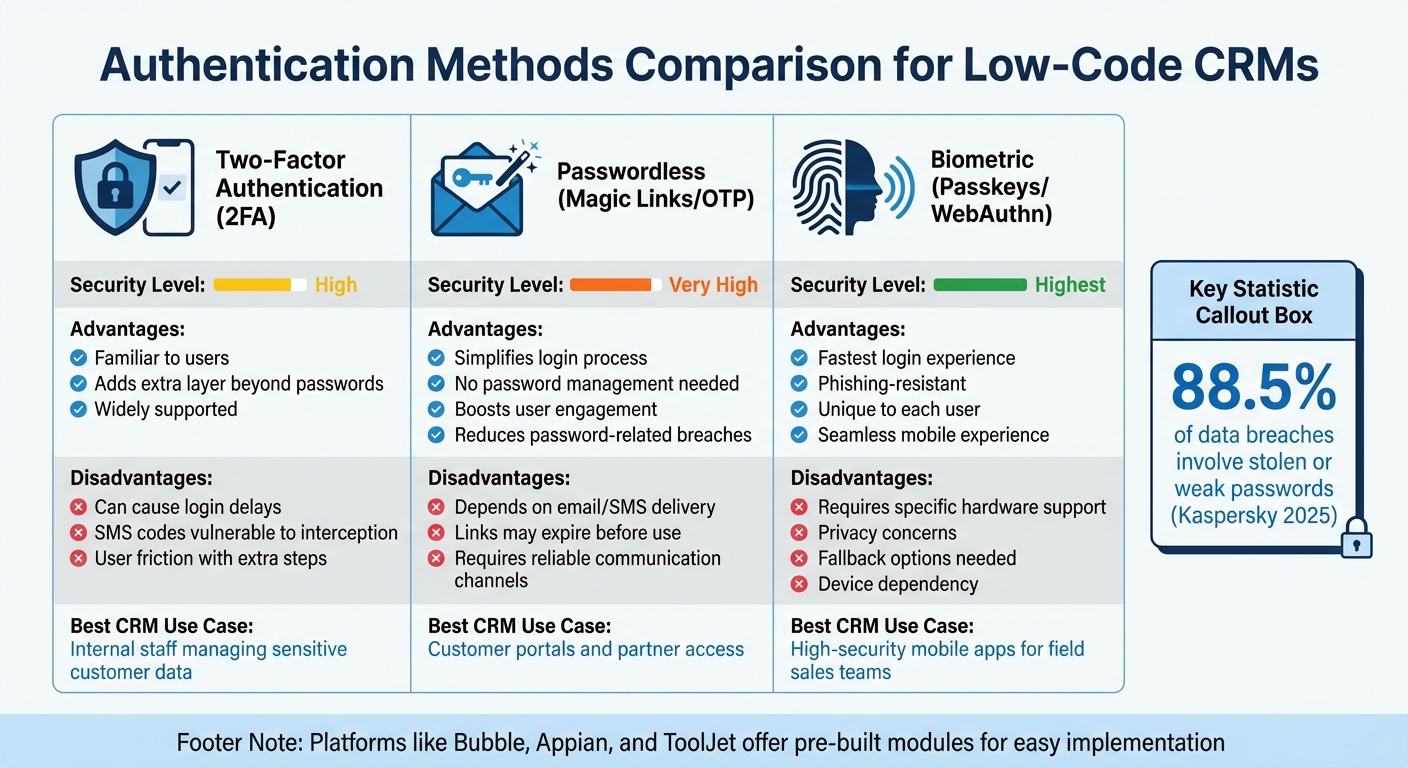
Comparison of Authentication Methods for Low-Code CRM Platforms
Choosing the right authentication method for low-code CRMs often boils down to the type of users and the sensitivity of the data involved. For internal teams handling critical customer information, two-factor authentication (2FA) is a standard choice. It combines a password with a secondary factor - like an SMS code or an authenticator app - to enhance security. However, it does come with a downside: users may find it inconvenient due to the extra steps required, such as waiting for codes or entering additional information during login.
On the other hand, passwordless authentication removes much of this friction. By using magic links or one-time passwords (OTPs) sent via email or SMS, it delivers a smoother login experience, particularly for customer portals or partner access. This can lead to better user engagement. As Gopal Ghelot, Founder, aptly puts it:
"Security is invisible until it fails; authentication is friction until it clicks".
That said, this method has its challenges too. It depends heavily on email or SMS delivery systems, and users may encounter issues if links expire before they can be used.
For those seeking both speed and high security, biometric authentication using passkeys (WebAuthn) is a standout option. This method, which includes fingerprint or facial recognition, is not only phishing-resistant but also offers a seamless experience. It’s especially useful for field sales teams relying on mobile CRM apps, as it ties authentication directly to the device. The catch? It requires specific hardware support, so fallback options like one-time passwords are essential for users with incompatible devices.
Authentication Methods Comparison Table
Here’s a snapshot of the key features of each authentication method:
| Authentication Method | Advantages | Disadvantages | CRM Use Case | Security Level |
|---|---|---|---|---|
| Two-Factor (2FA) | Familiar to users; adds an extra layer beyond passwords | Can cause delays; SMS codes are vulnerable to interception | Internal staff managing sensitive data | High |
| Passwordless (Magic Links/OTP) | Simplifies login; no need for passwords; boosts user engagement | Relies on email/SMS; links may expire | Ideal for customer portals or partner access | Very High |
| Biometric (Passkeys) | Fastest login; phishing-resistant; unique to the user | Requires specific hardware; privacy concerns; fallback needed | Best for high-security mobile apps for field teams | Highest |
Low-code platforms like Bubble, Appian, and ToolJet make implementing these authentication methods straightforward. Many offer pre-built modules or plugins, such as MojoAuth, that streamline the process without requiring complex backend development.
Research Findings on Challenges and Future Developments
Recent research sheds light on the persistent challenges and emerging solutions in authentication and access control, particularly within low-code platforms. While these platforms promise faster CRM development, they often come with security gaps. Many default configurations lack essential safeguards like email verification, password complexity requirements, and account lockout mechanisms. As Rose de Fremery from Spiceworks explains:
"The platform handles the hard security problems, but it can't stop someone from connecting to a database with their personal credentials or granting broader permissions than the app actually needs".
One frequent issue is the gap between frontend and backend enforcement. Developers sometimes hide admin buttons in the user interface but leave the corresponding API endpoints exposed. This creates a false sense of security - while sensitive data may seem protected visually, attackers can still access it by analyzing network traffic. In June 2025, researchers identified five Common Vulnerabilities and Exposures (CVEs) in Salesforce Industry Clouds. These vulnerabilities stemmed from minor configuration oversights that bypassed field-level security entirely. Another recurring problem involves credential exposure, where developers mistakenly embed sensitive API keys in client-side JavaScript, making them accessible to anyone inspecting the page source. These challenges underscore the need for solutions that address vulnerabilities on both the frontend and backend.
The Rise of Passkeys
Passkeys are emerging as a promising alternative to traditional authentication methods. In January 2026, Salesforce took a significant step by consolidating developer documentation for B2C Commerce to support SLAS (Shopper Login and API Access Service) Passwordless Login, enabling biometric-based authentication across commerce ecosystems. Similarly, Porkbun has mandated passkey-only authentication for account creation, effectively eliminating risks tied to passwords. Passkeys leverage public-key cryptography to counter phishing and man-in-the-middle attacks. However, challenges remain, particularly with account recovery when private keys are tied to specific hardware devices.
Adaptive Security and AI-Driven Anomaly Detection
AI-driven anomaly detection is gaining momentum as platforms move toward adaptive authentication. These systems analyze real-time user behavior - such as login location, device type, and time of day - to dynamically adjust security measures. For example, multi-factor authentication can be triggered only during high-risk scenarios, preserving both security and user experience. With Gartner predicting that 80% of low-code users will be outside IT departments by 2026, such automated guardrails are becoming increasingly critical as non-technical users build CRM applications.
Server-Side Enforcement and Credential Management
Another key trend is the shift toward server-side enforcement. Platforms are increasingly relying on measures like Row Level Security (RLS) and robust API authorization, moving away from frontend-only protections. However, many low-code tools still generate database tables with RLS disabled by default, leaving developers responsible for enabling this safeguard. Regular audits of connections and tokens are also essential, as platforms often fail to clean up outdated credentials. Microsoft Business Applications Expert Jukka Niiranen refers to this issue as "credential piling", where unused connections function as long-lived refresh tokens, creating vulnerabilities if not properly managed.
These findings highlight the importance of addressing low-code CRM security challenges, offering insights for both developers and non-technical users on improving system safeguards.
Conclusion
Low-code platforms have reshaped how businesses handle CRM user authentication by integrating protocols like OpenID Connect, SAML 2.0, and OAuth 2.0, combined with Role-Based Access Control (RBAC). The right platform ensures multiple layers of security - ranging from field-level permissions to API-level controls - while maintaining ease of use for non-technical teams. As Convertigo highlights:
"User authentication protocols stand as a pivotal element for ensuring robust security in low-code development platforms. These protocols serve as the first line of defense, verifying the identity of users and safeguarding sensitive data".
Choosing the right platform is crucial. Some platforms simplify security with visual, WYSIWYG-style permission tools, while others demand embedding security logic directly into data queries. Nigel Tape, an Enterprise Systems Expert, emphasizes:
"RBAC is where real life shows up. If a platform makes me bolt on custom logic for simple permission rules, I walk away. If the UI buries risk behind vague toggles, I raise a flag".
This underscores the importance of detailed access controls that go beyond surface-level security.
To maintain robust protection, businesses must enforce backend UI controls and adopt adaptive authentication measures. With 87% of developers now leveraging low-code platforms, automated security features and routine permission audits are essential.
For organizations evaluating their options, the Low Code Platforms Directory (https://lowcodeplatforms.org) is a helpful resource. It allows businesses to compare authentication features, security specifications, and compliance standards across platforms. By focusing on factors like Single Sign-On (SSO) integration, SCIM provisioning, and permission granularity, companies can choose tools that meet their security needs and technical capabilities - keeping their CRM systems accessible yet secure.
FAQs
When should I use SAML vs OIDC for CRM SSO?
When deciding between authentication protocols, go with SAML if you're working with legacy enterprise systems or require broad federation with enterprise identity providers. On the other hand, choose OIDC for modern web, mobile, or cloud-native CRM systems. OIDC offers simpler implementation and supports contemporary authentication flows. Many organizations find it useful to support both protocols, allowing them to accommodate both older and newer applications, ensuring adaptability across different environments.
How do I map IdP groups to CRM roles safely?
To ensure a secure process for mapping IdP groups to CRM roles, start by setting up group membership synchronization in your identity provider (IdP). Then, define the roles within your CRM system and link trusted IdP groups to the appropriate roles. Be especially cautious with sensitive roles, assigning them only to trusted groups.
Before rolling out the configuration, test the setup thoroughly. Use non-admin users or a separate admin account to verify that mappings work as intended. This precaution helps avoid losing administrative access and ensures the system is functioning as expected. These steps not only safeguard CRM access but also minimize the risk of manual errors.
What’s the best MFA option besides SMS?
The best way to improve security beyond SMS-based MFA is by switching to an authenticator app that generates Time-based One-Time Passwords (TOTP). This approach reduces risks tied to SMS codes, such as interception or SIM-swapping attacks.