Low Code PaaS platforms simplify app development, but scaling them to handle growth is a major concern. These platforms address scalability with features like auto-scaling, multi-tenancy, and built-in performance tools to manage traffic surges, optimize resource use, and maintain cost control. Key points:
- Traffic Surges: Tools manage spikes by optimizing workflows, database queries, and API usage.
- Cost Control: Platforms track backend tasks (e.g., database operations) to prevent budget overruns.
- Auto-Scaling: Resources adjust automatically based on demand, ensuring smooth performance.
- Multi-Tenancy: Efficiently allocates resources across multiple users while avoiding disruptions.
- Optimization Tools: Built-in features identify bottlenecks, improve response times, and reduce resource strain.
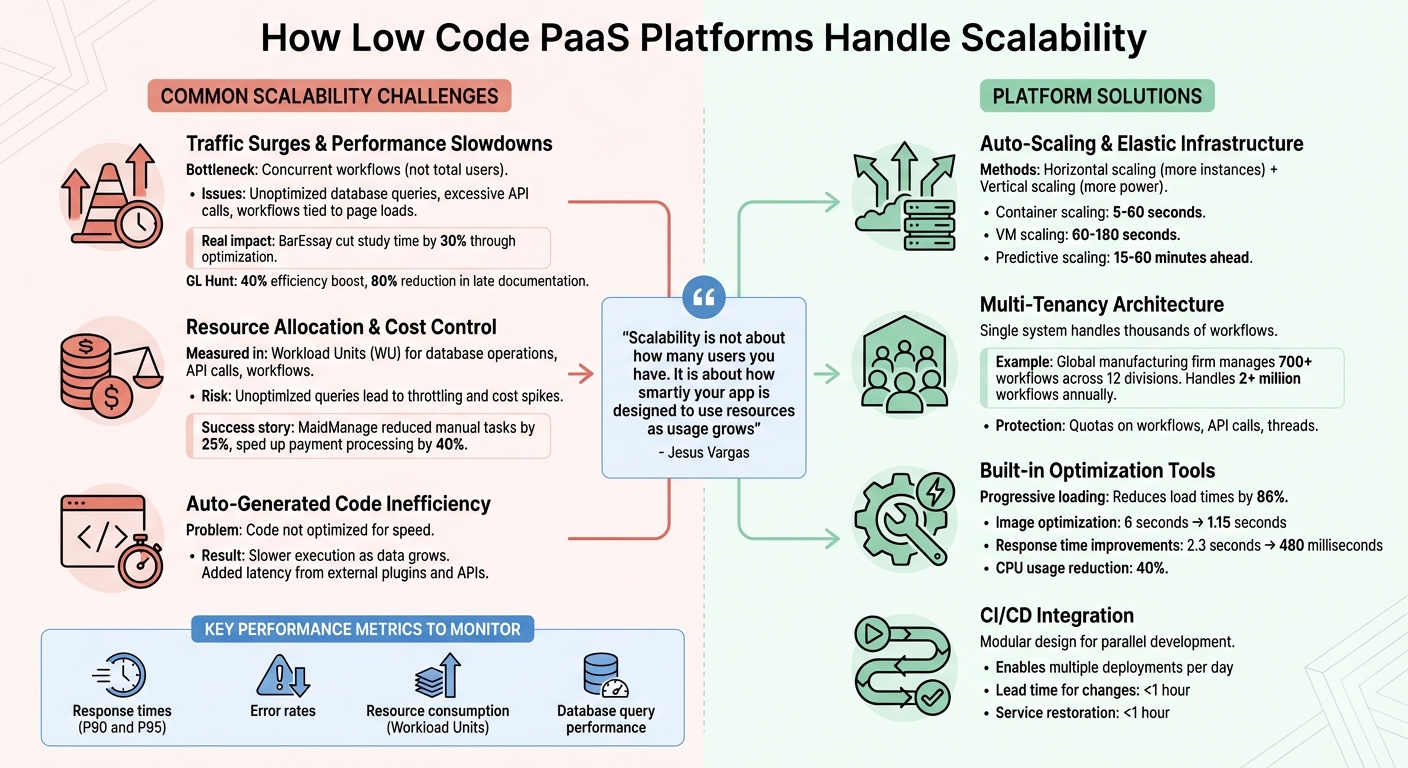
How Low Code PaaS Platforms Handle Scalability: Key Features and Solutions
Building a SaaS app with Low-Code in 4 months & scaling across multiple countries
Common Scalability Problems in Low Code PaaS
Even with automation at its core, low-code platforms often face scalability challenges that don’t become apparent until traffic surges push systems to their limits. Recognizing these issues early is key to creating apps that grow smoothly under pressure.
Traffic Surges and Performance Slowdowns
When traffic spikes, the cracks in a platform's architecture can quickly become obvious. The real bottleneck isn’t always the total number of users - it’s often the number of concurrent workflows. A few users running complex processes can strain the system more than thousands of users performing simpler tasks.
Common culprits include unoptimized database queries, excessive API calls, and workflows tied directly to page loads. These inefficiencies can drag down performance, especially during peak times. As Jesus Vargas, Founder of LowCode Agency, notes:
"Scalability in Bubble is not about how many users you have. It is about how smartly your app is designed to use resources as usage grows".
One issue is that the auto-generated code from low-code platforms isn’t always optimized for speed, leading to slower execution and longer data processing times as data grows. Additionally, external plugins and APIs can add latency, compounding the problem during high-demand periods.
Real-world examples highlight these challenges and solutions. For instance, in February 2026, BarEssay, an AI-powered platform for legal education, managed to serve thousands of active users by adopting efficient data structures and streamlining workflows. This optimization cut student study time by 30%. Similarly, GL Hunt improved its construction project management system by optimizing database queries and implementing role-based access. By July 2025, they saw a 40% boost in efficiency and an 80% reduction in late documentation.
Next, let’s look at how resource allocation and cost control play a role in scalability.
Resource Allocation and Cost Control
While traffic spikes test a platform’s performance, managing resources and budgets introduces another layer of complexity. Many platforms use Workload Units (WU) to measure backend tasks like database operations, API calls, and workflows. Poorly designed apps can drive up these costs, putting pressure on budgets.
Platforms like Bubble link pricing directly to processing power, meaning unoptimized queries or high-traffic periods can lead to unexpected cost increases or even throttling. Similarly, Firebase-based apps often face rising expenses due to increased data reads and real-time listener activity during surges. The challenge is finding a balance between scaling capacity based on immediate demand (elasticity) and keeping costs manageable.
Inefficient resource management can lead to slow performance, crashes, or even data loss - all of which can alienate users and hurt revenue. A great example of overcoming this challenge is MaidManage. In early 2026, the platform introduced workload-aware backend pricing logic, which helped reduce manual tasks by 25% and sped up payment processing by 40% as booking volumes grew.
These examples underline the importance of smart resource planning to ensure both scalability and cost efficiency.
How Low Code PaaS Platforms Handle Scalability
Auto-Scaling and Elastic Infrastructure
Auto-scaling works through a feedback loop: the platform monitors metrics like CPU usage, memory, and request rates, then adjusts resources based on predefined rules. This means when traffic spikes, the system can react within seconds.
These platforms use both horizontal scaling (adding more instances) and vertical scaling (boosting the power of existing ones). For example, container scaling can take as little as 5–60 seconds, while scaling virtual machines (VMs) often requires 60–180 seconds. Predictive scaling takes it a step further by analyzing historical data to anticipate demand, adjusting resources 15–60 minutes ahead of time.
One of the standout features is how low-code platforms simplify the complexity of scaling. They abstract the intricate details of tools like Kubernetes, making scaling nearly automatic through serverless architectures or managed instance groups. Load balancers are built-in to spread incoming traffic evenly across instances, ensuring no single node becomes overloaded.
To make auto-scaling efficient, it's critical to define minimum and maximum capacity limits. This approach ensures stable performance while avoiding excessive costs. Additionally, scaling policies should prioritize rapid resource allocation during traffic surges but remove resources more slowly to prevent constant fluctuations. For web services, "leading" signals like request concurrency or CPU usage are better triggers for scaling than "trailing" signals like latency.
Multi-tenancy complements auto-scaling by maximizing resource efficiency across users.
Multi-Tenancy for Efficient Resource Use
Multi-tenancy allows multiple users to share the same infrastructure without compromising data or process separation. A single system can handle thousands of workflows by dynamically reallocating resources as needed.
To avoid issues like the "noisy neighbor" effect - where one tenant's high usage disrupts others - platforms enforce quotas on workflows, API calls, and threads. Priority-based scheduling ensures that even during peak demand, performance remains consistent. As Dileepa Wijayanayake from FlowWright puts it:
"Scaling a multi‑tenant workflow engine is not simply about adding more servers - it's about smart architecture, autonomous optimization, and failure resilience".
For instance, a global manufacturing firm uses a multi-tenant low-code platform to manage over 700 workflows across 12 divisions, handling more than 2 million workflows annually. Platforms also use circuit breakers to handle external API failures. These mechanisms pause and queue calls after repeated failures, preventing wasted resources on unresponsive systems.
When paired with robust CI/CD tools, these strategies ensure smooth scaling and deployments.
CI/CD Integration for Smooth Deployments
CI/CD tools help teams iterate quickly while avoiding bottlenecks. Automated impact analysis identifies potential issues before they reach production.
Parallel development pipelines enable teams to work on different domains simultaneously, breaking applications into smaller, reusable modules. This modular approach not only keeps delivery consistent but also makes scaling and updates during deployments easier. Dan Iorg, Principal Product Manager at OutSystems, highlights this focus:
"OutSystems aims at enabling organizations to become high performers as designated by DORA research: organizations that deploy multiple times a day, with lead time for changes and restore of service in less than one hour, and with minimum change failure".
sbb-itb-33eb356
How to Optimize Performance in Low Code PaaS
Use Platform Optimization Tools
Many low-code platforms come with built-in tools designed to catch performance issues early. For instance, Adalo's X-Ray can scan your app to identify bottlenecks like slow database queries or inefficient data loading processes. Similarly, Appian's "Validate" tool checks for compatibility with autoscaling features and flags potential problems.
Application Performance Monitoring (APM) tools can pinpoint specific pain points, like time-consuming database queries or resource-heavy screens. For example, a logistics company using Mendix leveraged these insights to refactor their app, cutting response times from 2.3 seconds to just 480 milliseconds while reducing CPU usage by 40%.
Platforms also include features to improve speed right out of the box. One example is progressive loading, where content is loaded as users scroll. This method can slash initial screen load times by up to 86%. Additionally, platforms like Adalo often integrate with services like Imgix, which optimize and resize uploaded images. This can reduce download times from over 6 seconds to approximately 1.15 seconds.
After identifying issues, continuous monitoring of metrics ensures your app remains optimized as it evolves.
Monitor Metrics and Adjust Resources
Tracking the right metrics is key to understanding how your app performs in real-world conditions. Focus on response times, error rates, and resource consumption, rather than just average load times. Analyzing P90 and P95 response times - which show the slowest 10% and 5% of requests - can give a clearer picture of user experience and help pinpoint bottlenecks.
Platforms like Bubble use "Workload Units" to measure server resource usage, showing which actions - like searches, workflows, or API calls - consume the most resources. Setting up automated alerts for when resource usage exceeds thresholds allows your team to act quickly.
Database interactions are often a major source of slowdowns. Tools such as Power Apps Monitor or Salesforce Scale Center can identify costly queries that may need indexing or restructuring. In fact, just one or two poorly optimized workflows can account for over 70% of an app's slowdowns. As We LowCode aptly puts it:
"Hardware scaling without optimization just burns money faster. Proper tuning delivers sustainable performance".
Design for Future Growth
Beyond immediate fixes, designing with scalability in mind can save you from costly overhauls down the line. Start by normalizing your database structure to reduce redundancy and adding indexes to frequently queried fields like "Created At", "Status", or "Price". Pre-calculating values like counts or sums can also nearly double your app's speed.
Adopting a modular design is another smart move. Breaking complex screens into smaller, simpler ones and shifting resource-intensive calculations to background workflows can improve performance now while making it easier to add features or handle increased user traffic later.
User behavior should also guide your design choices. Since 53% of mobile users abandon apps that take longer than 3 seconds to load, implementing pagination and lazy loading is crucial. For heavy tasks like bulk exports or complex calculations, offloading them to serverless functions (e.g., Xano or Supabase) can keep the interface fast and responsive. These early architectural decisions ensure your app can grow without needing a complete rebuild.
Low Code Platforms Directory: Find Scalable Platforms
When it comes to choosing a platform that can handle your scalability needs, the Low Code Platforms Directory at lowcodeplatforms.org simplifies the process. This centralized resource offers filtering options to help you pinpoint platforms tailored to your requirements - whether you're looking for features like auto-scaling, multi-tenancy, or CI/CD support. These elements, which we covered earlier, are critical for ensuring your app performs well under increasing demand.
The directory categorizes platforms by their architectural strengths and use cases. For example, Kestra is highlighted as an "infinitely scalable" orchestration platform that can handle millions of workflows. Meanwhile, OutSystems and Mendix are designed for enterprise-grade applications where scalability is a top priority. If multi-tenancy is a must-have for managing multiple clients or business units within a single instance, platforms like Appsmith and GoodData are identified for their support of this architecture. Advanced filtering options make it easy to match these features to your specific needs.
The directory also lets you filter by deployment models, including SaaS, on-premises, private cloud, or edge-ready solutions. You can even refine your search by technical stack, such as database compatibility (SQL, NoSQL, Cassandra) or API-first approaches. For teams prioritizing continuous deployment, platforms like Flutterflow stand out with built-in CI/CD capabilities, offering one-click deployment to app stores or the web.
Pricing is another key factor, and the directory provides transparent cost comparisons. For instance, Appsmith offers a free community edition, with business plans starting at $0.40 per hour of usage. Mendix plans range from €52.50/month for basic options to €900/month for enterprise-level needs. On the higher end, OutSystems enterprise plans cost about $36,300 annually, while Power Apps premium plans start at $20 per user per month. This clarity helps you understand the financial implications of scaling your platform.
With the low-code market projected to hit $32 billion by 2024, this curated directory is an invaluable tool. It distinguishes between platforms suited for business developers, who need modest scalability, and professional developers, who require high-scale solutions with advanced tooling. By narrowing down your options, the directory makes it easier to choose a platform that aligns with your growth goals.
Conclusion
Scalability challenges don’t have to hold back your application’s growth. Low Code PaaS platforms tackle these issues head-on with features like auto-scaling infrastructure and multi-tenancy architectures. These tools ensure your apps perform efficiently, whether you're dealing with sudden user spikes or managing a growing portfolio of interconnected applications.
But here’s the key: smart design beats sheer user numbers. As Jesus Vargas, Founder of LowCode Agency, explains:
"Scalability in Bubble is not about how many users you have. It is about how smartly your app is designed to use resources as usage grows".
By refining your data models, shifting resource-heavy operations to backend workflows, and keeping a close eye on performance metrics, you can avoid bottlenecks before they affect your users.
Modern platforms make this easier with practical tools like workload units for tracking resources and automated scaling features. For example, Adalo 3.0’s infrastructure updates cut initial load times by 86%, while Appian’s Autoscale feature enables enterprises to handle up to 6 million processes per hour. These advancements translate directly into more reliable and scalable applications.
Whether your audience is in the hundreds or the millions, combining the right platform with thoughtful architecture sets the stage for sustainable growth. If you’re searching for platforms that excel in scalability, the Low Code Platforms Directory is a great resource.
Start by evaluating your anticipated workloads, designing modular systems from the outset, and continuously monitoring your metrics. With these steps, your low-code applications can confidently scale alongside your business.
FAQs
How do I estimate scaling costs before traffic grows?
To get a handle on scaling costs for a low-code platform, start by examining the platform’s pricing structure, workload caps, and your projected resource demands. Most low-code platforms operate on scalable cloud systems, meaning your costs will increase as your usage grows.
Take a close look at tiered pricing plans, the complexity of your app, and how much user growth you expect. These factors will help you estimate expenses more accurately. Keeping an eye on your app’s design and usage patterns is also crucial - this can help you sidestep surprise costs during sudden traffic spikes.
What’s the fastest way to find the biggest performance bottleneck?
The fastest way to uncover major performance issues in a low-code platform is by profiling your application and conducting load testing in conditions that mimic real-world usage. Pay close attention to key metrics like:
- Page load times: How quickly pages render for users.
- API response times: The speed at which your application communicates with APIs.
- Resource usage: How your app handles system resources during peak traffic.
By analyzing these metrics, you can quickly identify problem areas. This approach ensures your application is prepared to tackle scalability challenges head-on.
When should I offload heavy tasks to backend workflows or serverless functions?
When you're handling unpredictable demand, processing large datasets, or performing intensive computations, it's smart to offload these heavy tasks to backend workflows or serverless functions. Think of operations like image processing, text analysis, or other resource-heavy tasks. Offloading ensures your application runs smoothly by preventing it from being bogged down. Plus, it allows resources to scale automatically based on demand, keeping things efficient and cost-effective.