Field workers often face challenges when internet access is unreliable. Low-code platforms with offline data features address this by allowing users to store data locally and sync it once reconnected. Here’s a quick comparison of three platforms: Clappia, AppSheet, and Retool.
- Clappia: Best for ease of use with automatic offline sync, native mobile apps, and a free plan. Pricing starts at $6/user/month.
- AppSheet: Offers customizable sync options and strong Google Workspace integration. Pricing starts at $5/user/month.
- Retool: Designed for technical teams with advanced query control and job tracking. Offline mode is available only on Business plans, starting at $50/builder/month.
Quick Comparison
| Feature | Clappia | AppSheet | Retool |
|---|---|---|---|
| Offline Sync | Automatic background sync | Configurable (manual/auto) | Manual conflict resolution |
| Mobile Apps | Native (iOS, Android) | Native (iOS, Android) | Native (iOS, Android, PWA) |
| Starting Price | $6/user/month | $5/user/month | $50/builder/month (Business) |
Each platform serves different needs: Clappia for simplicity, AppSheet for flexibility, and Retool for enterprise-level control.
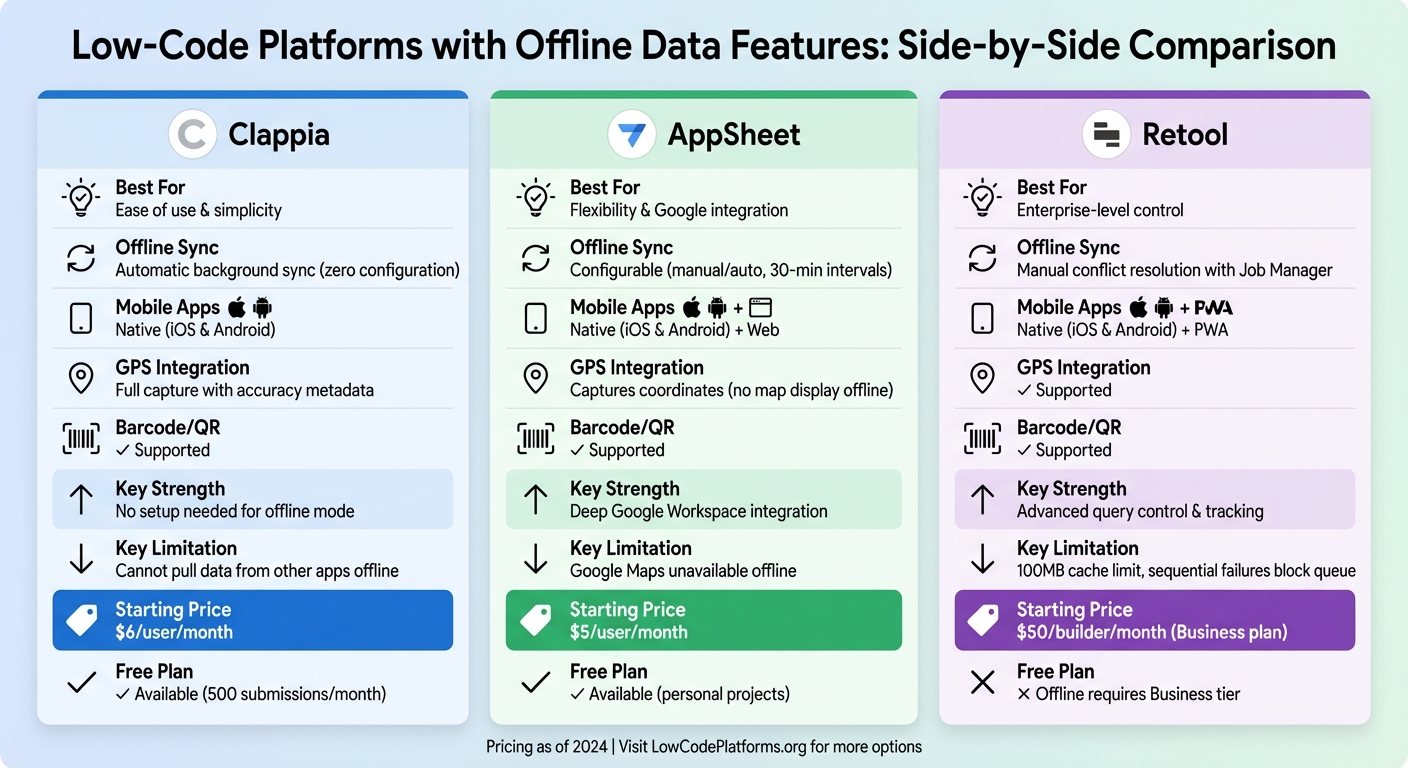
Low-Code Platforms Offline Features Comparison: Clappia vs AppSheet vs Retool
1. Clappia
Offline Sync Quality
Clappia is designed to keep things running smoothly even when you're offline. It stores data locally on your device and automatically uploads it once you're back online. The platform supports various data types, including text, numbers, GPS coordinates, photos, videos, digital signatures, and NFC scans. There’s also an Offline Data management section where you can check pending submissions, refresh syncs manually, or send diagnostic logs if needed. However, while offline, you won’t be able to change submission statuses or pull live data from other Clappia apps. To avoid hiccups in remote areas, make sure to open the app and pre-load any required submissions while you’re still connected to the internet. This offline sync capability translates seamlessly to its mobile app experience.
Mobile App Type
Clappia offers native apps for both Android and iOS, available on the Play Store and App Store. These apps take full advantage of Clappia’s offline sync capabilities, ensuring you can use any app built on the platform - even without internet access. For instance, a construction firm in Texas created a safety inspection tool using Clappia’s app, complete with GPS verification and offline photo capture. The result? A 70% drop in paperwork and a 95% improvement in compliance. Similarly, a logistics company in New Jersey used the app for delivery tracking in areas with poor connectivity, capturing proof of delivery with photos and signatures offline, which then synced automatically once they regained internet access.
Key Integrations
Clappia integrates with a wide range of databases, including MySQL, PostgreSQL, Microsoft SQL Server, Azure SQL, and MongoDB, allowing for two-way synchronization. It also connects with productivity tools like Google Sheets, Google Drive, Airtable, Microsoft SharePoint, OneDrive, and Dropbox, as well as enterprise systems such as Salesforce, HubSpot, SAP, Oracle, Microsoft Dynamics, NetSuite, and Zoho CRM. These integrations ensure workflows continue uninterrupted, even after auto-syncing. For example, Clappia can trigger actions like sending WhatsApp notifications, generating PDFs, or updating ERP records when you reconnect. Additionally, Zapier opens the door to over 5,000 other apps. If you’re integrating with a private database, you’ll need to whitelist Clappia’s IP addresses (15.197.176.43, 3.33.248.224, and 13.127.107.115) in your firewall settings.
Pricing
Clappia’s pricing is straightforward. The Free Plan includes unlimited apps and allows up to 500 submissions per month. The Starter Plan, priced at $6 per user per month, adds offline mode, GPS, workflows, and integrations. For larger organizations, the Enterprise Plan offers custom pricing and perks like white-labeled apps, Single Sign-On (SSO), and dedicated support.
sbb-itb-33eb356
2. AppSheet
Offline Sync Quality
AppSheet keeps a local copy of your app and its data on your mobile device. This means you can view, add, or edit records even when you're offline. The sync process involves three steps: uploading local changes, refreshing the app definition, and downloading updated data. You can choose from various sync options to suit your needs. For example, Delayed Sync queues changes locally, letting you sync manually or wait for an automatic update - a great option for areas with unreliable connectivity. Automatic Updates handle syncing in the background when the app starts, when changes are queued, or when local data is older than 30 minutes. Meanwhile, Quick Sync (available with the Core plan or higher) ensures you see others' updates almost instantly.
While spreadsheet data automatically caches, you'll need to enable offline access for images and documents. Features like Google Maps, video playback, and audio files may have limited or no functionality offline. To prepare for offline use, launch the app at least once while connected to the internet to download necessary content. Avoid staying offline for extended periods to minimize the risk of data conflicts.
Mobile App Type
AppSheet supports mobile apps for both iOS and Android, which can be accessed directly from your device's home screen. The platform has earned a 4.8/5 rating from 546 verified user reviews, with 95% highlighting its ease of use and accessibility for building prototypes. However, offline functionality isn't enabled by default. You’ll need to activate "Offline mode" and "The app can start when offline" in the settings. For apps requiring visual inspections, make sure to turn on "Store content for offline use" and allow time for the necessary downloads.
"AppSheet allowed us to build an Inventory Logistics App with just one person over a couple of days, a task that would have previously taken several months to achieve by several developers."
– Rhys Phillips, Digital Workplace Change & Adoption Lead, Airbus
Next, let's look at how Retool handles offline data capture.
Key Integrations
AppSheet's offline editing integrates smoothly with backend systems, ensuring your workflow stays uninterrupted. It connects with Google Workspace tools like Sheets, Drive, Calendar, and Meet, as well as Microsoft 365 apps such as Excel and OneDrive. It also supports proprietary low code platforms and enterprise data sources like Salesforce, MySQL, PostgreSQL, and SQL Server, along with services like Dropbox, Box, and BigQuery. These integrations allow backend data to cache locally, enabling offline editing. Additionally, AppSheet lets you capture GPS coordinates and scan barcodes or QR codes using your device’s hardware, even when offline. However, features that require real-time data - like Google Maps, video playback, or external API calls - depend on an active internet connection.
Pricing
AppSheet offers a free version for personal projects and initial testing. For more features, the Starter Plan costs $5 per user per month and includes basic authentication and offline functionality. The Core Plan, priced at $10 per user per month, adds features like advanced security, barcode scanning, and Quick Sync. Larger organizations can explore Enterprise Standard and Enterprise Plus plans with custom pricing, which include advanced options like team collaboration, governance tools, and machine learning capabilities. Advanced sync features such as Server Caching, Delta Sync, and Quick Sync are only available with the Core plan or higher.
3. Retool
Retool takes a unique approach to offline data capture, offering developers a high level of control and flexibility.
Offline Sync Quality
Retool handles offline syncing by caching read queries after they’ve been accessed online and queuing write queries for execution once reconnected. If a data conflict arises, syncing stops to avoid errors. The Job Manager feature lets you track pending, failed, and completed queries, providing the option to inspect or delete specific tasks. By default, queued queries execute automatically when the connection is restored, but you can override this behavior using the "Mobile offline mode delay sync" setting. The local cache can store up to 100MB, automatically clearing the oldest data when this limit is exceeded.
One key limitation: offline write queries must be independent. For example, you can’t create a record offline and immediately use its ID for another action. While this restriction ensures smooth query management, it may require adjustments in workflow. For files and images, enabling the mobileRetoolStorageAsync feature flag allows uploads to be queued for submission when back online.
Mobile App Type
Retool supports native apps for iOS and Android, built using React Native, alongside Progressive Web Apps (PWAs) for devices like Amazon Fire tablets or standard web browsers. Native apps require iOS 15.5+ or Android 6.0+, with offline mode fully supported. Connection status is indicated by color codes: green for connected, amber for offline with pending changes, and red for sync errors. Retool also supports offline PDF viewing via its Offline Asset Library and PDF Viewer component.
With a 4.6/5 rating on Gartner Peer Insights from 184 reviews, Retool is trusted by over 10,000 companies for internal operations. However, offline mode is only available on Business or Enterprise plans, meaning Free and Team tier users will need to upgrade to access this feature.
Key Integrations
Retool integrates with over 70 databases and APIs, including PostgreSQL, MySQL, MongoDB, REST, and GraphQL. It also connects with popular SaaS platforms like Salesforce, Stripe, and Zendesk. For offline use, Retool Storage plays a vital role, especially when the mobileRetoolStorageAsync flag is activated, enabling file and image uploads to queue until connectivity is restored. Retool takes advantage of native device features like NFC tag reading, signature capture, and camera access, and it supports specialized hardware such as Zebra and Proglove barcode scanners.
Pricing
Retool’s pricing starts at around $10 per builder per month and $5 per standard user per month. Offline mode, however, is exclusive to Business and Enterprise plans, applicable to both Cloud and Self-hosted deployments (Stable versions 3.33+ or Edge versions 3.36+).
Strengths and Weaknesses
Each platform has its own way of handling offline data capture, tailored to different levels of technical expertise and budget considerations. Here's a quick breakdown of their features:
| Feature | Clappia | AppSheet | Retool |
|---|---|---|---|
| Offline Sync Quality | Automatic background sync; no setup needed | Configurable (Delayed Sync, 30‑min auto‑sync) | Sequential write processing; manual conflict resolution |
| Mobile App Type | Native (Android & iOS) | Native (Android & iOS) and Web | Native (Android & iOS) and PWA |
| GPS Integration | Full GPS capture with accuracy metadata | Captures coordinates offline; no map display | GPS capture supported |
| QR/Barcode Scanning | Supported | Supported | Supported |
| Starting Price (USD) | $0 (Free plan available) | $5/user/month | $15/user/month (Business tier required) |
| Key Strength | Zero‑configuration offline mode; robust media support | Deep Google Workspace integration; granular sync control | Job Manager for tracking pending changes; granular query control |
| Key Weakness | Cannot pull data from other apps while offline | Google Maps won't display offline | 100MB cache limit; sequential failures block queue |
Clappia
Clappia stands out for its ease of use. As their documentation highlights, "Apps created in Clappia works offline, there's no need to change any setting". This simplicity extends to their free plan, which includes offline functionality, making it a great choice for small teams or those new to low-code development platforms. However, its biggest limitation is the inability to retrieve data from other apps when offline.
AppSheet
AppSheet shines with its configurable sync options, offering users control over how data is handled offline. The platform "automatically queues changes and defaults to delayed sync behavior to prevent the loss of data". This flexibility makes it appealing to users who need tailored offline workflows. That said, while it can capture GPS coordinates offline, Google Maps features are unavailable without an internet connection.
Retool
Retool is geared toward enterprises needing advanced control, but it comes at a higher cost. Its Job Manager allows users to inspect and manage queued queries individually. However, as noted, "one query fails due to a conflict, the user must resolve it before any remaining queries can run". Additionally, the 100MB cache limit and the requirement for a Business plan for offline functionality make it a better fit for organizations with complex needs and dedicated technical teams.
Conclusion
The comparisons above showcase how each low-code platform caters to specific operational needs. Selecting the right tool for offline data capture depends on factors like technical expertise, budget, and the demands of your industry.
For remote field data collection, Clappia stands out as a simple and affordable option, starting at $6 per user per month. It includes automatic offline functionality, making it ideal for field services. AppSheet, priced at $5 per user per month, offers customizable offline sync features and seamless integration with Google Workspace. On the other hand, Retool is geared toward enterprises building complex internal tools. Its offline capabilities, available only in the Business plan (starting at $50 per builder per month), include features like Job Manager and detailed query control, which help technical teams handle data caching and syncing efficiently.
The platforms differ significantly in terms of cost, user-friendliness, and enterprise-level features. Clappia provides offline mode without the need for setup, AppSheet allows detailed sync management, and Retool delivers advanced query handling for technical users.
For more options, the Low Code Platforms Directory offers a robust filtering system to explore tools tailored to specific needs, such as AI, automation, and CRM, helping you find the best fit.
FAQs
How long can I work offline before sync conflicts become likely?
The chances of running into sync conflicts grow the longer you work offline, particularly when several users are editing the same data. How quickly conflicts arise depends on the platform's sync setup and how it's being used. To reduce these issues, review the platform's recommendations for offline use and syncing processes.
What should I preload while online to avoid missing data offline?
To avoid losing access to important information when offline, make sure to preload the necessary data while you're online. This might include things like work orders, client information, asset inventories, or other key records. Depending on the app you're using, you can also preload structured forms, checklists, images, GPS coordinates, or QR codes. By doing this, users can continue working without interruptions, and all data will sync back to the server as soon as the connection is restored.
Which offline features stop working without internet (maps, files, APIs)?
Offline tools like maps, files, and APIs often lose functionality without an internet connection. However, data collection and synchronization can still operate effectively when set up correctly. Many platforms are designed to support offline data capture and syncing, allowing essential features to remain accessible even when you're offline.