Low-code test automation is transforming how teams handle continuous deployment. It simplifies testing, reduces maintenance time, and speeds up integration with CI/CD pipelines. Unlike script-based methods that require specialized coding skills, low-code QA automation tools use visual tools and AI-powered features to make testing faster and more accessible to non-technical team members.
Here’s the key takeaway:
- Speed: Low-code tools can create tests up to 10x faster than script-based methods.
- Maintenance: AI-driven self-healing minimizes manual updates when UI changes.
- Integration: Low-code platforms offer built-in compatibility with CI/CD tools, easing the setup process.
- Cost: While licensing fees range from $10,000 to $30,000 annually, the reduced engineering workload often offsets these costs.
For teams managing frequent deployments, low-code automation is a practical solution to keep up with fast-paced development cycles.
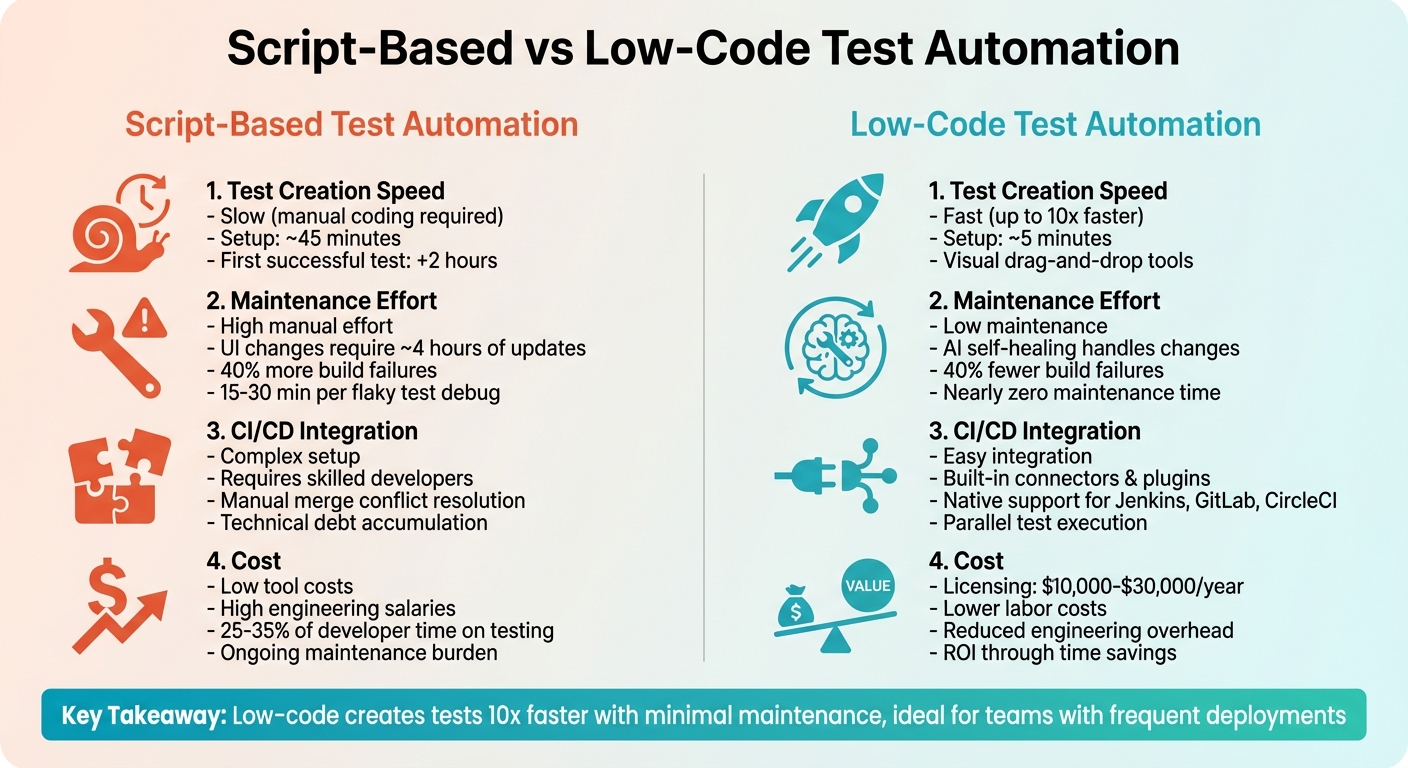
Script-Based vs Low-Code Test Automation Comparison
1. Script-Based Test Automation
Test Creation Speed
One of the biggest challenges with script-based automation is how much it slows down test creation. Developers have to manually code every test scenario, which delays the feedback loop in the CI/CD pipeline. Writing these tests takes time because they need to simulate user interactions in detail. Often, they’re written late in the development cycle, which means issues aren’t caught as early as they could be.
For example, setting up a complex script-based testing environment typically takes about 45 minutes. After that, it can take another 2 hours to get the first successful test run. When compared to modern approaches, this can be up to 10 times slower in terms of test creation speed. For teams deploying updates several times a week, these delays can quickly become a frustrating bottleneck.
Maintenance Effort
Maintaining script-based tests is another pain point, especially when the user interface (UI) changes. Even small tweaks to the UI can require developers to manually update scripts. In one case study involving a standard e-commerce checkout flow, legacy automation tools needed around 4 hours of manual updates after a UI refactor.
Then there’s the issue of flaky tests. These are tests that might pass in a local environment but fail in the CI/CD pipeline due to timing issues or race conditions. Each failure forces engineers to spend 15 to 30 minutes switching contexts to investigate. Traditional script-based solutions can lead to up to 40% more build failures compared to AI-powered tools, adding even more strain on engineering teams.
CI/CD Integration Ease
Getting script-based tests to work smoothly with CI/CD pipelines isn’t straightforward. It often requires skilled developers to manage the integration, which can lead to a buildup of technical debt. Over time, this makes the test suite harder to maintain with every new deployment.
Merge conflicts are another headache. Traditional tools often struggle with conflicts in XML and JSON metadata files, forcing teams to manually intervene during the pipeline stages. This "uncertainty tax" means developers spend more time debugging failing tests instead of building new features.
Cost
The costs tied to script-based testing go far beyond the price of the tools themselves. Maintaining these tests often becomes a full-time job for senior engineers, pulling them away from more impactful work like feature development. Unlike low-code options, script-based testing demands expertise in programming languages such as Java, Python, or C#, which drives up labor costs. Add in the time spent maintaining flaky tests and troubleshooting, and the financial and time drain becomes substantial.
These challenges highlight why many teams are exploring alternatives like proprietary low-code platforms, which aim to simplify test automation and reduce the burden on developers.
sbb-itb-33eb356
2. Low Code Test Automation
Test Creation Speed
free low-code platforms and paid tools make test creation faster by swapping out manual coding for visual tools like drag-and-drop interfaces and pre-built components. Instead of scripting in languages like Java or Python, teams can record user actions, describe scenarios in plain language (e.g., "Search for laptop"), or visually map out workflows using blocks. These tools significantly cut down setup and test execution times. For instance, some low-code tools can be ready in just 5 minutes, compared to the 45 minutes often required by traditional methods.
A standout feature of low-code platforms is how they open up testing to more team members. Product managers, business analysts, and designers can now create and run tests without needing to rely on QA automation engineers. According to Gartner, by 2025, 70% of new applications will use no-code or low-code tools, a big jump from less than 25% in 2022. Faster test creation also means fewer maintenance headaches down the line.
Maintenance Effort
Low-code platforms significantly reduce the effort needed for test maintenance. In traditional script-based testing, even small UI changes - like a CSS class update - can cause tests to break, requiring hours of manual fixes. Low-code tools tackle this with AI-driven self-healing, which automatically updates tests when UI changes occur. This feature can cut build failures by up to 40% compared to traditional methods. Engineers can then spend more time on new features instead of debugging. Tools like mabl are particularly noted for their AI-powered failure triage, which helps identify actual bugs while filtering out flaky tests.
CI/CD Integration Ease
Low-code tools also make integrating with CI/CD pipelines simpler. Built with continuous integration and deployment in mind, these platforms provide native integrations and plugins for popular systems like Jenkins, GitLab CI, CircleCI, and GitHub Actions. They also offer APIs and command-line tools to trigger tests automatically after a build or deployment. Features like parallel test execution speed up feedback loops, while support for environment variables ensures tests run smoothly across various configurations and staging environments. Additionally, Git-based version control integration allows teams to manage test assets alongside application code, improving collaboration and tracking.
Cost
Although low-code tools come with licensing fees, the efficiency gains and reduced engineering workload often justify the expense. Pricing varies by platform. For example, Katalon's Premium tier - necessary for CI/CD integration - costs about $170 per user per month (around $2,040 annually). TestRigor starts at approximately $10,000 annually for teams, while enterprise solutions like Leapwork and AccelQ can exceed $30,000 per year. These costs are offset by savings in labor. For instance, debugging a single test failure in traditional setups can take a senior engineer 15 to 30 minutes. Low-code automation, which can develop tests up to 10 times faster than traditional methods, delivers real value for teams releasing updates multiple times a week. This speed translates into quicker releases and lower engineering overhead.
Unlock Getting Started with Low-Code Automation in 5 Minutes
Advantages and Disadvantages
Script-based automation allows for endless customization to handle edge cases and complex scenarios. However, it comes with some notable challenges. These tests are fragile, often breaking with even minor changes to UI elements like CSS classes or HTML structures. When tests fail, they require extensive manual investigation to pinpoint issues. This introduces what some call an "uncertainty tax", which can quickly escalate in fast-paced continuous deployment environments where releases happen several times a week. Additionally, script-based automation demands engineers proficient in programming languages like Java or Python, raising the technical bar for implementation.
On the other hand, low-code automation shifts the dynamic by making test creation more accessible and cutting down on maintenance time. By enabling non-technical team members to participate in test writing, it broadens the scope of who can contribute, moving beyond just QA engineers. AI-powered self-healing features automatically adjust tests when UI elements change, which significantly reduces the frequency of build failures. Keith Powe, VP of Engineering at IDT, highlighted this improvement:
We spent so much time on maintenance when using Selenium, and we spend nearly zero time with maintenance using testRigor.
To summarize, the core trade-off lies between flexibility and speed. Script-based automation offers full control but requires constant manual updates and specialized engineering expertise. In contrast, low-code platforms prioritize speed - enabling test creation up to 10 times faster - and require almost no maintenance. While low-code solutions do introduce vendor dependency, they align better with the rapid pace of continuous deployment, as teams can rely on the platform provider for updates and bug fixes.
Here’s a comparison of key features across both approaches:
| Feature | Script-Based Automation | Low Code Test Automation |
|---|---|---|
| Test Creation Speed | Slow (manual coding required) | Fast (up to 10x faster via visual tools) |
| Maintenance Effort | High (manual updates for every UI change) | Low (AI self-healing handles changes) |
| CI/CD Integration Ease | Complex (requires custom scripts and setup) | Easy (built-in connectors and plugins) |
| Cost | High engineering salaries, low tool costs | Higher licensing fees ($10,000–$30,000+ annually), lower labor costs |
The cost aspect deserves attention. While low-code platforms may charge licensing fees ranging from $10,000 to over $30,000 annually - depending on the solution, such as testRigor or Leapwork - they save significant engineering time that would otherwise be spent on maintaining tests. Considering that testing can take up 25% to 35% of a developer's time, these efficiency gains often make the expense worthwhile for teams that release updates frequently. These pros and cons underscore the broader goal of simplifying continuous deployment through smarter test automation.
Conclusion
Low-code test automation is a natural fit for the fast-paced demands of continuous deployment. When updates roll out several times a week, these platforms make it easier to create tests quickly, reduce the hassle of maintenance, and involve non-technical team members in the testing process. This approach not only speeds up test creation but also guides smarter decisions when selecting tools.
As mentioned earlier, low-code platforms streamline test creation, minimize upkeep, and work seamlessly with CI/CD pipelines. For teams managing frequent deployments, it's essential to pick tools that align with user needs while supporting native CI/CD integration, command-line execution, and parallel testing.
Though licensing costs range between $10,000 and $30,000 annually, the time saved on engineering tasks often justifies the expense. By 2024, industry forecasts predicted that over 65% of all application development would involve low-code tools, highlighting their expanding role in modern DevOps workflows. Hybrid platforms strike a balance by offering the simplicity of visual tools while allowing custom scripting for more complex scenarios, ensuring flexibility over time.
Lastly, consider implementing back-deployments to keep development environments aligned with production. This prevents the drift that can lead to merge conflicts and delay future releases. For a curated list of tools tailored to automation, testing, and continuous deployment, check out the Low Code Platforms Directory at https://lowcodeplatforms.org.
FAQs
When should a team choose script-based testing over low-code?
Script-based testing works best for situations requiring highly tailored, complex, or edge-case scenarios that low-code platforms often can't manage effectively. This approach provides more flexibility and control when dealing with intricate logic, strict requirements, or integrations involving specialized systems. Teams with strong coding skills or those handling complex testing demands may find script-based methods a better fit compared to low-code alternatives in such cases.
How does AI self-healing actually fix broken UI tests?
AI self-healing keeps UI tests running smoothly by automatically adjusting to changes in an application's interface - no manual fixes needed. When elements like CSS selectors or XPaths break due to UI updates, the AI steps in to re-identify them. It uses methods like analyzing visual attributes, contextual positioning, and unique element identifiers (often called fingerprints). This approach helps maintain test stability, cuts down on maintenance work, and reduces the chances of inaccurate test failures.
What’s the best way to add low-code tests to an existing CI/CD pipeline?
To integrate low-code tests into a CI/CD pipeline, opt for platforms that support visual test automation with little to no coding required. Look for tools that work seamlessly with CI/CD systems such as Jenkins or GitHub Actions. These tools let you design visual test cases through drag-and-drop interfaces, set up automatic triggers to run tests during builds or deployments, and track outcomes using built-in analytics. This approach simplifies testing, minimizes the need for scripting, and ensures continuous validation throughout the development process.