Scalability is a critical aspect of low-code projects. Without proper planning, your app could struggle with performance issues, costly rewrites, or vendor lock-in as it grows. Here's what you need to know:
- Scalability has two dimensions: runtime (handling traffic spikes, large datasets) and dev-time (managing teams, interconnected apps).
- Common risks: performance bottlenecks, vendor dependency, and inadequate architecture.
- Key strategies: plan for user load and data growth, optimize databases, use hybrid development (low-code + custom code), and optimize low-code app performance through early testing.
- Platform selection matters: Choose tools with strong API support, cloud-native infrastructure, and monitoring capabilities.
Example: A legal education platform scaled to thousands of users by optimizing workflows and database structures, cutting study time by 30%.
Start by estimating user traffic, indexing data fields, and separating transactional from analytical data. For enterprise growth, focus on governance, modular designs, and real-time monitoring. These steps ensure your app grows without compromising performance or spiraling costs.
Building Scalable Apps with Low Code - Meera S
sbb-itb-33eb356
Common Scalability Risks in Low Code Projects
Ensuring your low-code projects scale effectively without sacrificing performance is no small feat. While these platforms promise faster development—often starting with free low-code platforms—they also bring unique challenges that can hinder growth if not addressed early. Identifying these risks is essential to keep your systems running smoothly as your business expands.
Performance Bottlenecks
Low-code applications often face performance issues due to inefficiencies in databases and workflows. For example, unconstrained searches, missing indexes, and overly complex object relationships can bog down system resources as your data grows. Similarly, frontend workflows that execute heavy logic during page loads can tax client-side processing, while synchronous handling of long-running tasks creates bottlenecks when multiple users access the system at once.
Another hurdle is the reliance on point-to-point dependencies and the limited use of modern techniques like queues or event-driven architectures, which are essential for distributing workloads efficiently. On top of that, the abstraction layers that make low-code platforms easy to use can limit the fine-tuning required for high-traffic applications.
These performance struggles often pave the way for broader scalability issues, including challenges tied to vendor dependency, which we’ll discuss next.
Vendor Dependency Constraints
Vendor lock-in is a significant concern for low-code users. Proprietary runtime engines and non-standard code generation often tether applications to a single platform. In fact, 62% of IT leaders worry about vendor lock-in, and nearly 70% of organizations experience rising costs within five years of adopting a low-code platform.
The pricing models of many low-code platforms, which scale based on users, apps, or deployments, can exacerbate these costs. As Amitabh Sharan from Betty Blocks points out:
"The more successful your low-code initiatives become, the more locked in you are. Growth becomes a liability rather than an asset".
Breaking free from these platforms isn’t easy - 83% of enterprise data migration projects either fail or overshoot their budgets, making the transition costly and complex. If a vendor’s roadmap doesn’t align with your scaling needs, you might face lengthy delays or even have to rebuild your solution from scratch.
But vendor issues are just one piece of the puzzle. Scalability risks also emerge during both runtime and development phases.
Run-Time and Dev-Time Scalability Issues
Scalability challenges generally fall into two categories:
- Runtime scalability focuses on whether an application can handle growing user loads, larger data volumes, and more complex transactions without performance dips. Failures in this area lead to slow responses, crashes, and a poor user experience.
- Dev-time scalability involves managing a growing number of applications and coordinating multiple development teams without accumulating technical debt. As Dan Iorg, Principal Product Manager at OutSystems, explains:
"An application is scalable when it can keep up with increasing load without affecting performance and user experience".
Without proper governance, teams can struggle to coordinate releases, manage dependencies, and onboard new developers efficiently. This issue is magnified by the fact that 75% of enterprises use four or more low-code platforms, which increases governance challenges and multiplies potential points of failure.
Evaluating Scalability Needs During Project Planning
Scalability planning isn't something you can leave for later - it starts before development even kicks off. The choices you make during the planning phase will determine whether your app can handle growth or falters under pressure. This means ditching guesswork and relying on data to guide your decisions.
Estimating User Load and Traffic Projections
Accurately predicting how many users will hit your system at once goes beyond just counting total users. Jesus Vargas, Founder of LowCode Agency, explains:
"Scalability in Bubble is not about how many users you have. It is about how smartly your app is designed to use resources as usage grows".
Modern low-code platforms use Workload Units (WU) to measure system load, representing the processing power used by workflows and queries. Surprisingly, a single complex workflow can strain your system more than thousands of users performing straightforward actions.
Here are three common methods to estimate user load:
- Requirement-driven estimation: Ideal for predictable events. Start with your total user count and add a 10% safety buffer.
- Transaction-based estimation: Works best for existing apps with clear metrics. Divide peak hourly transactions by 60, then multiply by the average transaction duration to calculate concurrent users.
- Analytics-based estimation: Uses real traffic data. Take peak hourly visitors from Google Analytics, divide by 60, and multiply by the average session duration in minutes.
For high-stress situations, like university enrollment periods, traffic can exceed your user base as people log in on multiple devices. In such cases, test your system at 200% of the expected user load. To handle unexpected spikes, always include a safety margin of 25% to 50% in your estimates.
Once you have your load estimates, the next step is creating a database plan that supports future growth.
Planning for Data Growth and Storage Needs
A well-designed database today ensures your app can scale tomorrow. By 2025, the global datasphere is projected to hit 175 zettabytes, and your app will inevitably contribute to this explosion of data.
Start by forecasting your data needs for the next 3–5 years, using historical trends and business goals as your guide. From the beginning, index frequently queried fields like "Status" or "Created At" to maintain query speeds. Without indexing, query performance can drop by 2–5 times once your dataset grows beyond 10,000 rows.
Avoid overly complex object relationships, especially many-to-many relationships, as they can drag down performance when your dataset exceeds 100,000 records. Instead, pre-calculate values - for example, store "Total Orders" as a property rather than recalculating it every time it’s needed. Also, separate transactional data from analytical data to avoid performance bottlenecks.
For storage, consider a tiered approach:
- Hot storage: SSD-backed and optimized for frequently accessed data.
- Warm storage: For data accessed less often.
- Cold storage: Archival storage for historical data.
If your dataset grows into the millions of rows, connect your low-code platform to external databases like PostgreSQL or MS SQL Server instead of relying solely on the platform’s internal storage.
Beyond data management, enterprise-level scalability requires additional planning for governance and architecture.
Accounting for Enterprise-Level Requirements
After addressing load and storage, enterprise systems demand robust governance and secure architecture. By 2029, 80% of businesses worldwide are expected to use enterprise low-code platforms for mission-critical apps, up from just 15% in 2024.
Scalability at this level requires features like Enterprise Single Sign-On (SSO), role-based access control (RBAC), and audit trails to manage thousands of users and processes across different teams. For instance, McDermott International scaled their low-code platform to support over 10,000 users and 450+ business processes, proving how thorough planning can handle enterprise-scale demands.
When designing your integration architecture, rely on APIs as stable contracts instead of point-to-point dependencies, which can lead to cascading failures. Break your app into functional domains, separating core business logic from presentation layers. This allows individual components to scale independently. As Ashok Kata, Founder of We LowCode, points out:
"At scale, performance issues are rarely caused by the platform itself. Instead, they stem from architectural shortcuts, poor governance, and designs that were never intended to grow".
Set performance baselines and monitoring thresholds early in the process. Ensure data consistency across horizontal instances, establish archiving policies, and implement structured logging to catch bottlenecks before they affect users. This level of preparation reduces scalability risks and sets a solid foundation for selecting the right platform.
Selecting a Low Code Platform for Scalability
Once you've assessed your scalability needs and evaluated potential risks, the next step is choosing a platform that aligns with your goals. Low-code platforms vary widely - some are ideal for quick prototypes, while others are built to handle enterprise-level demands and complex workflows.
Key Criteria for Scalability
When selecting a platform, focus on features that ensure long-term flexibility and growth. Platforms that support hybrid development through custom code injection (like JavaScript or SDKs) and code export options are essential. These features help you avoid vendor lock-in and provide room to grow when the platform's built-in capabilities no longer suffice.
Cloud-native infrastructure is another must-have. Platforms utilizing Kubernetes and containerization can scale automatically, whether by adding servers (horizontal scaling) or increasing server capacity (vertical scaling). Strong API orchestration (supporting REST, SOAP, GraphQL, and event-driven APIs) is equally important for integrating with existing systems like ERPs and CRMs.
For applications that rely heavily on data, prioritize platforms with advanced data management capabilities. Look for support for complex data models, relational databases like PostgreSQL, and centralized, secure data handling. Additionally, robust DevOps and governance features - such as continuous integration and deployment (CI/CD) tools, version control, role-based access control (RBAC), and immutable audit logs - are key to maintaining control as your team and projects grow.
Performance monitoring tools are another critical factor. Features like real-time analytics dashboards, automated scaling, and bottleneck detection help you identify and resolve issues before they affect users. Many organizations using high-performance low-code platforms report achieving elite DORA metrics, including restoring services in under an hour and deploying updates multiple times daily.
These criteria can guide your decision-making process, and specialized tools are available to simplify your search.
Using the Low Code Platforms Directory
Finding a platform that meets all these requirements can be challenging, especially with the low-code market projected to hit $21.2 billion by 2027. The Low Code Platforms Directory (https://lowcodeplatforms.org) is a valuable resource for comparing platforms based on enterprise-level criteria like security compliance (e.g., GDPR, HIPAA), deployment options, and scalability ratings.
The directory organizes platforms by architecture type - such as UI Builders, Application Platforms, Backend-as-a-Service (BaaS), Workflow Automation, and Execution-First Platforms. This structure helps you quickly identify whether a tool is optimized for front-end development speed or backend orchestration. For example, if your goal is to support over 5,000 concurrent users with heavy data processing, you can filter for "Execution-First" platforms designed for backend microservices and AI-driven workflows, rather than simpler form-building tools.
Set clear scalability targets - whether for 50 users or 5,000+ - and verify the platform's backend orchestration capabilities, multi-cloud support (AWS, Azure, GCP), and pro-developer features. Choosing the right platform is essential to minimizing scalability challenges and ensuring your application can grow seamlessly, as outlined in earlier sections.
Building and Testing for Scalability During Development
Selecting the right platform is just the first step - ensuring scalability requires continuous testing and optimization throughout development. This process helps identify and address potential issues early, avoiding costly fixes once the application is live. While low-code platforms are often assumed to handle performance automatically, problems like inefficient database queries, overly complex workflows, or poorly configured third-party integrations can still arise. Addressing these issues during development can save significant time and money, as production fixes can cost up to 10 times more.
Conducting Load Testing
Load testing is a vital step in assessing how your application performs under real-world conditions. By simulating actual user behavior, such as pauses between actions ("think time" of 3–12 seconds), weighted tasks (e.g., 70% browsing and 30% purchasing), and using dynamic data to avoid artificial cache hits, you can uncover how the system handles pressure.
Different types of tests reveal specific performance issues:
- Baseline tests: Run a consistent user load for 15–30 minutes to detect memory leaks.
- Ramp-up tests: Gradually increase user load to verify that auto-scaling mechanisms work as intended.
- Spike tests: Simulate sudden surges, such as jumping from 100 to 700 users in 30 seconds, to see how the system reacts.
For example, in January 2026, a logistics company using a Mendix-based tracking system faced lag issues, with CPU usage hitting 92% and response times stretching to 2.3 seconds. By profiling the application with Application Performance Monitoring (APM), optimizing microflows, and adjusting the Java Virtual Machine (JVM) heap configuration, the development team reduced response times to 480 milliseconds and cut CPU usage by 40%. These changes boosted throughput by 60% and lowered cloud infrastructure costs by 30%.
Instead of focusing on averages, prioritize percentile metrics, such as P95 latency (the time experienced by 95% of users). For instance, a missing database index could push P95 latency from 200 milliseconds to 1,200 milliseconds under load. Always test in an environment that mirrors production as closely as possible. As TheLinuxCode aptly puts it:
"If you hammer the server with zero wait time, you're modeling bots, not people".
The insights gained from these tests guide targeted performance improvements.
Improving Application Performance
Once load testing identifies problem areas, the next step is optimization. Start by improving database performance - add indexes to frequently accessed fields, avoid nested loops that repeatedly query the database, and commit data in batches to reduce unnecessary overhead. This is crucial since about 53% of users abandon websites that take longer than 3 seconds to load.
Shift resource-intensive tasks, like generating reports or sending emails, to asynchronous queues to keep the front-end responsive. Implement caching for static data and use distributed caching to minimize repeated database queries. For applications running on the JVM, fine-tune heap size and Garbage Collection settings. For example, using G1GC for enterprise workloads can significantly enhance performance. Proper tuning can enable low-code applications to handle 10 times the traffic on the same infrastructure.
Monitoring and Iterative Improvements
Even after optimizing performance, continuous monitoring is essential to catch new bottlenecks as they arise. Performance tuning is not a one-and-done task - it requires ongoing adjustments. Tools like New Relic or AppDynamics provide live insights into execution times and query latency, helping teams stay ahead of issues. Integrating automated load tests into your CI/CD pipeline ensures performance regressions are caught early, before they affect users.
Key metrics to track include P95/P99 latency, throughput (transactions per second), and CPU/memory usage. Watch for tipping points where response times suddenly spike, signaling hard limits like database locks or connection pool constraints. As TheLinuxCode explains:
"Load testing alone doesn't tell you why; it tells you when. The 'why' lives in system telemetry".
Regular performance audits, conducted every sprint, and traffic replay tools that simulate real production traffic can help identify and resolve issues before they impact users. These practices are crucial for mitigating scalability risks and meeting enterprise-grade performance standards.
Using Hybrid Development and Advanced Strategies
When standard low-code methods hit their limits, advanced strategies step in to help scale without sacrificing performance. Hybrid development offers a smart solution by blending the speed of visual development for routine features with custom code for more demanding tasks. The key is to set clear boundaries - use low-code for user interfaces and straightforward workflows, while reserving custom code for CPU-heavy processes, advanced data handling, or complex business logic that visual tools can't efficiently manage.
The benefits are hard to ignore. Companies adopting hybrid strategies report 40% faster project delivery times and a 30% increase in developer productivity. This approach allows senior developers to focus on challenging problems while low-code tools handle the repetitive work. As Peter Mangialardi, Co-Founder of Aurelis, puts it:
"The strategic advantage lies in their intelligent integration. By embracing a hybrid approach, businesses can accelerate innovation... and build truly differentiated digital experiences that are both agile and robust".
Combining Low Code with Custom Code
To make hybrid development work, start by clearly defining what tasks belong in the low-code layer and what require custom development. Adopting an "API contract first" approach - where API specifications are designed and agreed upon before building components - can save you from integration headaches later.
A modular architecture is another must for scalability. Splitting your application into functional domains or microservices allows you to scale specific high-traffic components independently. For example, if your checkout process faces heavy usage, you can deploy it on more powerful infrastructure without impacting other parts of the system. This avoids the bottlenecks often seen in monolithic designs as demand grows.
Middleware tools can further enhance modular designs by simplifying integration and streamlining data management.
Using Middleware and Third-Party Tools
Middleware platforms like Zapier or Workato are invaluable for managing complex data flows between systems without extensive manual coding. They’re particularly effective for asynchronous processing - offloading tasks like report generation or data synchronization to background queues ensures your application stays responsive, even during traffic surges. Tools like Kafka or RabbitMQ can also support event-driven patterns, preventing issues in one system from cascading across your entire ecosystem.
For legacy systems, wrapping them in RESTful APIs can make them compatible with modern low-code platforms. This approach addresses the challenges of outdated systems that may not meet today’s data demands. Additionally, defining a canonical data model for key objects - like customers, orders, or transactions - avoids the need to remap data with every new integration. Including retry logic and circuit breakers in your middleware configurations ensures your system can gracefully handle rate limits and temporary outages.
These middleware strategies not only improve performance but also reduce scalability risks by decoupling complex integrations. By designing for failure from the start, you build a system that’s resilient and ready for growth.
Comparison Table: Scalability Mitigation Techniques
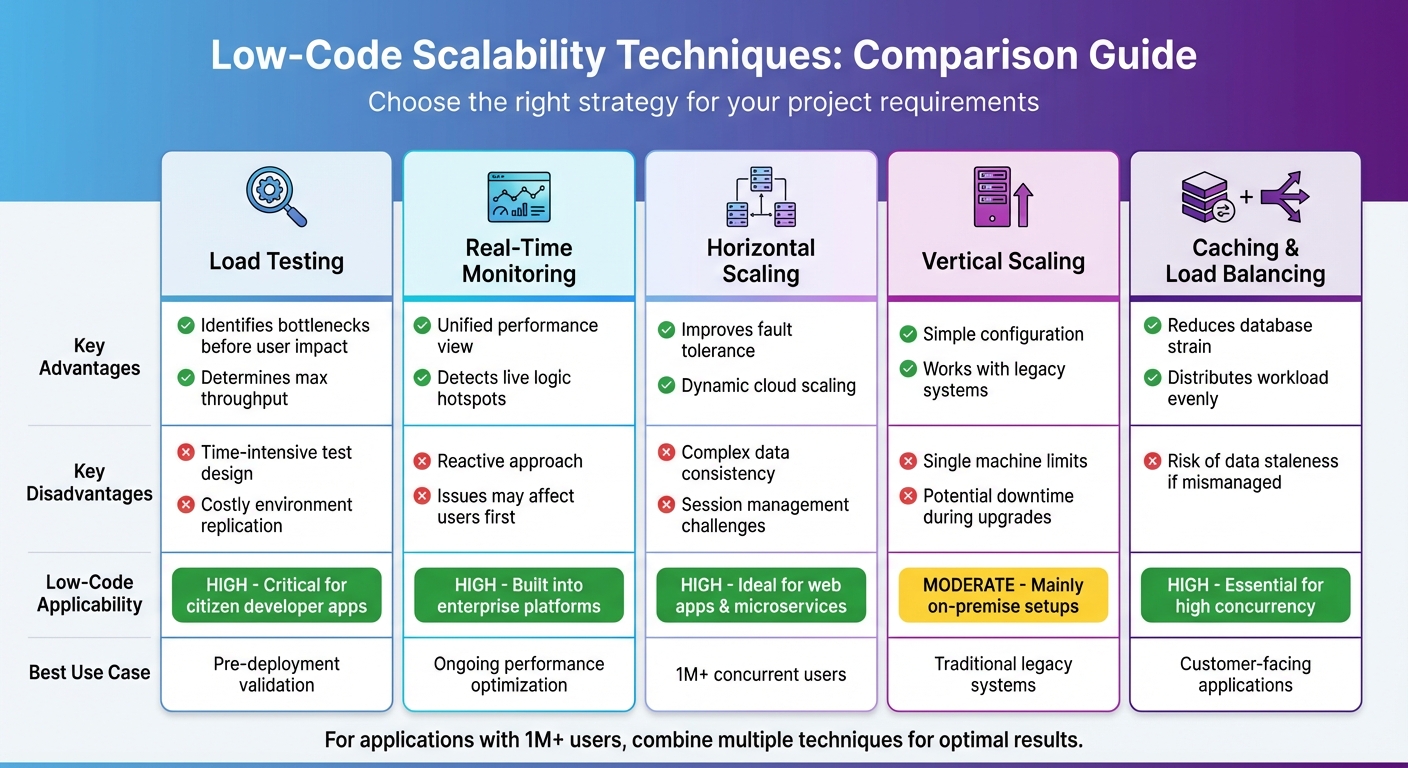
Comparison of Low-Code Scalability Mitigation Techniques
Choosing the right scalability strategy depends on your project's requirements, budget, and complexity. Each method has its strengths and weaknesses, which can influence your timeline and resource allocation. The table below provides a clear overview of the trade-offs to help you make an informed decision.
Comparison Table of Techniques
| Technique | Advantages | Disadvantages | Applicability to Low Code |
|---|---|---|---|
| Load Testing | Helps determine maximum throughput; identifies memory leaks and CPU issues before users are impacted. | Designing tests can be time-intensive; replicating production environments is costly. | High; crucial for validating low-code apps designed by "citizen developers" before enterprise deployment. |
| Real-Time Monitoring | Offers a unified view of frontend and backend performance; detects live logic "hotspots". | Reactive in nature; issues may affect users before being detected. | High; many enterprise platforms like OutSystems and Mendix include built-in monitoring tools. |
| Horizontal Scaling | Improves fault tolerance; enables dynamic server additions in cloud environments. | Adds complexity to managing data consistency and user sessions. | High; well-suited for web apps and microservices built with low-code. |
| Vertical Scaling | Simple to configure; works well for legacy systems. | Limited by the capacity of a single machine; upgrades may cause downtime. | Moderate; mainly applicable to traditional on-premise low-code development platform setups. |
| Caching & Load Balancing | Reduces database strain; evenly distributes workload to avoid bottlenecks. | Risk of data staleness if not managed properly. | High; essential for handling high concurrency in customer-facing applications. |
Selecting the right strategy early on can prevent scalability issues down the line. For applications expected to accommodate over 1 million concurrent users, combining multiple techniques is often necessary. Low-code platforms can handle such scale when built with modular designs and stateless components. As Ashok Kata points out, many performance problems arise from architectural shortcuts rather than limitations of the platform itself.
A good starting point is load testing to establish capacity limits. From there, real-time monitoring can help fine-tune performance. For high-traffic applications, combining horizontal scaling with caching offers a solid foundation, though it requires more upfront architectural planning. These methods are key to creating scalable, resilient low-code applications that can grow alongside your business.
Conclusion
Scalability in low-code projects depends on making smart decisions right from the start. As one expert puts it, "Low-code platforms provide powerful capabilities, but no platform can compensate for poor architectural decisions". The strategies covered in this guide - like modular design, load testing, hybrid development, and real-time monitoring - help create applications that can grow with your business without running into performance issues or ballooning costs.
This is particularly important because the financial stakes are high. Many projects fail not because of technical limitations but due to inefficiencies like unoptimized queries and excessive use of real-time listeners, which can cause backend expenses to spiral as user numbers increase. By adopting scalable low-code architectures, organizations can reduce long-term maintenance costs by as much as 40–60%. With the low-code market expected to hit $21.2 billion by 2027, focusing on scalability today can provide a strong competitive edge.
Choosing the right platform is a critical first step. The Low Code Platforms Directory offers a detailed filtering system to help you find platforms tailored to your scalability needs - whether that’s AI integration, enterprise-level performance, or cloud-native capabilities. It’s also important to differentiate between platforms aimed at business developers and those designed for professional developers, as this choice can prevent expensive rebuilds later on. Thoughtful platform selection lays the groundwork for achieving the performance and flexibility necessary for success.
Scalability isn’t just about handling high user loads; it’s also about enabling efficient development. By combining modular design, load testing, and hybrid approaches, leading organizations can achieve change lead times of under one hour. Pairing the right platform with disciplined architecture, strong observability tools, and effective governance practices allows businesses to build low-code applications that can support over 1 million users while keeping performance and costs under control.
FAQs
When should I start planning for scalability in a low-code app?
Planning for scalability right from the start is essential when developing a low-code app. The choices you make early on regarding architecture and design can have a big impact on your app's ability to grow smoothly. Without this foresight, you might face performance bottlenecks or expensive migrations down the line.
To set yourself up for success, focus on a few critical areas:
- Optimize your data models: Well-structured data models are the backbone of a scalable app. Poorly designed models can slow down your app as it grows.
- Monitor performance regularly: Keep an eye on how your app performs under different conditions. This helps you address potential issues before they escalate.
- Manage infrastructure smartly: Ensure your app's infrastructure is ready to handle increasing user demands without compromising reliability.
By building with scalability in mind, you can ensure your app remains efficient and dependable as it evolves.
How do I estimate peak concurrent users and traffic spikes?
To get a handle on peak concurrent users and traffic spikes, start by diving into historical data and running load tests to figure out your app’s capacity limits. Be ready for sudden surges by using tools like auto-scaling, caching, and rate limiting. Keep an eye on critical metrics like response times, error rates, and throughput. Also, make sure your data model and resource management are fine-tuned to manage heavier loads smoothly.
What’s the best way to avoid vendor lock-in with low-code?
When selecting a low-code platform, avoiding vendor lock-in is crucial for maintaining control over your applications and data. To achieve this, focus on solutions built on open standards and offering maximum flexibility. Choose platforms that support reusable components, open APIs, and industry-standard technologies.
Additionally, take the time to review licensing terms carefully and steer clear of heavy reliance on proprietary features. By doing so, you'll make it much easier to switch providers or migrate your applications whenever necessary, ensuring long-term adaptability and freedom.