Real-time data integration allows systems to process and share information instantly, unlike batch processing, which works on delays. It’s now a must-have for businesses using low-code platforms, enabling faster decisions and automation. By leveraging tools like webhooks, two-way sync, and AI-powered workflows, companies can reduce errors, save time, and improve operations. For example, Mastercard processes over 5,000 transactions per second for fraud detection, showcasing the power of real-time systems.
Key points:
- Webhooks trigger immediate updates, reducing API waste by up to 99%.
- Two-way sync ensures data consistency across systems.
- Data mapping and transformation clean and standardize information for accuracy.
- Real-time processing suits tasks like fraud detection, while scheduled processing fits non-urgent updates.
- Platforms like Stacksync, Whalesync, and Prismatic offer tailored solutions for different needs.
Real-time integration is essential for handling growing data demands and maintaining competitiveness. Start small, prioritize reliable platforms, and ensure proper data validation to avoid common challenges like API rate limits or schema changes.
Dataflow for Real-time ETL and Integration
sbb-itb-33eb356
Key Components of Real-Time Data Integration
Real-Time vs Scheduled Data Processing: Key Differences and Use Cases
Real-time data integration brings different systems together, enabling them to share and update information instantly. These systems rely on several interconnected elements to ensure data moves seamlessly and quickly, responding to events as they happen. Let’s break down the key pieces that make this possible.
Event-Driven Triggers and Two-Way Sync
Webhooks are the backbone of real-time integration in low-code platforms. Unlike traditional polling, where a system repeatedly asks, "Has anything changed?", webhooks send data to your platform as soon as an event happens. Polling wastes nearly 98–99% of API requests, as only 1–2% detect actual updates.
Change Data Capture (CDC) works alongside webhooks by monitoring database changes - like inserts, updates, or deletions - and replicating those changes to other systems almost immediately.
Two-way synchronization ensures data stays consistent across platforms. For instance, if a sales rep updates a customer record in your CRM, two-way sync makes sure that change reflects in your ERP, marketing tools, and support system without needing manual imports or exports. To achieve this, systems must configure CRUD (Create, Read, Update, Delete) endpoints correctly.
These components lay the groundwork for real-time data movement. Next, we’ll see how mapping and transformation refine this process.
Data Mapping, Transformation, and Workflow Automation
Once webhooks are in place, data mapping and transformation ensure data is accurate and workflows run smoothly.
Data mapping acts like a translator, connecting fields between systems. For example, it might map "customer_email" in Salesforce to "email_address" in your warehouse system. Advanced proprietary low-code platforms simplify mapping with visual tools or AI-powered field matching.
Data transformation standardizes and cleans data as it moves through systems. This could mean formatting dates to ISO 8601, converting currencies, filtering incomplete records, or even calculating new fields automatically. As Donal Tobin from Integrate.io explains:
Webhooks replace resource-intensive polling with push notifications that fire on actual changes, avoiding the vast majority of empty API calls.
Workflow engines manage the entire process, automating multi-step tasks like deducting inventory and generating invoices when an order is placed. Modern platforms are moving beyond simple "If-Then" logic to "Event-Decide-Action" patterns, where AI analyzes data - like scoring a lead or prioritizing a support ticket - before deciding what action to take. These engines also handle reliability features, such as retrying failed API calls with increasing delays (e.g., 1, 2, then 4 seconds).
Real-Time vs. Scheduled Processing
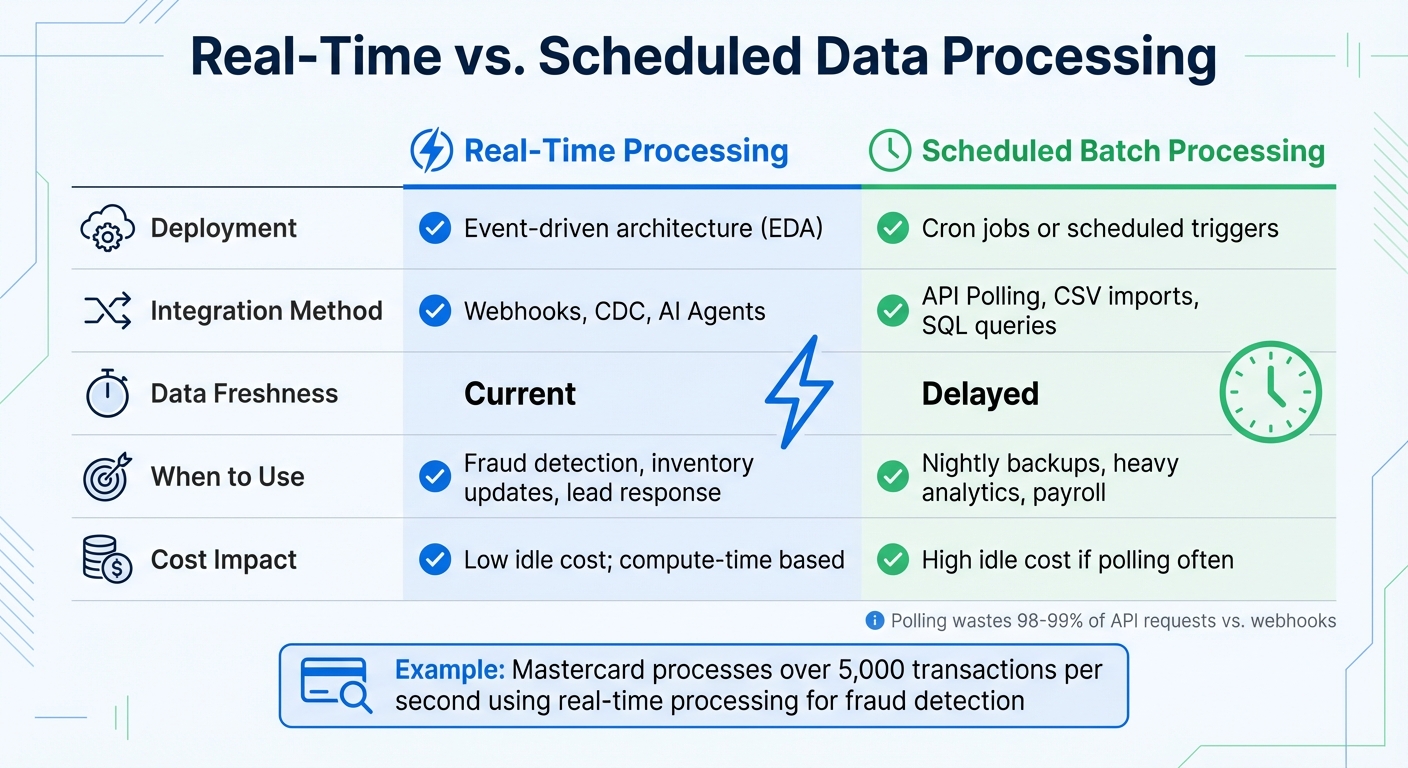
Deciding between real-time and scheduled processing depends on the specific needs of your integration. Real-time processing uses event-driven architecture with webhooks and CDC to deliver data in seconds or milliseconds. Scheduled processing, on the other hand, runs at fixed intervals - every 15 minutes, hourly, or overnight - using cron jobs or polling.
| Aspect | Real-Time Processing | Scheduled Batch Processing |
|---|---|---|
| Deployment | Event-driven architecture (EDA) | Cron jobs or scheduled triggers |
| Integration Method | Webhooks, CDC, AI Agents | API Polling, CSV imports, SQL queries |
| Data Freshness | Current | Delayed |
| When to Use | Fraud detection, inventory updates, lead response | Nightly backups, heavy analytics, payroll |
| Cost Impact | Low idle cost; compute-time based | High idle cost if polling often |
Real-time processing is ideal for time-sensitive workflows, like detecting fraud, updating live inventory, or responding to customer inquiries. For example, Mastercard’s fraud detection system processes over 5,000 transactions per second. Scheduled processing, however, works better for large-scale analytics, overnight data updates, or payroll runs where immediate changes aren’t critical.
In low-code platforms, real-time processing supports fast, efficient data flows to keep up with modern business demands. The pricing models also differ: platforms like Latenode use execution-based pricing, which charges based on actual compute time, making real-time systems more cost-effective for high-volume tasks. Meanwhile, traditional batch processing can rack up costs when frequent polling is used just to catch occasional updates.
Choosing a Low-Code Platform for Real-Time Data Integration
Required Features and Capabilities
When selecting a low-code platform for real-time data integration, it’s important to focus on features that ensure seamless and efficient data flow. A key element is two-way synchronization, which keeps CRMs, ERPs, and databases aligned in both directions. Without this, you’ll likely face the hassle of manual reconciliations between systems.
Another must-have is real-time triggers, enabling workflows to execute instantly through webhooks or events. This ensures that data remains up-to-date across all connected systems. Additionally, platforms should support custom code, allowing developers to use languages like JavaScript, TypeScript, Python, or SQL for handling advanced transformations or integrating proprietary systems. This flexibility is essential for avoiding the so-called "complexity wall", where native features fall short of your integration needs.
For businesses, especially B2B SaaS providers, scalability is non-negotiable. The platform should handle numerous customer-specific integrations without performance issues. Look for platforms offering pre-built connectors for popular tools like Salesforce, Slack, and HubSpot, as well as workflow templates to speed up development. Effective monitoring and troubleshooting tools - such as detailed logging, real-time performance dashboards, and error alerts - are also crucial for maintaining integration reliability.
Lastly, rich field support is vital. This means the platform should handle complex data types, including images, formulas, and multi-reference fields. As Bru Woodring from Prismatic explains:
"Low-code integration platforms accelerate development, lower costs, and make integrations accessible to a broader range of users."
These features form the foundation for evaluating platforms that can support the continuous, real-time data flow needed in modern operations.
Platform Options and Comparisons
With these features in mind, let’s look at a few platforms that excel in real-time data integration. Each option comes with unique strengths tailored to different needs.
Stacksync specializes in real-time, two-way synchronization between CRMs, ERPs, and databases. It processes millions of events per minute using managed event queues. Alex Marinov, VP Technology at Acertus Delivers, highlights its impact:
"We've been using Stacksync across 4 different projects and can't imagine working without it."
Whalesync simplifies two-way sync for tools like Airtable, Notion, Webflow, and Salesforce. It handles API rate limits and retries automatically, making it a great choice for SaaS tools. For example, the Business plan supports syncing up to 30,000 records for $489/month.
Prismatic, on the other hand, is an embedded iPaaS designed for B2B SaaS companies. It offers robust scalability and supports custom components using TypeScript, making it ideal for developers managing thousands of customer integrations.
Here’s a quick comparison of these platforms:
| Platform | Primary Strength | Sync Speed | Key Limitation |
|---|---|---|---|
| Stacksync | Real-time, two-way synchronization for enterprise data | Milliseconds | Focused primarily on the enterprise data layer |
| Whalesync | Two-way sync for SaaS tools with rich field support | Real-time | Smaller connector library |
| Prismatic | Embedded iPaaS with custom code support (TypeScript) | Real-time | Higher complexity; developer-focused |
The right platform depends on your specific needs. For example, an Enterprise iPaaS works best for internal workflow automation, while an Embedded iPaaS is ideal for customer-facing integrations. Meanwhile, citizen integration tools are better suited for non-technical tasks. If live data is central to your operations, prioritize platforms offering true two-way synchronization and real-time updates over those relying on scheduled batch processing.
For a broader view of available platforms, the Low Code Platforms Directory offers a filtering system to help you find the best fit for your integration requirements.
How to Implement Real-Time Data Integration
Implementation Steps
Setting up real-time data integration on a low-code platform involves a series of straightforward steps. Start by defining your event trigger using webhooks instead of traditional polling. Webhooks provide immediate push notifications when events occur, unlike polling, which checks for updates at set intervals and can introduce delays of 5–15 minutes.
Next, focus on data transformation to clean and prepare the incoming data. Many modern platforms let you use AI models like GPT-4 or Claude - or even custom JavaScript - to parse complex JSON data before sending it to the destination system. After the transformation, visually map the fields by connecting the output from transformation nodes to the corresponding input fields in your destination API, such as a CRM or SQL database. Be sure to map all required parameters accurately.
For intelligent routing, process data instantly. AI agents can, for example, analyze lead sentiment in real time before syncing records to your CRM. Include error-handling mechanisms like Try/Catch with exponential backoff retries (e.g., 1s, 2s, 4s) to handle API timeouts or 503 errors.
Set up alerts through Slack or email to catch failures immediately. Use serverless infrastructure that scales automatically during traffic spikes. Platforms like Adalo 3.0, for instance, handle over 20 million daily requests with 99% uptime.
Secure your webhooks by validating headers or using secret tokens, and standardize date formats to YYYY-MM-DD or ISO 8601 to avoid sync errors. When updating records, use the PATCH method instead of PUT. PATCH modifies specific fields, while PUT replaces the entire record, risking data loss if some fields are missing.
For data that is often accessed but rarely updated, implement caching by storing it in the platform’s internal database. This reduces external API calls and avoids hitting rate limits. For example, Airtable caps requests at 5 per second per base. When dealing with large datasets, create pre-filtered views in your source system (e.g., an Airtable "Low Stock" view) so only relevant records are synced.
These steps form the backbone of effective real-time data integration, setting the stage for practical applications.
Common Use Cases and Applications
Real-time data integration has a transformative impact on various business operations. One example is instant lead enrichment, where webhooks trigger workflows immediately after a form submission. AI agents can gather public data from sources like LinkedIn to enrich profiles before syncing them to your CRM. This ensures sales teams have access to complete, up-to-date information.
In e-commerce inventory sync, a sale on one platform (such as Shopify) can trigger logic to recalculate global stock levels and update other platforms like Amazon, point-of-sale systems, or marketplaces. This prevents overselling and maintains accurate inventory across channels. For instance, Ule, a commerce platform in China, implemented real-time inventory management and loyalty tracking for rural stores, leading to a 25% revenue increase for participating locations.
Customer support triage is another key application. AI classifiers can analyze support tickets in real time, using sentiment analysis to identify high-priority issues. These urgent cases can be routed to Slack for immediate human intervention, while routine requests follow standard workflows. Similarly, financial institutions rely on real-time integration for fraud detection, analyzing transactions against historical patterns and machine learning models in milliseconds. Mastercard, for example, processes over 5,000 transactions per second with such systems.
Real-time data integration also powers IoT and sensor monitoring, enabling instant responses to changing conditions. For example, sensor data can adjust HVAC settings based on occupancy or trigger predictive maintenance for industrial equipment. Maidstone and Tunbridge Wells NHS Trust in the UK used real-time patient tracking systems to improve bed management and patient flow, saving an estimated $2.6 million annually while enhancing care delivery.
Common Challenges and Solutions
While real-time integration offers many benefits, it also comes with challenges. Data quality and consistency is a major concern. Unlike batch processing, errors in real-time systems propagate instantly. To address this, integrate validation checks directly into your processing pipelines. For instance, ensure dates follow the YYYY-MM-DD format, booleans are lowercase (true/false), and all required fields are present before passing data along.
API rate limits can also hinder operations. External sources like Airtable enforce strict limits, such as 5 requests per second per base. To mitigate this, create pre-filtered views in your source system to sync only relevant records, and cache frequently accessed data to reduce API calls. If you encounter a 429 error due to rate limits, use delay nodes or queuing to space out requests.
Latency and performance bottlenecks are another issue, as data often passes through multiple intermediary components. Each transfer point adds delay. To minimize latency, use direct connections when possible, in-memory processing for faster operations, and load balancing to distribute workloads efficiently. For example, JPMorgan Chase implemented a GenAI toolkit to address such challenges, achieving a 20% increase in asset and wealth management sales while saving approximately $1.5 billion through improved fraud prevention and credit decisions between 2023–2024.
Schema drift, where changes in source data structures disrupt integration logic, is another common problem. Combat this by setting up automated schema detection or manually re-testing connections when schema changes are detected. Some platforms now offer notifications when connected systems undergo schema updates.
Lastly, scalability during traffic spikes can strain systems. To handle surges gracefully, use horizontal scaling to add processing nodes, partition workloads for parallel processing, and implement message queue back-pressure management. Modern low-code platforms achieve processing speeds 3–4 times faster than earlier versions due to modular architecture.
For specific errors, verify token prefixes for 401 Unauthorized, check URLs for 404 errors, and resolve 500 errors by ensuring proper data formatting.
Conclusion
Real-time data integration is reshaping how businesses function by delivering information almost instantly - within seconds or milliseconds - rather than the traditional wait of hours or days. Low-code platforms make this capability more accessible, even for teams bridging the tech skills gap without deep coding expertise. These platforms use visual tools, drag-and-drop workflows, and pre-built connectors, eliminating the need for custom development. The payoff? Faster decision-making, streamlined operations, and better customer experiences through instant personalization.
The impact on businesses is clear: greater efficiency and revenue growth. In fact, by 2026, an estimated 70% of new applications will rely on low-code or no-code technologies.
To succeed, it’s crucial to select the right platform and follow best practices for real-time integration. For example, prioritize webhooks instead of polling for immediate event triggers, opt for PATCH over PUT for more efficient updates, and standardize data formats like ISO 8601 for dates to minimize synchronization issues. Start small by testing with a single integration to ensure everything works smoothly before scaling up to more complex workflows. These steps help lay the groundwork for using specialized tools that simplify both platform selection and integration.
For those ready to dive in, the Low Code Platforms Directory (https://lowcodeplatforms.org) is a valuable resource. It offers a detailed filtering system to help you find platforms tailored to your needs - whether you’re looking for AI capabilities, CRM integration, automation, or other features. You can also compare critical functionalities like event-driven webhooks, Change Data Capture (CDC), two-way synchronization, and compliance with standards like SOC 2, GDPR, and HIPAA. Plus, it provides insights into pricing models, whether you prefer predictable scaling or usage-based options.
FAQs
Do I need real-time sync or scheduled batches?
When deciding between real-time sync and scheduled batches, it all comes down to your specific needs.
- Real-time sync ensures instant updates, making it ideal for scenarios like live dashboards, customer-facing interactions, or resolving incidents as they happen.
- On the other hand, scheduled batches handle data processing at predetermined intervals, which works well for tasks like generating nightly reports or performing routine backups.
If immediate updates are critical, go with real-time sync. If slight delays are acceptable and efficiency is your goal, scheduled batches are the better option.
How do webhooks differ from API polling?
Webhooks and API polling handle data transfer in distinct ways. Webhooks operate on an event-driven model, meaning they send data immediately when a specific event happens. This provides near-instant updates with very little lag. On the other hand, API polling involves your system regularly checking for updates at set intervals, which can lead to delays and wasted resources.
Webhooks are quicker in delivering updates but often require a more involved setup process. In contrast, polling is easier to implement but is less effective for scenarios where real-time information is crucial.
How do I avoid rate limits and schema changes?
When dealing with schema changes, adopting strategies like schema versioning and flexible data schemas can help ensure data continues to flow without interruptions. Additionally, leveraging tools that can detect changes, automate field mapping, and validate data in real time is crucial for maintaining data accuracy and consistency.
To address rate limits in real-time data integration, consider these approaches:
- Configure retry mechanisms with exponential backoff to prevent overwhelming APIs.
- Use event-driven triggers or webhooks to minimize the frequency of API calls.
These methods help manage data integration challenges while maintaining efficiency and reliability.